







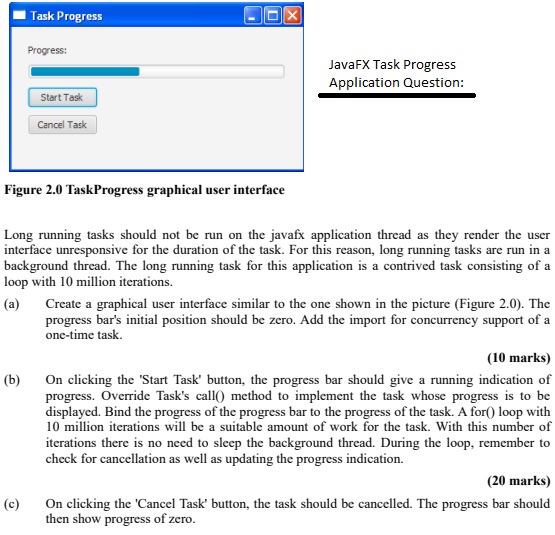
Question: Figure 2 . 0 TaskProgress graphical user interface Long running tasks should not be run on the javafx application thread as they render the user
Figure TaskProgress graphical user interface
Long running tasks should not be run on the javafx application thread as they render the user
interface unresponsive for the duration of the task. For this reason, long running tasks are run in a
background thread. The long running task for this application is a contrived task consisting of a
loop with million iterations.
a Create a graphical user interface similar to the one shown in the picture Figure The
progress bar's initial position should be zero. Add the import for concurrency support of a
onetime task.
marks
b On clicking the 'Start Task' button, the progress bar should give a running indication of
progress. Override Task's call method to implement the task whose progress is to be
displayed. Bind the progress of the progress bar to the progress of the task. A for loop with
million iterations will be a suitable amount of work for the task. With this number of
iterations there is no need to sleep the background thread. During the loop, remember to
check for cancellation as well as updating the progress indication.
marks
c On clicking the 'Cancel Task' button, the task should be cancelled. The progress bar should
then show progress of zero.
Step by Step Solution
There are 3 Steps involved in it
1 Expert Approved Answer
Step: 1 Unlock

Question Has Been Solved by an Expert!
Get step-by-step solutions from verified subject matter experts
Step: 2 Unlock
Step: 3 Unlock
 Study Help