







Question: Figure 3 shows the result after you execute the sub. B 1 Before 2 a 10 3 b 20 4 5 After 6 a 7
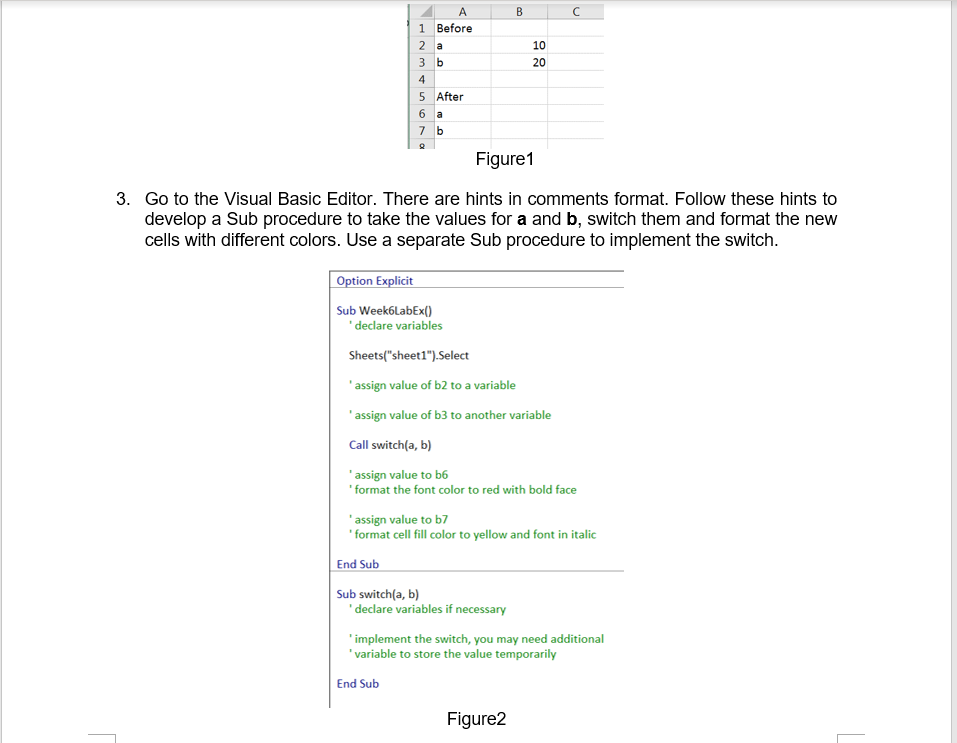
- Figure 3 shows the result after you execute the sub.
B 1 Before 2 a 10 3 b 20 4 5 After 6 a 7 b Figure 1 3. Go to the Visual Basic Editor. There are hints in comments format. Follow these hints to develop a Sub procedure to take the values for a and b, switch them and format the new cells with different colors. Use a separate Sub procedure to implement the switch. Option Explicit Sub Week6LabEx() declare variables Sheets("sheet1").Select 'assign value of b2 to a variable 'assign value of b3 to another variable Call switch(a, b) 'assign value to b6 'format the font color to red with bold face 'assign value to b7 'format cell fill color to yellow and font in italic End Sub Sub switch(a, b) declare variables if necessary 'implement the switch, you may need additional 'variable to store the value temporarily End Sub Figure2 B 1 Before 2 a 10 3 b 20 4 5 After 6 a 7 b Figure 1 3. Go to the Visual Basic Editor. There are hints in comments format. Follow these hints to develop a Sub procedure to take the values for a and b, switch them and format the new cells with different colors. Use a separate Sub procedure to implement the switch. Option Explicit Sub Week6LabEx() declare variables Sheets("sheet1").Select 'assign value of b2 to a variable 'assign value of b3 to another variable Call switch(a, b) 'assign value to b6 'format the font color to red with bold face 'assign value to b7 'format cell fill color to yellow and font in italic End Sub Sub switch(a, b) declare variables if necessary 'implement the switch, you may need additional 'variable to store the value temporarily End Sub Figure2
Step by Step Solution
There are 3 Steps involved in it

Get step-by-step solutions from verified subject matter experts
 Study Help