



Question: file exp_eval.py outline is given at the bottom with starting code for function postfix_eval array_stacks.py is also provided incase you need anything from there #array_stack.py
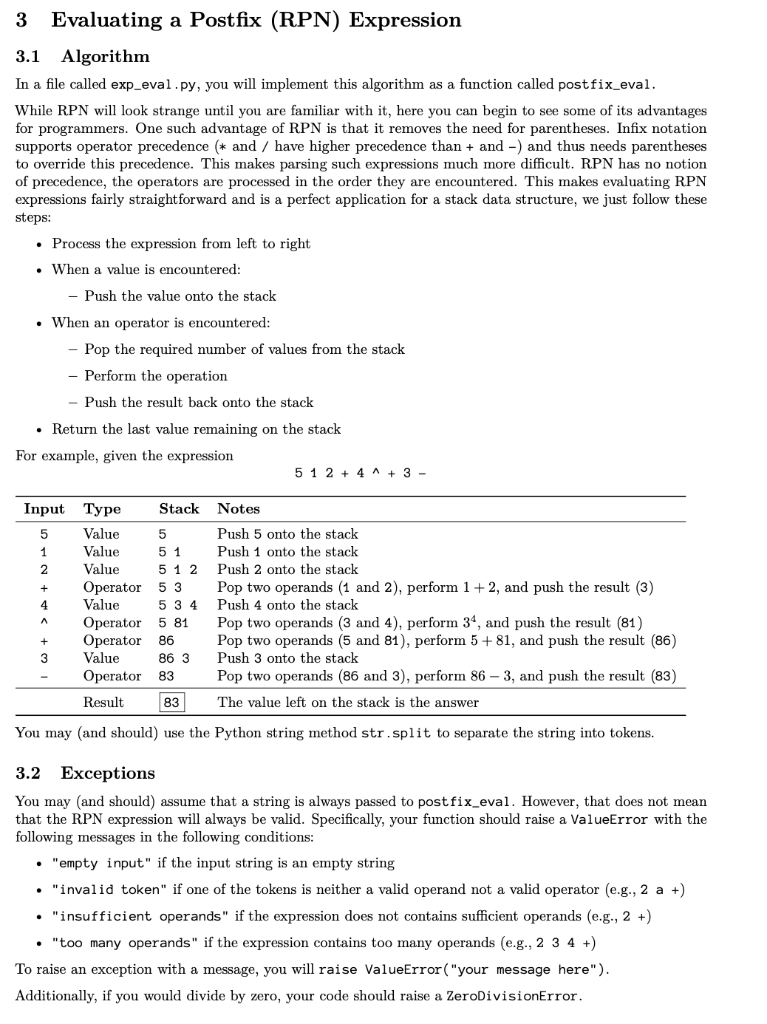
file exp_eval.py outline is given at the bottom with starting code for function postfix_eval
array_stacks.py is also provided incase you need anything from there
#array_stack.py
from __future__ import annotations
from typing import Any
class ArrayStack:
"""A class that implements an array-based stack
The stack is initialized with a default capacity of 4, which means the stack can hold up to 4 elements
If the number of elements in the stack exceeds the capacity, the capacity is doubled
Attributes:
capacity: The maximun number of elements the stack can hold.
array: The list to store the elements in the stack.
size: The number of elements in the stack.
"""
def __init__(self) -> None:
self.capacity = 4
self.array: list[Any] = [None] * self.capacity
self.size = 0
def empty_stack() -> ArrayStack:
return ArrayStack()
def push(stack: ArrayStack, value: Any) -> None:
if stack.size == stack.capacity:
stack.capacity *= 2
new_array = [None] * stack.capacity
for i in range(stack.size):
new_array[i] = stack.array[i]
stack.array = new_array
stack.array[stack.size] = value
stack.size += 1
def pop(stack: ArrayStack) -> Any:
if stack.size == 0:
raise IndexError("pop from an empty stack")
value = stack.array[stack.size - 1]
stack.array[stack.size - 1] = None
stack.size -= 1
return value
def peek(stack: ArrayStack) -> Any:
if stack.size == 0:
raise IndexError("peek from an empty stack")
return stack.array[stack.size - 1]
def is_empty(stack: ArrayStack) -> bool:
return stack.size == 0
def size(stack: ArrayStack) -> int:
return stack.size
#exp_eval.py
from __future__ import annotations
# NOTE: You'll probably need to import some things from array_stack. def postfix_eval(input_string: str) -> float: """Evaluate the given RPN expression.
Args: input_string: an RPN expression
Returns: The result of the expression evaluation
Raises: ValueError: if the input is not well-formed ZeroDivisionError: if the input would cause division by zero """
3 Evaluating a Postfix (RPN) Expression 3.1 Algorithm In a file called exp_eval.py, you will implement this algorithm as a function called postfix_eval. While RPN will look strange until you are familiar with it, here you can begin to see some of its advantages for programmers. One such advantage of RPN is that it removes the need for parentheses. Infix notation supports operator precedence (* and / have higher precedence than + and ) and thus needs parentheses to override this precedence. This makes parsing such expressions much more difficult. RPN has no notion of precedence, the operators are processed in the order they are encountered. This makes evaluating RPN expressions fairly straightforward and is a perfect application for a stack data structure, we just follow these steps: - Process the expression from left to right - When a value is encountered: - Push the value onto the stack - When an operator is encountered: - Pop the required number of values from the stack - Perform the operation - Push the result back onto the stack - Return the last value remaining on the stack For example, given the expression 512+4+3 You may (and should) use the Python string method str.split to separate the string into tokens. 3.2 Exceptions You may (and should) assume that a string is always passed to post fix_eval. However, that does not mean that the RPN expression will always be valid. Specifically, your function should raise a ValueError with the following messages in the following conditions: - "empty input" if the input string is an empty string - "invalid token" if one of the tokens is neither a valid operand not a valid operator (e.g., 2 a +) - "insufficient operands" if the expression does not contains sufficient operands (e.g., 2 +) - "too many operands" if the expression contains too many operands (e.g., 2 3 4 +) To raise an exception with a message, you will raise ValueError("your message here"). Additionally, if you would divide by zero, your code should raise a ZeroDivisionError
Step by Step Solution
There are 3 Steps involved in it

Get step-by-step solutions from verified subject matter experts