







Question: File Home Insert Draw Page Layout Formulas Data Review View Help fx Calculate Now Ey Trace Precedents Dx Show Formulas Trace Dependents Error Checking FRemove
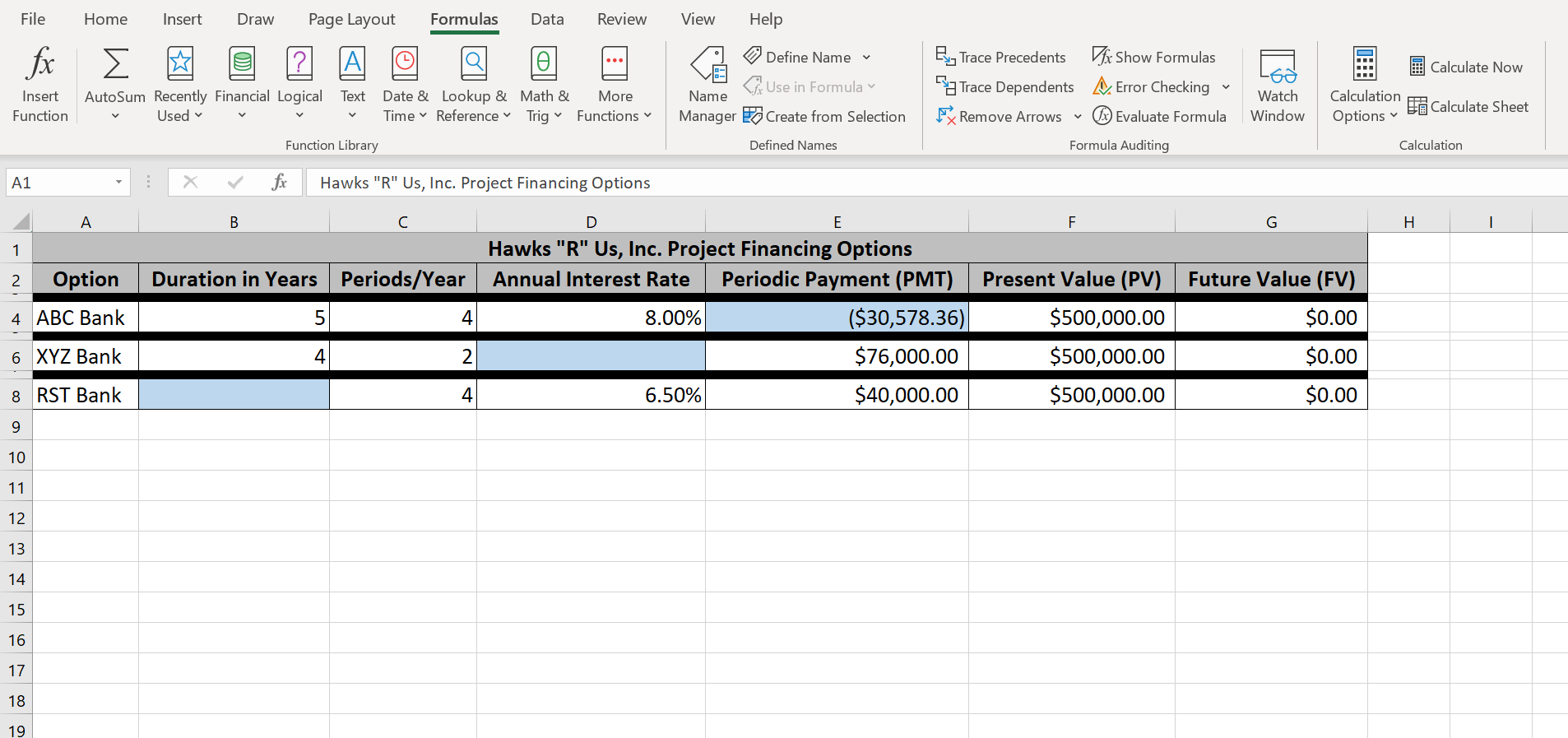
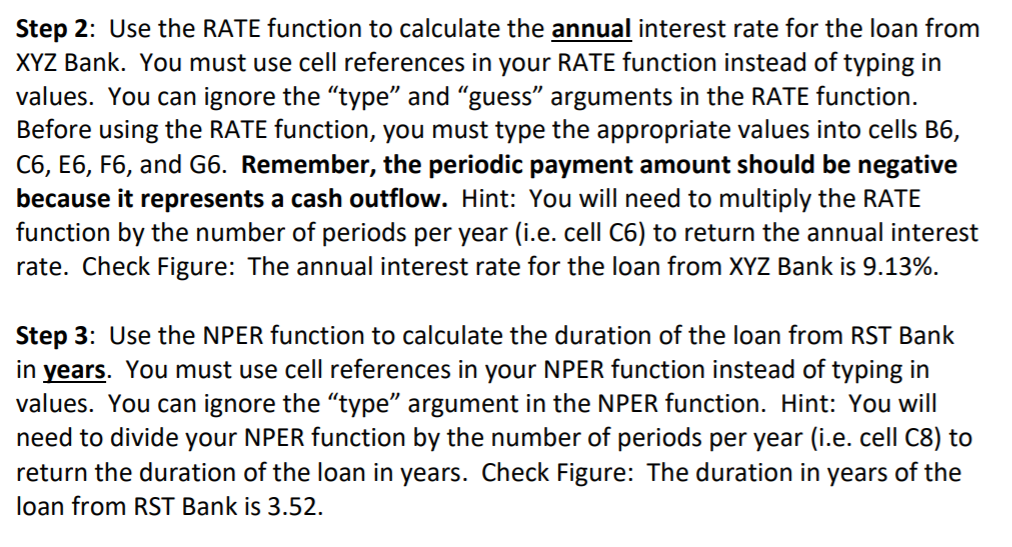
File Home Insert Draw Page Layout Formulas Data Review View Help fx Calculate Now Ey Trace Precedents Dx Show Formulas Trace Dependents Error Checking FRemove Arrows Evaluate Formula Text Insert Function AutoSum Recently Financial Logical Used Define Name Use in Formula v Name Manager go create from Selection Date & Lookup & Math & Time Reference Trig More Functions Watch Window Calculation Options Calculate Sheet Function Library Defined Names Formula Auditing Calculation A1 ! X fr Hawks "R" Us, Inc. Project Financing Options A B D E F G H 1 2 Option Duration in Years Periods/Year 4. ABC Bank 5 4 Hawks "R" Us, Inc. Project Financing Options Annual Interest Rate Periodic Payment (PMT) 8.00% ($30,578.36) $76,000.00 6.50% $40,000.00 Present Value (PV) $500,000.00 $500,000.00 $500,000.00 Future Value (FV) $0.00 $0.00 $0.00 6 XYZ Bank 4 2 8 RST Bank 4 9 10 11 12 13 14 15 16 17 18 19 Step 2: Use the RATE function to calculate the annual interest rate for the loan from XYZ Bank. You must use cell references in your RATE function instead of typing in values. You can ignore the type and guess arguments in the RATE function. Before using the RATE function, you must type the appropriate values into cells B6, C6, E6, F6, and G6. Remember, the periodic payment amount should be negative because it represents a cash outflow. Hint: You will need to multiply the RATE function by the number of periods per year (i.e. cell C6) to return the annual interest rate. Check Figure: The annual interest rate for the loan from XYZ Bank is 9.13%. Step 3: Use the NPER function to calculate the duration of the loan from RST Bank in years. You must use cell references in your NPER function instead of typing in values. You can ignore the "type argument in the NPER function. Hint: You will need to divide your NPER function by the number of periods per year (i.e. cell C8) to return the duration of the loan in years. Check Figure: The duration in years of the loan from RST Bank is 3.52
Step by Step Solution
There are 3 Steps involved in it

Get step-by-step solutions from verified subject matter experts
 Study Help