







Question: ####File name: InputBox.py import tkinter from tkinter import * root = Tk() e1 = Entry(root, width=55) l1=Label(root, justify=LEFT) result = def ShowDialog(s): root.title(Input Box)
####File name: InputBox.py import tkinter from tkinter import * root = Tk() e1 = Entry(root, width=55) l1=Label(root, justify=LEFT) result = "" def ShowDialog(s): root.title("Input Box") l1.grid(row=0, column=1, sticky=W, padx= 10, pady=5) l1['text'] = s e1.grid(row=1, column=1, padx= 10, pady=5) button1 = Button(root, text=" OK ", command = button1_Click) button1.grid(row=2, column=1, sticky=E, padx= 10, pady=5) root.mainloop() def button1_Click(): f = open('tttemp', 'w') f.write(e1.get()) f.close() e1.delete(0, END) l1['text'] = "" root.quit() def GetInput(): f = open('tttemp', 'r') result = f.read() f.close() import os os.remove('tttemp') return result
#File name: MessageBox.py import tkinter from tkinter import * def Show(str): root = Tk() root.title('Message Box') Label(root, justify=LEFT, text = str).grid() root.mainloop()
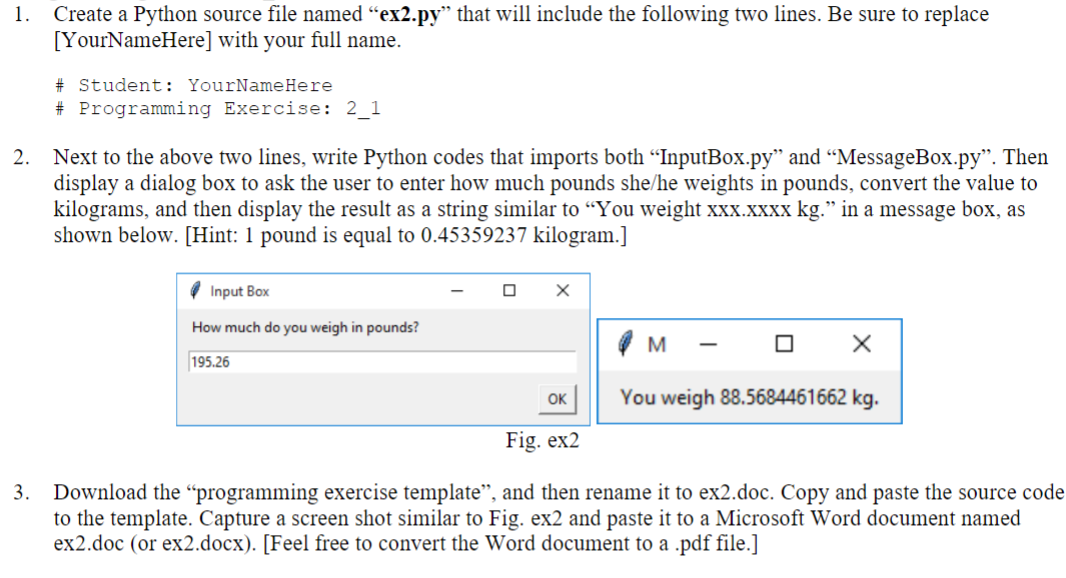
1. Create a Python source file named "ex2.py" that will include the following two lines. Be sure to replace [YourNameHere] with your full name. \# Student: YourNameHere \# Programming Exercise: 2_1 2. Next to the above two lines, write Python codes that imports both "InputBox.py" and "MessageBox.py". Then display a dialog box to ask the user to enter how much pounds she/he weights in pounds, convert the value to kilograms, and then display the result as a string similar to "You weight xxx.xxxx kg." in a message box, as shown below. [Hint: 1 pound is equal to 0.45359237 kilogram.] rlg. ex 2 3. Download the "programming exercise template", and then rename it to ex2.doc. Copy and paste the source code to the template. Capture a screen shot similar to Fig. ex2 and paste it to a Microsoft Word document named ex2.doc (or ex2.docx). [Feel free to convert the Word document to a .pdf file.]
Step by Step Solution
There are 3 Steps involved in it

Get step-by-step solutions from verified subject matter experts
 Study Help