







Question: File to submit: One Jupiter Notebook file File required: winequality.csv Dataset description: The dataset is related to variants of white wine. The following shows the
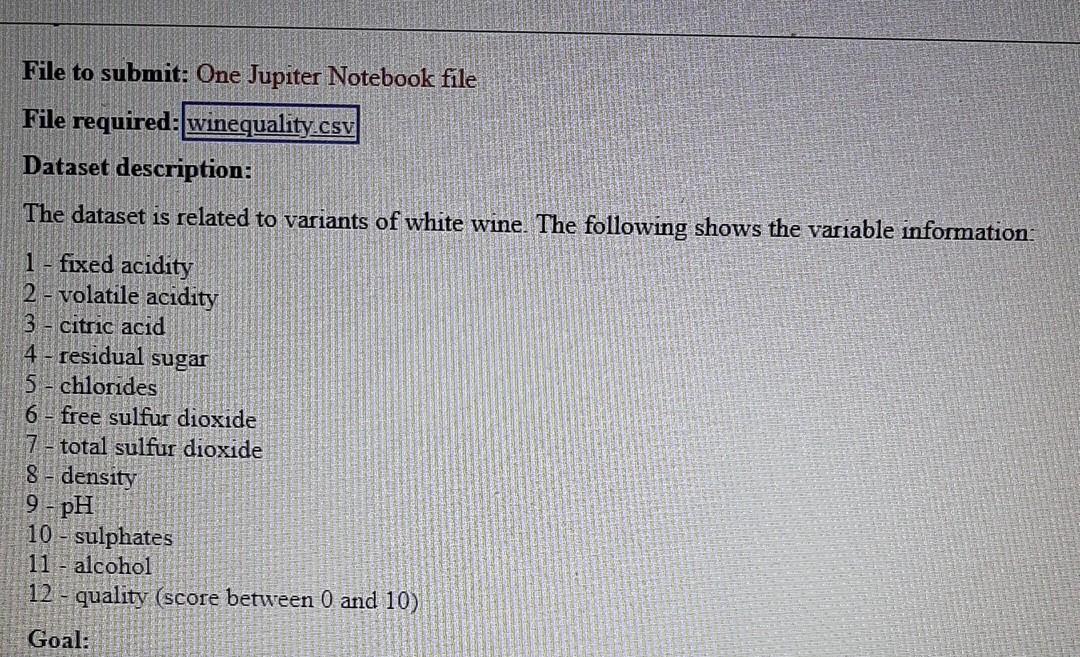
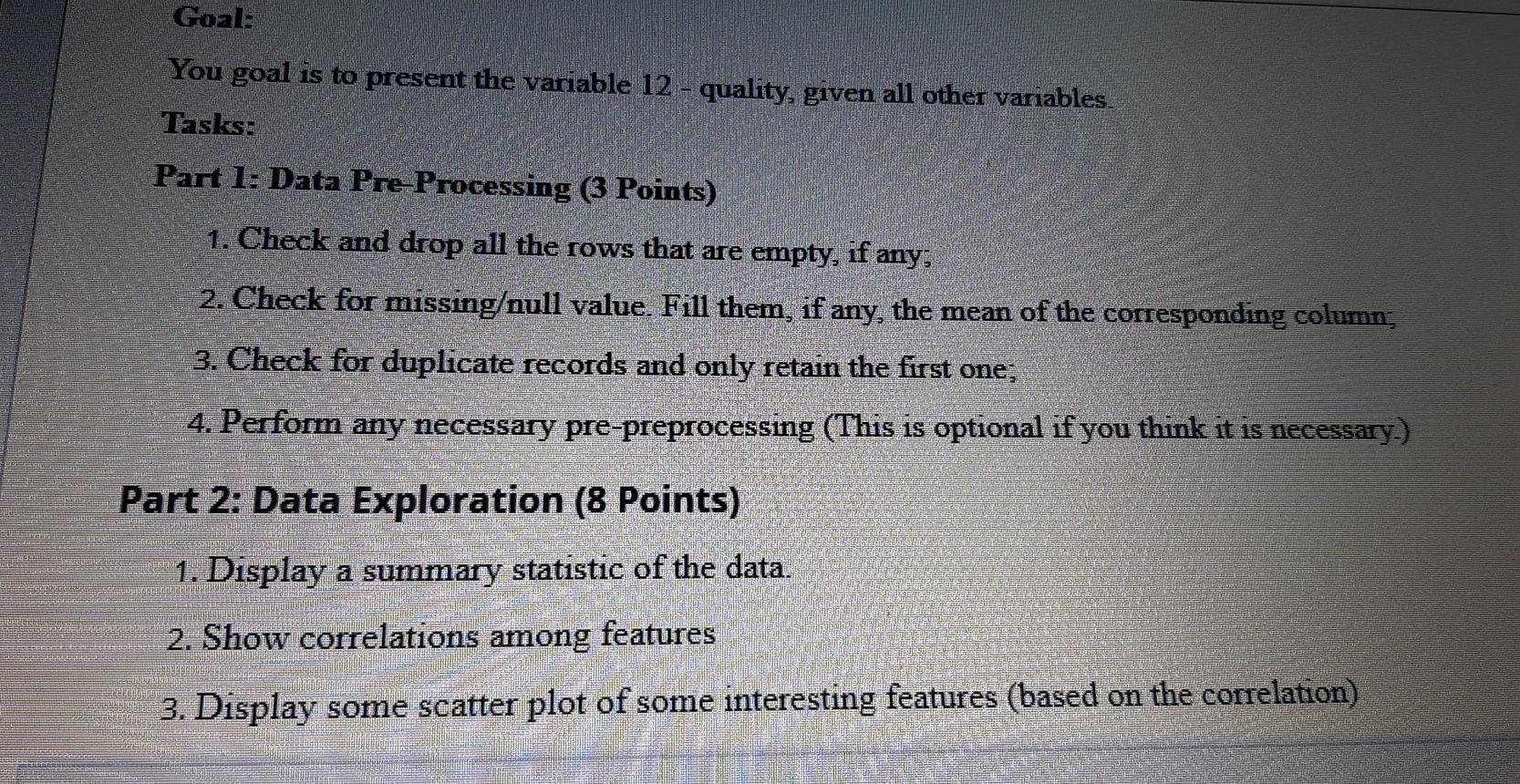
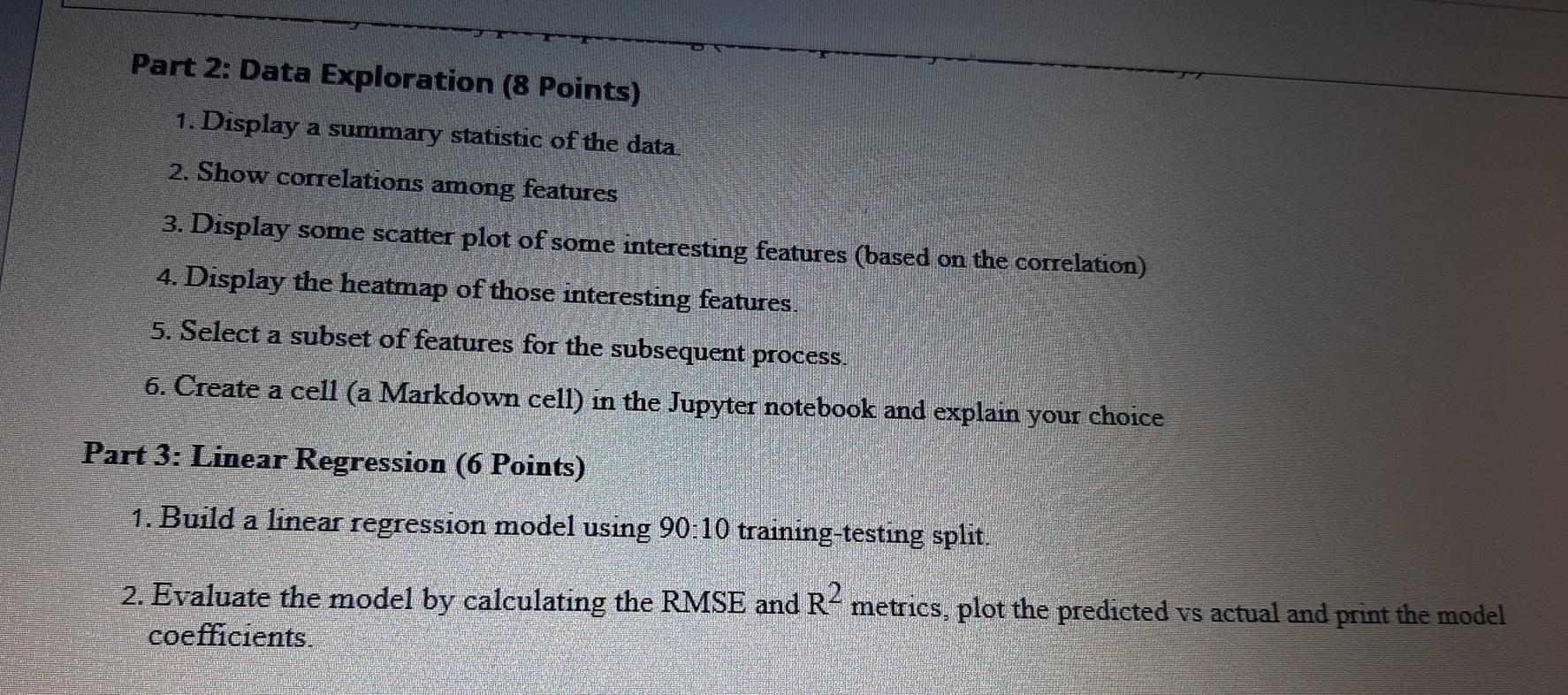
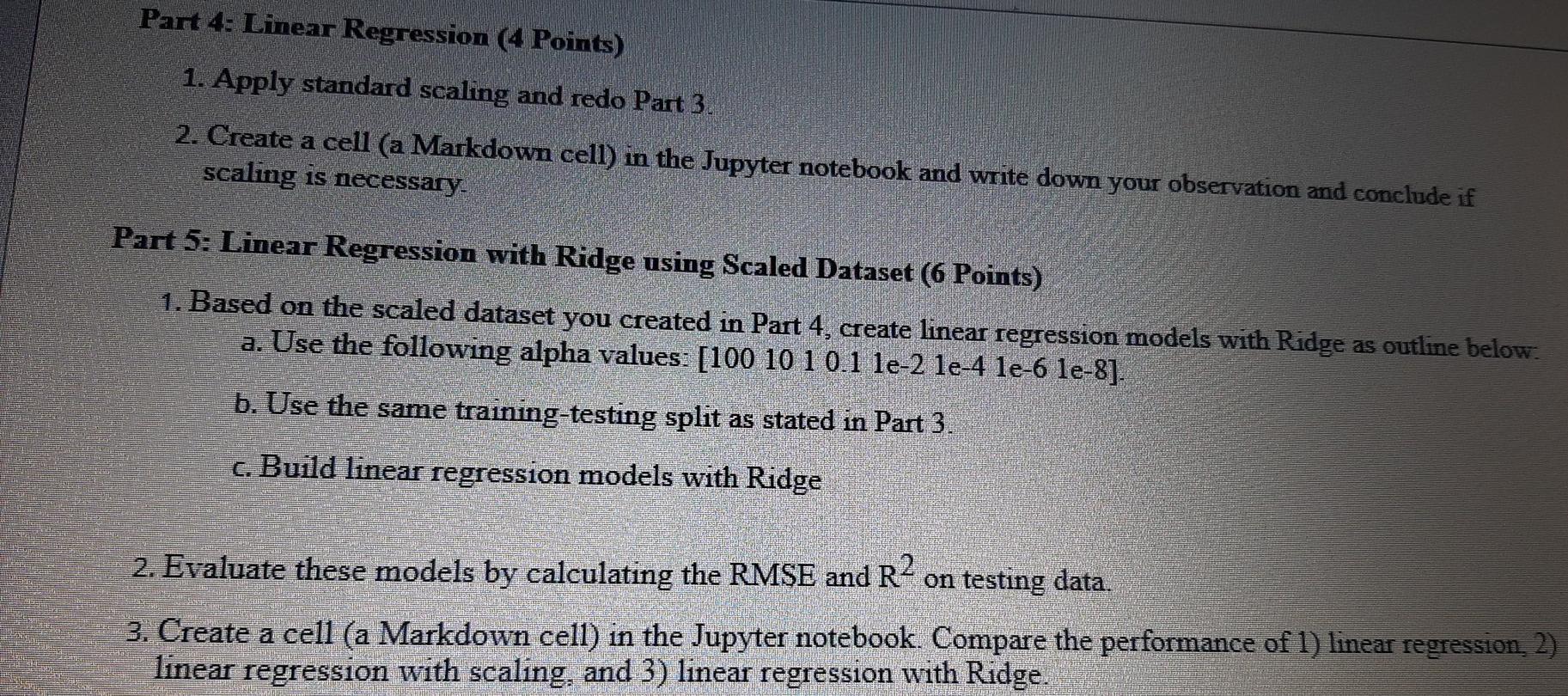
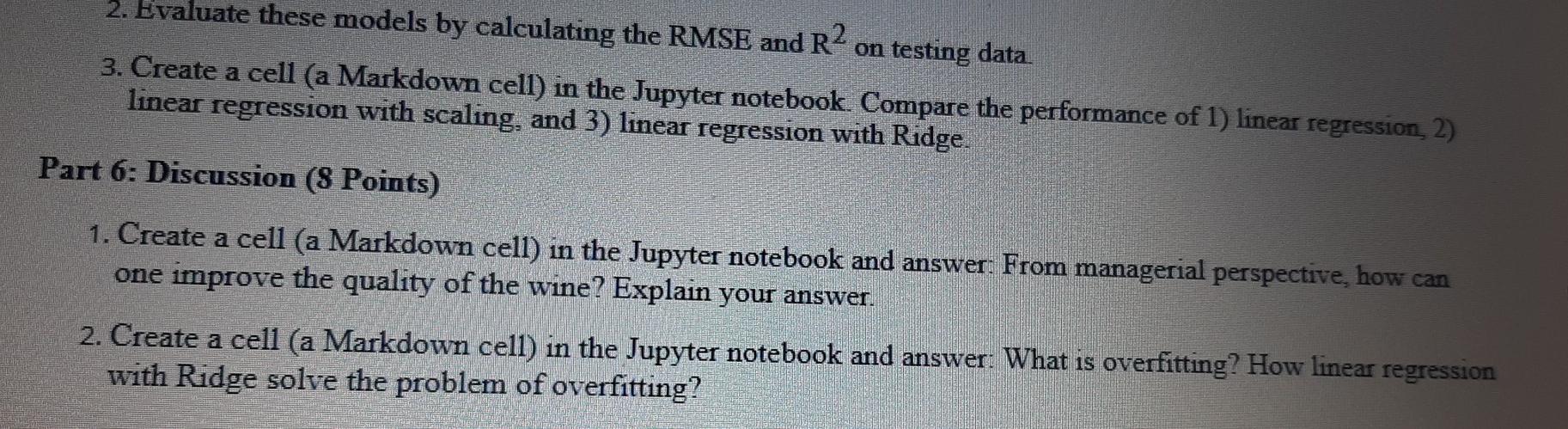
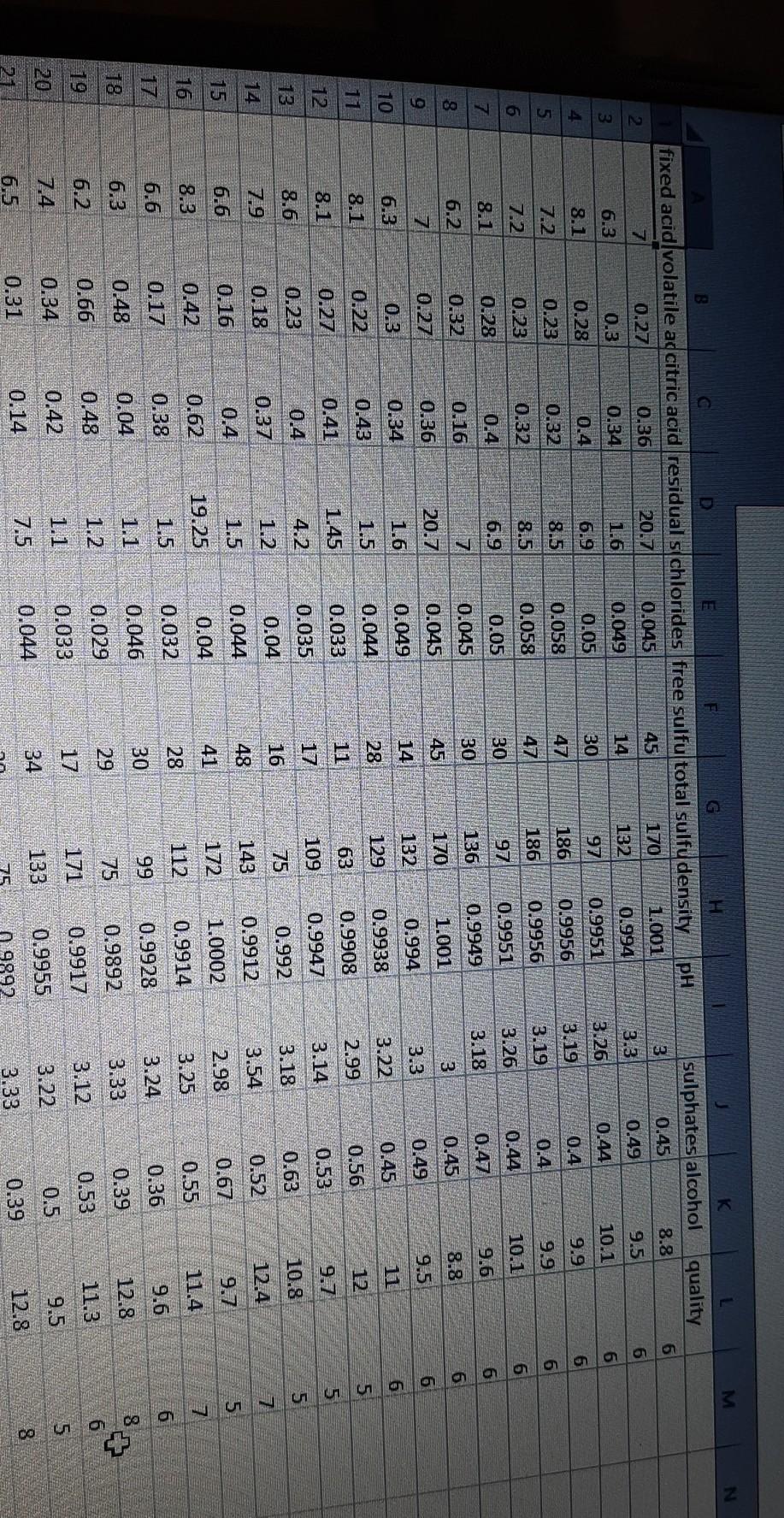
File to submit: One Jupiter Notebook file File required: winequality.csv Dataset description: The dataset is related to variants of white wine. The following shows the variable information: 1 - fixed acidity 2 - volatile acidity 3 citric acid 4 5 - chlorides 6 - free sulfur dioxide 7 - total sulfur dioxide 8 - density 9 - pH 10 - sulphates 11 - alcohol 12 - quality (score between 0 and 10) residual sugar Goal: Goal: You goal is to present the variable 12 - quality, given all other variables. Tasks: Part 1: Data Pre-Processing (3 Points) 1. Check and drop all the rows that are empty, if any: 2. Check for missingull value. Fill them, if any, the mean of the corresponding column; 3. Check for duplicate records and only retain the first one; 4. Perfom any necessary pre-preprocessing (This is optional if you think it is necessary.) Part 2: Data Exploration (8 Points) 1. Display a summary statistic of the data. 2. Show correlations among features 3. Display some scatter plot of some interesting features (based on the correlation) Part 2: Data Exploration (8 Points) 1. Display a summary statistic of the data. 2. Show correlations among features 3. Display some scatter plot of some interesting features (based on the correlation) 4. Display the heatmap of those interesting features 5. Select a subset of features for the subsequent process. 6. Create a cell (a Markdown cell) in the Jupyter notebook and explain your choice Part 3: Linear Regression (6 Points) 1. Build a linear regression model using 90:10 training-testing split. 2. Evaluate the model by calculating the RMSE and R metrics, plot the predicted vs actual and print the model coefficients. Part 4: Linear Regression (4 Points) 1. Apply standard scaling and redo Part 3. 2. Create a cell (a Markdown cell) in the Jupyter notebook and write down your observation and conclude if scaling is necessary. Part 5: Linear Regression with Ridge using Scaled Dataset (6 Points) 1. Based on the scaled dataset you created in Part 4, create linear regression models with Ridge as outline below. a. Use the following alpha values: [100 10 10.1 le-2 le-4 le-6 le-8]. b. Use the same training-testing split as stated in Part 3. c. Build linear regression models with Ridge DESENTER 2. Evaluate these models by calculating the RMSE and R2 on testing data. 3. Create a cell (a Markdown cell) in the Jupyter notebook. Compare the performance of 1) linear regression, 2) linear regression with scaling, and 3) linear regression with Ridge. SHE 2. Evaluate these models by calculating the RMSE and R2 on testing data. 3. Create a cell (a Markdown cell) in the Jupyter notebook. Compare the performance of 1) linear regression 2) linear regression with scaling, and 3) linear regression with Ridge. Part 6: Discussion (8 Points) 1. Create a cell (a Markdown cell) in the Jupyter notebook and answer. From managerial perspective, how can one improve the quality of the wine? Explain your answer. 2. Create a cell (a Markdown cell) in the Jupyter notebook and answer. What is overfitting? How linear regression with Ridge solve the problem of overfitting? N PH C D E H fixed acid volatile adcitric acid residual s chlorides free sulfu total sulfu density 7 0.27 0.36 20.7 0.045 45 170 1.001 sulphates alcohol quality 3 0.45 8.8 6 3.3 0.49 9.5 6. 3.26 0.44 10.1 6 2 0.994 132 14 1.6 6.3 0.34 0.3 3 0.049 0.9951 30 97 0.05 6.9 0.4 0.28 8.1 4 6 3.19 0.9956 186 47 0.058 8.5 0.32 0.23 9.9 9.9 0.4 0.4 7.2 5 6 0.9956 186 47 0.058 8.5 0.32 0.23 7.2 6 3.19 3.26 6 10.1 0.44 0.9951 97 0.05 30 0.4 8.1 6.9 0.28 7 0.47 3.18 9.6 136 0.045 30 0.16 0.32 6.2 8 0.9949 1.001 6 8.8 0.45 3 170 45 20.7 0.27 7 0.36 9.5 0.49 3.3 0.994 132 14 0.045 0.049 0.044 1.6 0.34 0.3 6.3 10 6 0.45 3.22 0.9938 129 28 1.5 0.22 0.43 8.1 5 12. 0.56 0.9908 63 0.033 1.45 0.41 0.27 2.99 3.14 8.1 12 9.7 0.53 0.9947 109 17 0.035 4.2 0.4 0.23 8.6 13 5 10.8 0.63 u o coa vanua ala ao 0.992 75 16 0.04 1.2 3.18 3.54 0.37 0.18 7.9 14 12.4 0.52 143 0.9912 48 0.044 1.5 0.4 6.6 15 9.7 2.98 1.0002 172 41 0.04 0.16 0.42 0.17 19.25 0.67 0.55 8.3 0.62 11.4 3.25 112 0.9914 28 1.5 0.032 0.38 6.6 17 9.6 0.36 3.24 0.9928 99 30 0.046 0.04 6.3 0.48 18 12.8 0.39 3.33 0.9892 75 29 0.029 1.2 0.48 0.66 6.2 19 11.3 0.53 3.12 17 0.9917 0.033 171 0.42 0.34 20 9.5 0.5 3.22 133 0.9955 34 0.044 7.5 0.14 8 0.31 6.5 DON 12.8 3.33 9892 0.39 File to submit: One Jupiter Notebook file File required: winequality.csv Dataset description: The dataset is related to variants of white wine. The following shows the variable information: 1 - fixed acidity 2 - volatile acidity 3 citric acid 4 5 - chlorides 6 - free sulfur dioxide 7 - total sulfur dioxide 8 - density 9 - pH 10 - sulphates 11 - alcohol 12 - quality (score between 0 and 10) residual sugar Goal: Goal: You goal is to present the variable 12 - quality, given all other variables. Tasks: Part 1: Data Pre-Processing (3 Points) 1. Check and drop all the rows that are empty, if any: 2. Check for missingull value. Fill them, if any, the mean of the corresponding column; 3. Check for duplicate records and only retain the first one; 4. Perfom any necessary pre-preprocessing (This is optional if you think it is necessary.) Part 2: Data Exploration (8 Points) 1. Display a summary statistic of the data. 2. Show correlations among features 3. Display some scatter plot of some interesting features (based on the correlation) Part 2: Data Exploration (8 Points) 1. Display a summary statistic of the data. 2. Show correlations among features 3. Display some scatter plot of some interesting features (based on the correlation) 4. Display the heatmap of those interesting features 5. Select a subset of features for the subsequent process. 6. Create a cell (a Markdown cell) in the Jupyter notebook and explain your choice Part 3: Linear Regression (6 Points) 1. Build a linear regression model using 90:10 training-testing split. 2. Evaluate the model by calculating the RMSE and R metrics, plot the predicted vs actual and print the model coefficients. Part 4: Linear Regression (4 Points) 1. Apply standard scaling and redo Part 3. 2. Create a cell (a Markdown cell) in the Jupyter notebook and write down your observation and conclude if scaling is necessary. Part 5: Linear Regression with Ridge using Scaled Dataset (6 Points) 1. Based on the scaled dataset you created in Part 4, create linear regression models with Ridge as outline below. a. Use the following alpha values: [100 10 10.1 le-2 le-4 le-6 le-8]. b. Use the same training-testing split as stated in Part 3. c. Build linear regression models with Ridge DESENTER 2. Evaluate these models by calculating the RMSE and R2 on testing data. 3. Create a cell (a Markdown cell) in the Jupyter notebook. Compare the performance of 1) linear regression, 2) linear regression with scaling, and 3) linear regression with Ridge. SHE 2. Evaluate these models by calculating the RMSE and R2 on testing data. 3. Create a cell (a Markdown cell) in the Jupyter notebook. Compare the performance of 1) linear regression 2) linear regression with scaling, and 3) linear regression with Ridge. Part 6: Discussion (8 Points) 1. Create a cell (a Markdown cell) in the Jupyter notebook and answer. From managerial perspective, how can one improve the quality of the wine? Explain your answer. 2. Create a cell (a Markdown cell) in the Jupyter notebook and answer. What is overfitting? How linear regression with Ridge solve the problem of overfitting? N PH C D E H fixed acid volatile adcitric acid residual s chlorides free sulfu total sulfu density 7 0.27 0.36 20.7 0.045 45 170 1.001 sulphates alcohol quality 3 0.45 8.8 6 3.3 0.49 9.5 6. 3.26 0.44 10.1 6 2 0.994 132 14 1.6 6.3 0.34 0.3 3 0.049 0.9951 30 97 0.05 6.9 0.4 0.28 8.1 4 6 3.19 0.9956 186 47 0.058 8.5 0.32 0.23 9.9 9.9 0.4 0.4 7.2 5 6 0.9956 186 47 0.058 8.5 0.32 0.23 7.2 6 3.19 3.26 6 10.1 0.44 0.9951 97 0.05 30 0.4 8.1 6.9 0.28 7 0.47 3.18 9.6 136 0.045 30 0.16 0.32 6.2 8 0.9949 1.001 6 8.8 0.45 3 170 45 20.7 0.27 7 0.36 9.5 0.49 3.3 0.994 132 14 0.045 0.049 0.044 1.6 0.34 0.3 6.3 10 6 0.45 3.22 0.9938 129 28 1.5 0.22 0.43 8.1 5 12. 0.56 0.9908 63 0.033 1.45 0.41 0.27 2.99 3.14 8.1 12 9.7 0.53 0.9947 109 17 0.035 4.2 0.4 0.23 8.6 13 5 10.8 0.63 u o coa vanua ala ao 0.992 75 16 0.04 1.2 3.18 3.54 0.37 0.18 7.9 14 12.4 0.52 143 0.9912 48 0.044 1.5 0.4 6.6 15 9.7 2.98 1.0002 172 41 0.04 0.16 0.42 0.17 19.25 0.67 0.55 8.3 0.62 11.4 3.25 112 0.9914 28 1.5 0.032 0.38 6.6 17 9.6 0.36 3.24 0.9928 99 30 0.046 0.04 6.3 0.48 18 12.8 0.39 3.33 0.9892 75 29 0.029 1.2 0.48 0.66 6.2 19 11.3 0.53 3.12 17 0.9917 0.033 171 0.42 0.34 20 9.5 0.5 3.22 133 0.9955 34 0.044 7.5 0.14 8 0.31 6.5 DON 12.8 3.33 9892 0.39
Step by Step Solution
There are 3 Steps involved in it

Get step-by-step solutions from verified subject matter experts
 Study Help