







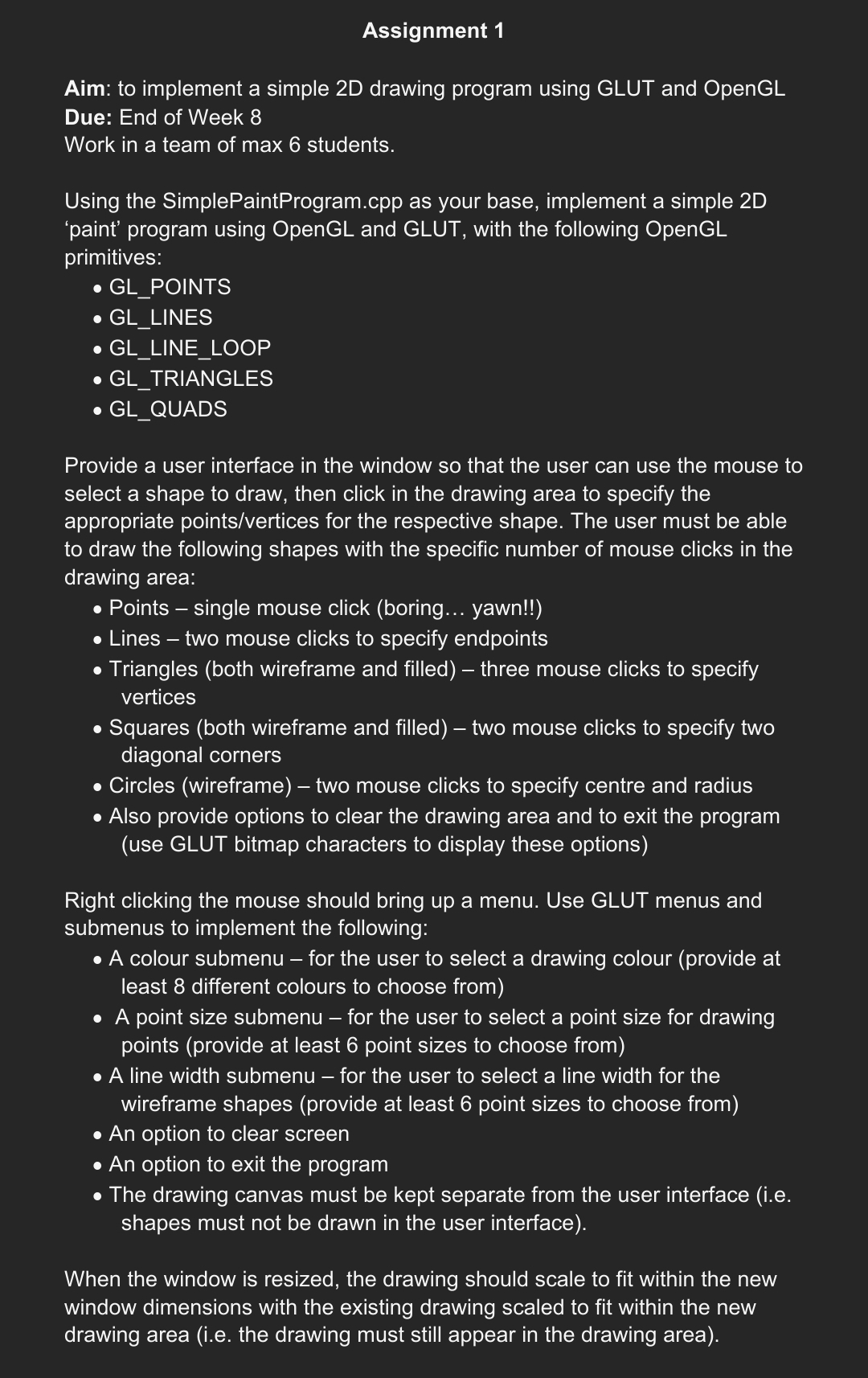
Question: / * Filename: SimplePaintProgram.cpp Author: TMT 2 0 3 3 Introduction to Computer Graphics Date: 6 January 2 0 1 0 Description: This is a
Filename: SimplePaintProgram.cpp
Author: TMT Introduction to Computer Graphics
Date: January
Description: This is a simple paint program that can draw lines and points. Upon
pressing the c or r key on the keyboard, the drawing area will clear. The program
will close when the e key is pressed.
Modification Log:
#include
#include
#include
#define LINE
#define POINT
#define CLEAR
initialize global variables
int pointsize;
int linesize;
int X X Y Y;
bool P false, Pfalse, Pfalse, Clearedfalse, Clearedfalse, Linefalse, Pointfalse;
char shapeNo Shape Selected";
this function draws the program's panels
void drawPanel
panel backgound
glBeginGLQUADS;
glColorf;
glVertexi;
glVertexi;
glVertexi;
glVertexi;
glEnd;
panel lines
glBeginGLLINES;
glColorf;
glVertexi;
glVertexi;
glVertexi;
glVertexi;
glVertexi;
glVertexi;
glEnd;
this draws image of a point on its button
glBeginGLPOINTS;
glColorf;
glVertexi;
glVertexi;
glVertexi;
glVertexi;
glEnd;
this draws image of a line on its button
glBeginGLLINES;
glColorf;
glVertexi;
glVertexi;
glEnd;
this displays the shape status on the panel
glColorf;
int tlength strlenshape;
glRasterPosf;
for int counter; counter tlength; counter
glutBitmapCharacterGLUTBITMAPTIMESROMAN shapecounter;
this function draws points on the drawing area when the point button is selected
void drawPoint
ifPtrue
glPointSizepointsize; set point size
glBeginGLPOINTS;
glColorf;
glVertexiXY;
glEnd;
Pfalse;
this draws lines on the drawing area when the line button is selected
a line is drawn by clicking twice on the drawing area
void drawLine
ifPtrue && Ptrue
glLineWidthlinesize;
glBeginGLLINES;
glColorf;
glVertexiXY;
glVertexiXY;
glEnd;
Pfalse;
Pfalse;
this is where all the calls to the functions are made
void draw
the GLCOLORBUFFERBIT is cleared only once to keep the content of the drawing page
ifCleared false
glClearGLCOLORBUFFERBIT;
Cleared true;
the drawPanel function is called everytime the draw function is called
drawPanel;
checks if the object is selected using the boolean, and calls the appropriate function
if Linetrue
drawLine;
if Pointtrue
drawPoint;
glFlush;
this function is responsible for the action that happens when we select from the menu panel
void processMenuEventsint option
ifCleared false
glClearGLCOLORBUFFERBIT;
Cleared true;
switch option
case LINE :
Line true;
Point false;
Pfalse;Pfalse;Pfalse;
shape"Drawing a Line";
break;
case POINT :
Line false;
Point true;
Pfalse;Pfalse;Pfalse;
shape"Drawing a Point";
break;
case CLEAR :
glClearGLCOLORBUFFERBIT;
P false,Pfalse, P false;
break;
glutPostRedisplay;
this function is responsible for mouse interaction
void mouse int btn int state, int x int y
these are listeners for left mouse click events in the drawing area
if btn GLUTLEFTBUTTON && state GLUTDOWN && y
if Linetrue
ifPtrue && Pfalse
Xx;Yy;
Ptrue;
ifPfalse
Xx;Yy;
Ptrue;
if Pointtrue
ifPfalse
Xx;Yy;
Ptrue;
these are listeners for buttons in the panel
if x && x && y && y
processMenuEventsLINE; line button
if x && x && y && y
processMenuEventsPOINT; point button
glutPostRedisplay;
this function is responsible for creating a popup menu when the right mouse button is clicked
void createGLUTMenus
int menu;
menu glutCreateMenuprocessMenuEvents;
glutAddMenuEntryClearCLEAR;
glutAttachMenuGLUTRIGHTBUTTON;
this function is responsible for keyboard interaction
void keyboard unsigned char key, int x int y
switchkey
case :
glClearGLCOLORBUFFERBIT;
break;
case :
glClearGLCOLORBUFFERBIT;
break;
case :
exit;
break;
this is the main function where the toolkit is initialized, the display mode is set,
the window is created and the callback functions are registered.
void main
glutInitDisplayModeGLUTSINGLE GLUTRGB;
glutInitWindowSize;
glutInitWindowPosition;
glutCreateWindowSimple Paint Program for TMT;
glutMouseFuncmouse;
glutKeyboardFunckeyboard;
glClearColor;
glutDisplayFuncdraw;
glutIdleFuncdraw;
glOrtho;
createGLUTMenus;
glutMainLoop;
Step by Step Solution
There are 3 Steps involved in it
1 Expert Approved Answer
Step: 1 Unlock

Question Has Been Solved by an Expert!
Get step-by-step solutions from verified subject matter experts
Step: 2 Unlock
Step: 3 Unlock
 Study Help