







Question: Files and Pointe A CSV file, Comma Separated Vector, is a file format normally used to implement log files or simple database applications. It is
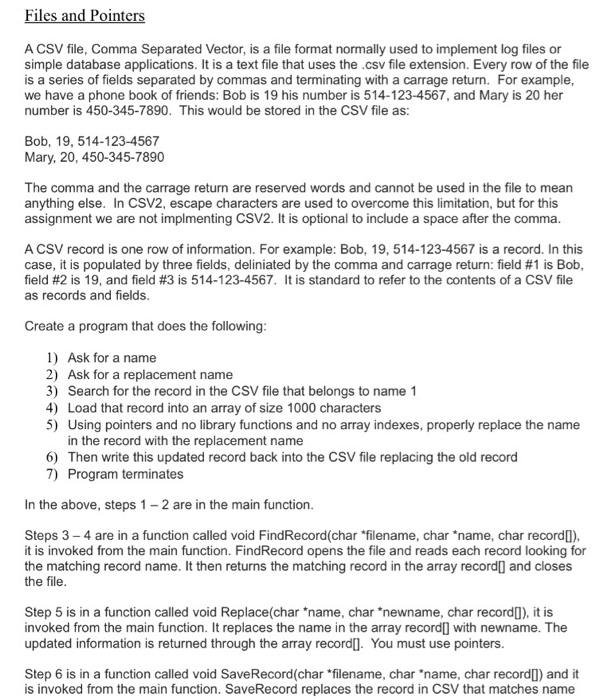
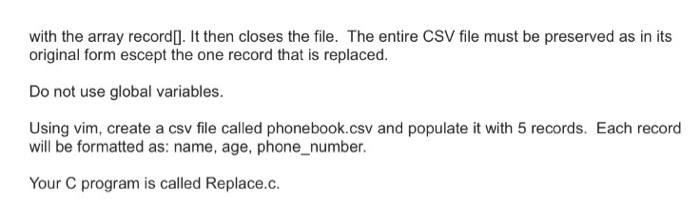
Files and Pointe A CSV file, Comma Separated Vector, is a file format normally used to implement log files or simple database applications. It is a text file that uses the .csv file extension. Every row of the file is a series of fields separated by commas and terminating with a carrage return. For example, we have a phone book of friends: Bob is 19 his number is 514-123-4567, and Mary is 20 her number is 450-345-7890. This would be stored in the CSV file as: Bob, 19, 514-123-4567 Mary, 20, 450-345-7890 The comma and the carrage return are reserved words and cannot be used in the file to mean anything else. In CSV2, escape characters are used to overcome this limitation, but for this assignment we are not implmenting CSV2. It is optional to include a space after the comma A CSV record is one row of information. For example: Bob, 19, 514-123-4567 is a record. In this case, it is populated by three fields, deliniated by the comma and carrage return: field #1 is Bob field #2 is 19, and field #3 is 514-123-4567. It is standard to refer to the contents of a CSV file as records and fields Create a program that does the following 1) Ask for a name 2) Ask for a replacement name 3) Search for the record in the CSV file that belongs to name 1 4) Load that record into an array of size 1000 characters 5) Using pointers and no library functions and no array indexes, properly replace the name in the record with the replacement name 6) Then write this updated record back into the CSV file replacing the old record 7) Program terminates In the above, steps 1-2 are in the main function Steps 3- 4 are in a function called void FindRecord(char "filename, char "name, char recordl) it is invoked from the main function. FindRecord opens the file and reads each record looking for the matching record name. It then returns the matching record in the array record] and closes the file Step 5 is in a function called void Replace(char "name, char "newname, char record), it is invoked from the main function. It replaces the name in the array record] with newname. The updated information is returned through the array recordl]. You must use pointers. Step 6 is in a function called void SaveRecord(char *filename, char "name, char recordI) and it is invoked from the main function. SaveRecord replaces the record in CSV that matches name
Step by Step Solution
There are 3 Steps involved in it

Get step-by-step solutions from verified subject matter experts
 Study Help