







Question: Fill in the blank with LC-3 Assembly code. ONLY NEED 5 LINES OF CODE- QUICK PROBLEM. You will notice in the code below their is
Fill in the blank with LC-3 Assembly code. ONLY NEED 5 LINES OF CODE- QUICK PROBLEM.
You will notice in the code below their is a spot that says "Your code here". For this problem, you must write assembly code in LC-3 to perform the multiplication of two numbers. LC3 has no multiply instruction, so you must simulate it with a loop (branch and label) and the addition instruction. Remember, another way to look at multiplication (x * y) is to sum/add a particular number (x), some number of time (y). To help with this I have given you fully functional assembly code in LC-3 that allows the user to read in 2- two digit numbers, adds them together, and prints them back out. (Hint: this should be around 5 lines of instructions you should have to write)
You will notice in the middle of this program it says "Your Code Goes Here". That is where the code you write will be placed.
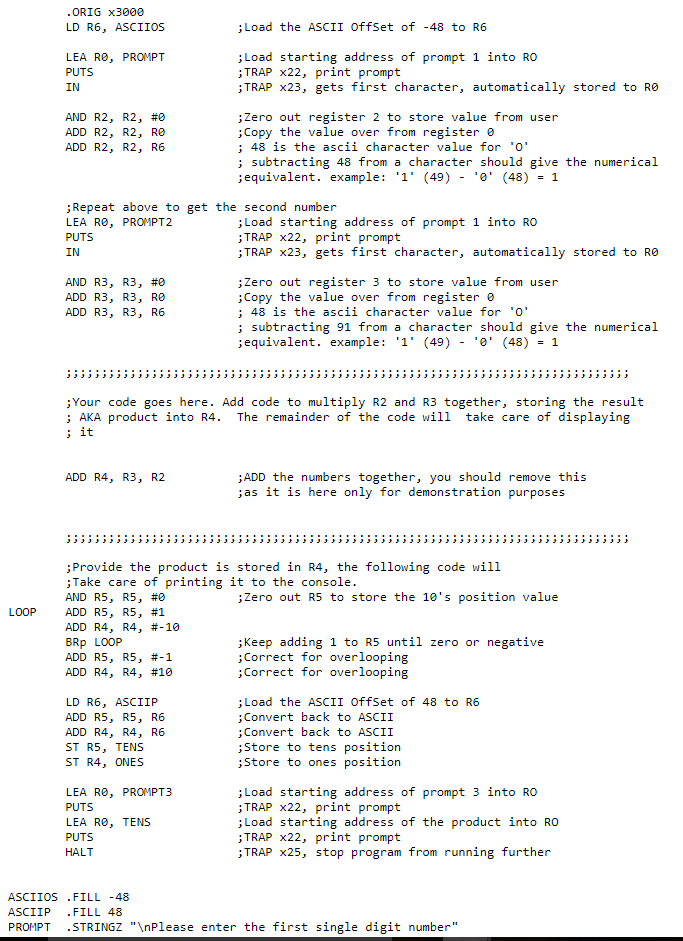

ORIG x3000 LD R6, ASCIIOS ;Load the ASCII OffSet of -48 to R6 LEA RO, PROMPT PUTS Load starting address of prompt 1 into RO ;TRAP x22, print prompt ;TRAP x23, gets first character, automatically stored to Ro AND R2, R2, #0 ADD R2, R2, RO ADD R2, R2, R6 ;Zero out register 2 to store value from user ;Copy the value over from register e ; 48 is the ascii character value for .0' ; subtracting 48 from a character should give the numerical ;equivalent. example: '1'(49) - '0' (48)1 GRepeat above to get the second number LEA RO, PROMPT2 PUTS IN Load starting address of prompt 1 into RO ;TRAP x22, print prompt ;TRAP x23, gets first character, automatically stored to Ro AND R3, R3, #0 ADD R3, R3, RO ADD R3, R3, R6 ;Zero out register 3 to store value from user ;Copy the value over from register e ; 48 is the ascii character value for 'o subtracting 91 from a character should give the numerical equivalent. example: '1' (49) 0 (48)1 Your code goes here. Add code to multiply R2 and R3 together, storing the result ; AKA product into R4. The remainder of the code will take care of displaying ADD the numbers together, you should remove this ;as it is here only for demonstration purposes ADD R4, R3, R2 Provide the product is stored in R4, the following code will Take care of printing it to the console. AND R5, R5, #0 ADD R5, R5, #1 ADD R4, R4, #-10 BRp LooP ADD R5, R5, #-1 ADD R4, R4, #10 ;Zero out R5 to store the 10's position value ;Keep adding 1 to R5 until zero or negative Correct for overlooping Correct for overlooping LD R6, ASCIIP ADD R5, R5, R6 ADD R4, R4, R6 ST R5, TENS ST R4, ONES ;Load the ASCII Offset of 48 to R6 ;Convert back to ASCII ;Convert back to ASCII Store to tens position ;Store to ones positior LEA RO, PROMPT3 PUTS LEA Re, TENS PUTS HALT Load starting address of prompt 3 into RO ;TRAP x22, print prompt ;Load starting address of the product into RO ;TRAP x22, print prompt TRAP x25, stop program from running further ASCIIOS .FILL -48 ASCIIP .FILL 48 PROMPT .STRINGZ " Please enter the first single digit number
Step by Step Solution
There are 3 Steps involved in it

Get step-by-step solutions from verified subject matter experts
 Study Help