







Question: Fill out the green boxes Home Insert Draw Page Layout Formulas Data Review View Tell me X Calibri (Body) v 10 V = = =
Fill out the green boxes
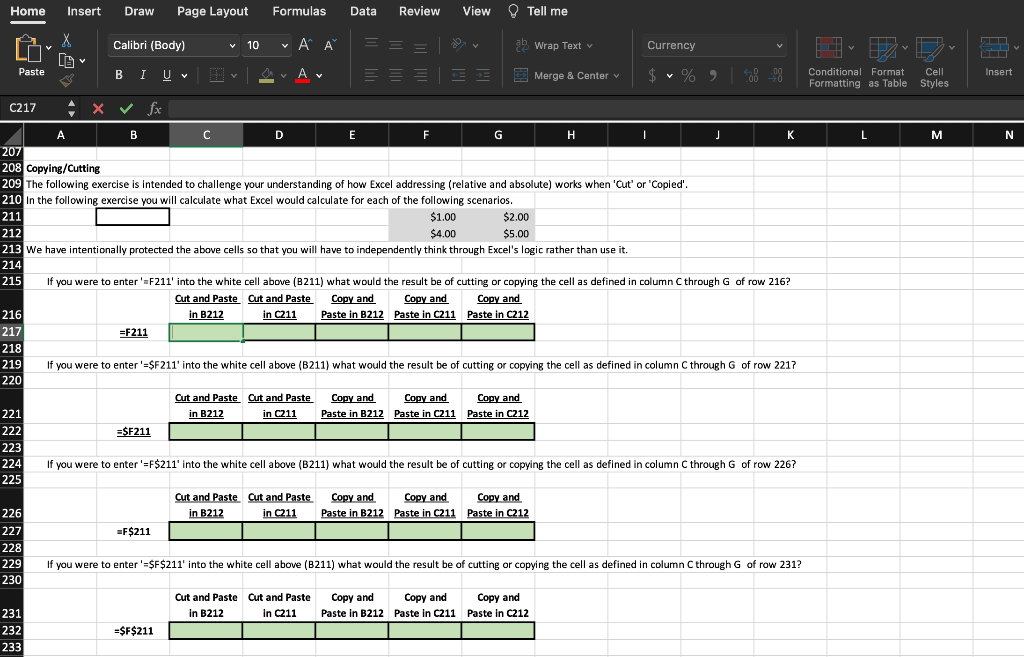
Home Insert Draw Page Layout Formulas Data Review View Tell me X Calibri (Body) v 10 V = = = ab Wrap Text Currency v HU IT Paste I U V av Av ==== = Merge & Center v $ v % % , &-09 Insert Conditional Format Cell Formatting as Table Styles C217 X fx K L M N $1.00 A B C D E F G . I I 2071 208 Copying/Cutting 209 The following exercise is intended to challenge your understanding of how Excel addressing (relative and absolute) works when 'Cut' or 'Copled'. '' . 210 in the following exercise you will calculate what Excel would calculate for each of the following scenarios. 211 $2.00 212 $4.00 $5.00 $ 213 we have intentionally protected the above cells so that you will have to independently think through Excel's logic rather than use it. 214 215 If you were enter '=F211' into the white cell above (B211) what would the result be of cutting or copying the cell as defined in column C through G of row 216? Cut and Paste Cut and Paste Copy and Copy and Copy and 216 in B212 in C211 Paste in B212 Paste in C211 Paste in C212 217 =F211 218 219 If you were to enter '=SF211' into the white cell above (B211) what would the result be of cutting or copying the cell as defined in column C through G of row 2217 220 Cut and Paste Cut and Paste Copy and Copy and Copy and 221 in B212 in C211 Paste in B212 Paste in C211 Paste in C212 222 =$F211 223 224 If you were to enter '=F$211' into the white cell above (B211) what would the result be of cutting or copying the cell as defined in column C through G of row 226? 225 Cut and Paste Cut and Paste Copy and Copy and Copy and 226 in B212 in C211 Paste in B212 Paste in C211 Paste in C212 227 =F$211 = 228 229 If you were to enter '=$F$211' into the white cell above (B211) what would the result be of cutting or copying the cell as defined in column C through G of row 231? 230 Cut and Paste Cut and Paste in B212 in C211 Copy and Copy and Copy and Paste in B212 Paste in C211 Paste in C212 231 232 233 =$F$211 Home Insert Draw Page Layout Formulas Data Review View Tell me X Calibri (Body) v 10 V = = = ab Wrap Text Currency v HU IT Paste I U V av Av ==== = Merge & Center v $ v % % , &-09 Insert Conditional Format Cell Formatting as Table Styles C217 X fx K L M N $1.00 A B C D E F G . I I 2071 208 Copying/Cutting 209 The following exercise is intended to challenge your understanding of how Excel addressing (relative and absolute) works when 'Cut' or 'Copled'. '' . 210 in the following exercise you will calculate what Excel would calculate for each of the following scenarios. 211 $2.00 212 $4.00 $5.00 $ 213 we have intentionally protected the above cells so that you will have to independently think through Excel's logic rather than use it. 214 215 If you were enter '=F211' into the white cell above (B211) what would the result be of cutting or copying the cell as defined in column C through G of row 216? Cut and Paste Cut and Paste Copy and Copy and Copy and 216 in B212 in C211 Paste in B212 Paste in C211 Paste in C212 217 =F211 218 219 If you were to enter '=SF211' into the white cell above (B211) what would the result be of cutting or copying the cell as defined in column C through G of row 2217 220 Cut and Paste Cut and Paste Copy and Copy and Copy and 221 in B212 in C211 Paste in B212 Paste in C211 Paste in C212 222 =$F211 223 224 If you were to enter '=F$211' into the white cell above (B211) what would the result be of cutting or copying the cell as defined in column C through G of row 226? 225 Cut and Paste Cut and Paste Copy and Copy and Copy and 226 in B212 in C211 Paste in B212 Paste in C211 Paste in C212 227 =F$211 = 228 229 If you were to enter '=$F$211' into the white cell above (B211) what would the result be of cutting or copying the cell as defined in column C through G of row 231? 230 Cut and Paste Cut and Paste in B212 in C211 Copy and Copy and Copy and Paste in B212 Paste in C211 Paste in C212 231 232 233 =$F$211
Step by Step Solution
There are 3 Steps involved in it

Get step-by-step solutions from verified subject matter experts
 Study Help