







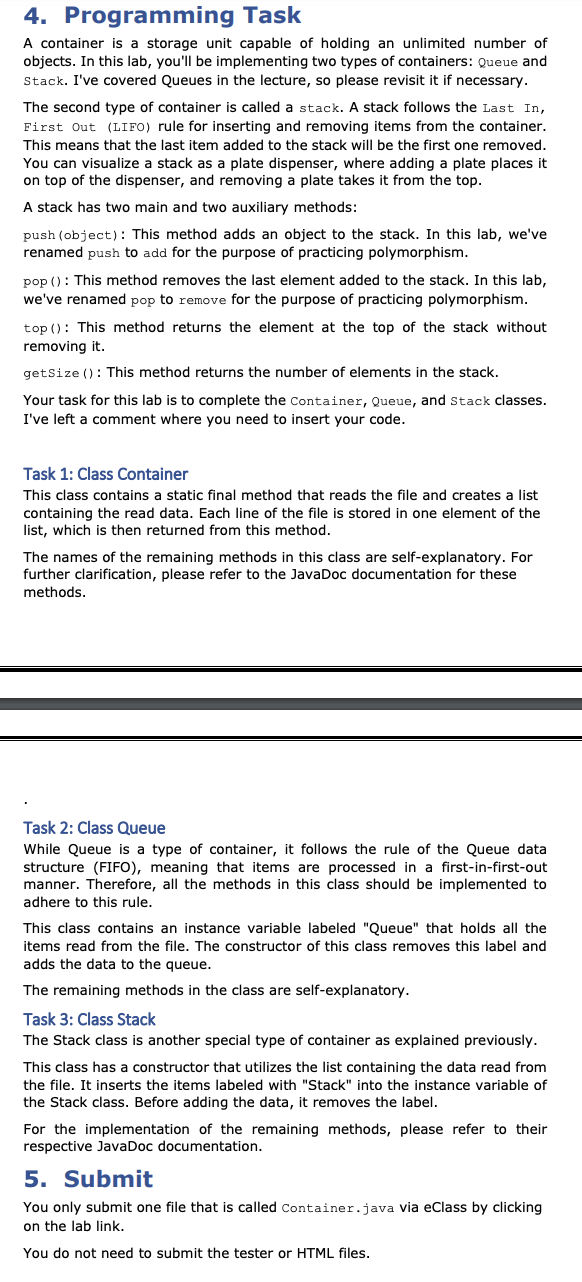
Question: fill the code sample, without any errors Container.java code package Lab 7 ; import java.util. * ; import java.io . * ; / * *
fill the code sample, without any errors
Container.java code
package Lab;
import java.util.;
import java.io;
This class is a container that holds an unlimited number of
String objects. It is able to remove objects and add objects.
public class Container
No instance variable should be defined for this class.
Reads the given file and add it into a list.
Each element of the list contains one line of the file.
@param fileName is the name of the file that is read in this method.
public static final List readFileString fileName
add your code here. You may change the return value.
return null;
This method adds the obj to the container.
@param obj is the object that is added to the container.
void addObject object
insert your code here
This method removes the object from the container
@return returns the removed object.
Object remove
insert your code here, you may want to change the return value
return null;
@return It returns the number of elements in the container.
int getSize
insert your code here. You may want to change the return value.
return ;
This class simulates a Queue, which is a data structure that insert and remove data
by FIFO firstin firstout rule
class Queue extends Container
ArrayList queue;
This is the constructor that initializes the queue
with all the strings in the fileName that is labeled
by "Queue"
@param fileName is the name of the file that is read.
public QueueString fileName
insert your code here
This method adds the object into the Queue.
Please note that the rule of the queue insertionremoval is
First in First out.
@param obj is the object that is added to the queue.
@Override
public void addObject obj
insert your code here
This method removes an object from the Queue.
Please note that the rule of the queue insertionremoval is
First in First out.
@Override
public Object remove
insert your code here. You may want to change the return value.
return null;
@return returns the object which is in front of the queue.
public Object top
insert your code here. You may want to change the return value.
return null;
Returns the number of items in the queue.
@Override
public int getSize
insert your code here. You may want to change the return value.
return ;
This class simulates a Stack, which is a data structure that insert and remove data
by FILO firstin lastout rule
class Stack extends Container
ArrayList stack;
This is the constructor that initializes the stack
with all the strings in the fileName that is labeled
by "Stack"
@param fileName is the name of the file that is read.
public StackString fileName
insert your code here.
This method removes an object from the stack.
Please note that the rule of the stack insertionremoval is
First in Last out.
@Override
public void addObject obj
insert your code here.
This method removes an object from the stack.
Please note that the rule of the stack insertionremoval is
First in Last out.
@Override
public Object remove
insert your code here. You may want to change the return value.
return null;
@return returns the object which is on top of the stack.
public Object top
insert your code here. You may want to change the return value.
return null;
Returns the number of items in the stack.
@Override
public int getSize
insert your code here. You may want to change the return value.
return ;
ContainerTester.java code
package Lab;
import static org.junit.jupiter.api.Assertions.;
import org.junit.jupiter.api.AfterAll;
import org.junit.jupiter.api.AfterEach;
import org.junit.jupiter.api.BeforeAll;
import org.junit.jupiter.api.BeforeEach;
import org.junit.jupiter.api.Test;
class ContainerTester
@Test
void testQueue
Container container new Queueinputtxt;
int expected ;
int actual container.getSize;
assertEqualsexpected actual, "The queue is not populated properly or getSize method is not correct";
@Test
void testQueue
Container container new Queueintxt;
int expected ;
int actual container.getSize;
assertEqualsexpected actual, "The queue is not populated properly or getSize method is not correct";
@Test
void testQueueAdd
Container container new Queueintxt;
container.addJack;
int expected
Step by Step Solution
There are 3 Steps involved in it
1 Expert Approved Answer
Step: 1 Unlock

Question Has Been Solved by an Expert!
Get step-by-step solutions from verified subject matter experts
Step: 2 Unlock
Step: 3 Unlock
 Study Help