







Question: fillCircleSVG function. Description: The idea is to generate text files in HTML5 and SVG format. These files can be viewed in your favorite web browser
fillCircleSVG function.
Description:
The idea is to generate text files in HTML5 and SVG format. These files can be viewed in your favorite web browser and can be mailed to your friends and family. In the process, we learn the basics of how to create web pages using HTML5 and SVG which are critical skills for coop jobs. Most web pages are generated using programs using various programming languages. By rightclicking in any web page and selecting "View page source" you can view its HTML5/SVG source code.
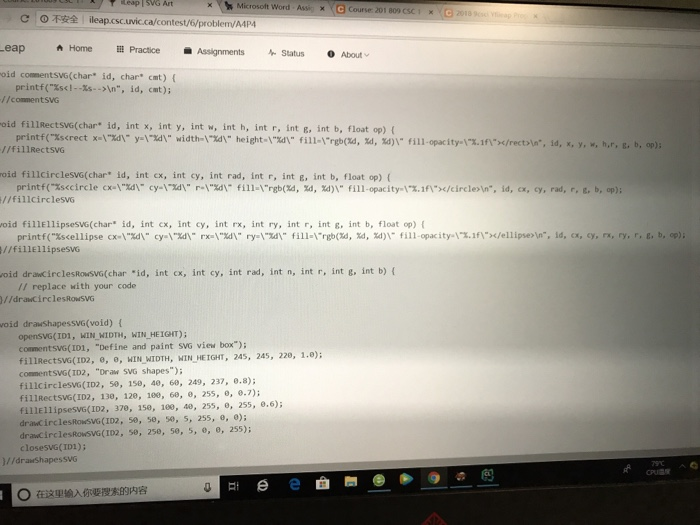
In this part, you are given a C template (cf. Section Hint) that generates the web page depicted in Figures 3 and 4 of the instructions uploaded to CourseSpaces. You are to complete the functiondrawCirclesRowSVG in this C template (i.e., about 10 lines of C code) to generate the web page depicted in Figure 5 of the instructions. Draw the row of circles by calling the function fillCircleSVG in a forloop and by adjusting the cx coordinate (i.e., the x coordinate of the circle center). Feel free to experiment with colors and opacities. Your code must call the function fillCircleSVG
------------------------------
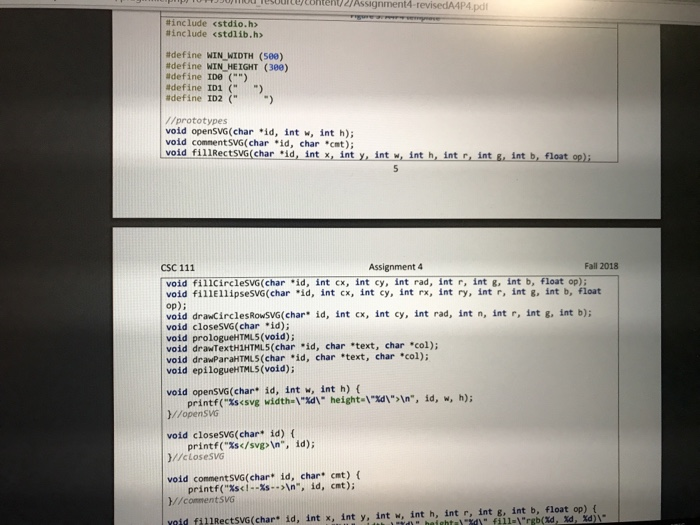
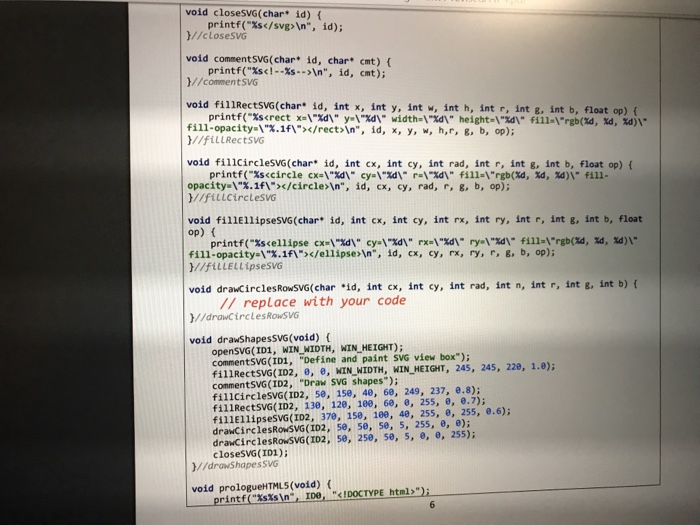
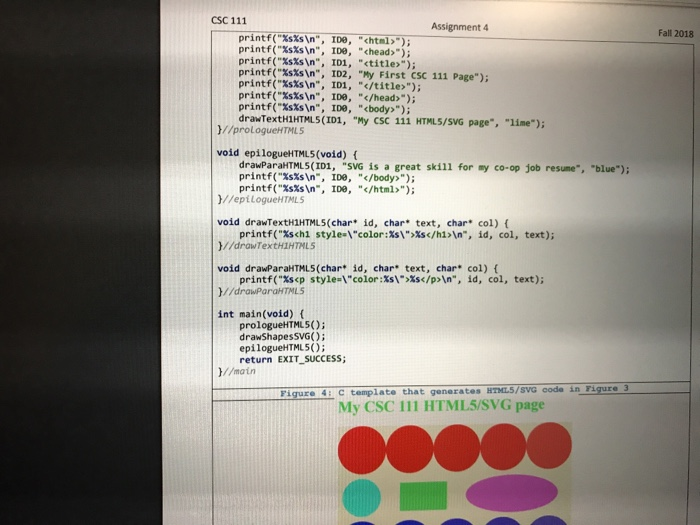
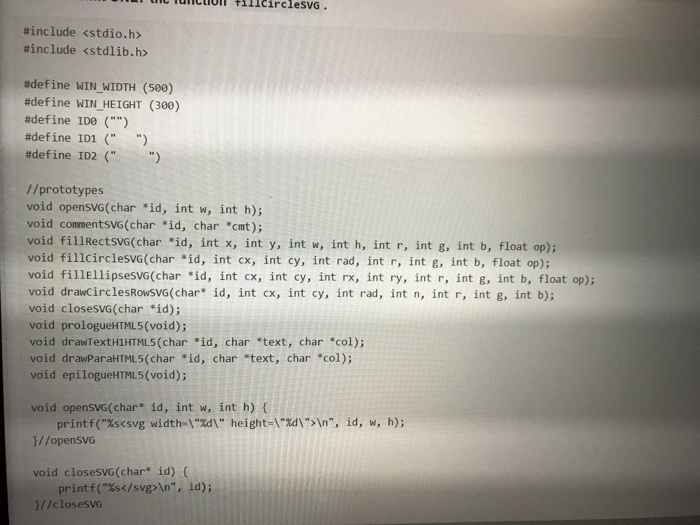
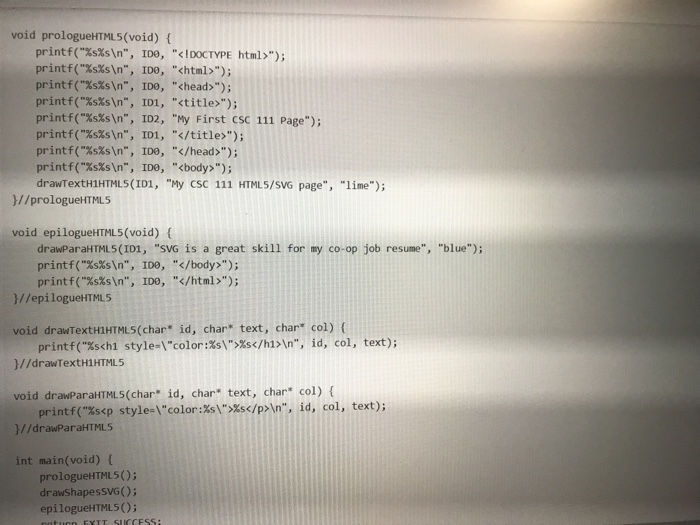
#include #include #define WIN_WIDTH (500) #define WIN_HEIGHT (300) #define ID0 ("") #define ID1 (" ") #define ID2 (" ") //prototypes void openSVG(char *id, int w, int h); void commentSVG(char *id, char *cmt); void fillRectSVG(char *id, int x, int y, int w, int h, int r, int g, int b, float op); void fillCircleSVG(char *id, int cx, int cy, int rad, int r, int g, int b, float op); void fillEllipseSVG(char *id, int cx, int cy, int rx, int ry, int r, int g, int b, float op); void drawCirclesRowSVG(char* id, int cx, int cy, int rad, int n, int r, int g, int b); void closeSVG(char *id); void prologueHTML5(void); void drawTextH1HTML5(char *id, char *text, char *col); void drawParaHTML5(char *id, char *text, char *col); void epilogueHTML5(void); void openSVG(char* id, int w, int h) { printf("%s ", id); }//closeSVG void commentSVG(char* id, char* cmt) { printf("%s ", id, cmt); }//commentSVG void fillRectSVG(char* id, int x, int y, int w, int h, int r, int g, int b, float op) { printf("%sn", id, x, y, w, h,r, g, b, op); }//fillRectSVG void fillCircleSVG(char* id, int cx, int cy, int rad, int r, int g, int b, float op) { printf("%scircle> ", id, cx, cy, rad, r, g, b, op); }//fillCircleSVG void fillEllipseSVG(char* id, int cx, int cy, int rx, int ry, int r, int g, int b, float op) { printf("%sellipse> ", id, cx, cy, rx, ry, r, g, b, op); }//fillEllipseSVG void drawCirclesRowSVG(char *id, int cx, int cy, int rad, int n, int r, int g, int b) { // replace with your code }//drawCirclesRowSVG void drawShapesSVG(void) { openSVG(ID1, WIN_WIDTH, WIN_HEIGHT); commentSVG(ID1, "Define and paint SVG view box"); fillRectSVG(ID2, 0, 0, WIN_WIDTH, WIN_HEIGHT, 245, 245, 220, 1.0); commentSVG(ID2, "Draw SVG shapes"); fillCircleSVG(ID2, 50, 150, 40, 60, 249, 237, 0.8); fillRectSVG(ID2, 130, 120, 100, 60, 0, 255, 0, 0.7); fillEllipseSVG(ID2, 370, 150, 100, 40, 255, 0, 255, 0.6); drawCirclesRowSVG(ID2, 50, 50, 50, 5, 255, 0, 0); drawCirclesRowSVG(ID2, 50, 250, 50, 5, 0, 0, 255); closeSVG(ID1); }//drawShapesSVG void prologueHTML5(void) { printf("%s%s ", ID0, ""); printf("%s%s ", ID0, ""); printf("%s%s ", ID0, ""); printf("%s%s ", ID1, ""); printf("%s%s ", ID2, "My First CSC 111 Page"); printf("%s%s ", ID1, " "); printf("%s%s ", ID0, ""); printf("%s%s ", ID0, ""); drawTextH1HTML5(ID1, "My CSC 111 HTML5/SVG page", "lime"); }//prologueHTML5 void epilogueHTML5(void) { drawParaHTML5(ID1, "SVG is a great skill for my co-op job resume", "blue"); printf("%s%s ", ID0, ""); printf("%s%s ", ID0, ""); }//epilogueHTML5 void drawTextH1HTML5(char* id, char* text, char* col) { printf("%s%s
", id, col, text); }//drawTextH1HTML5 void drawParaHTML5(char* id, char* text, char* col) { printf("%s%s
", id, col, text); }//drawParaHTML5 int main(void) { prologueHTML5(); drawShapesSVG(); epilogueHTML5(); return EXIT_SUCCESS; }//main COMPLETE THE drawCirclesRowSVG FUNCTION with for-loop. 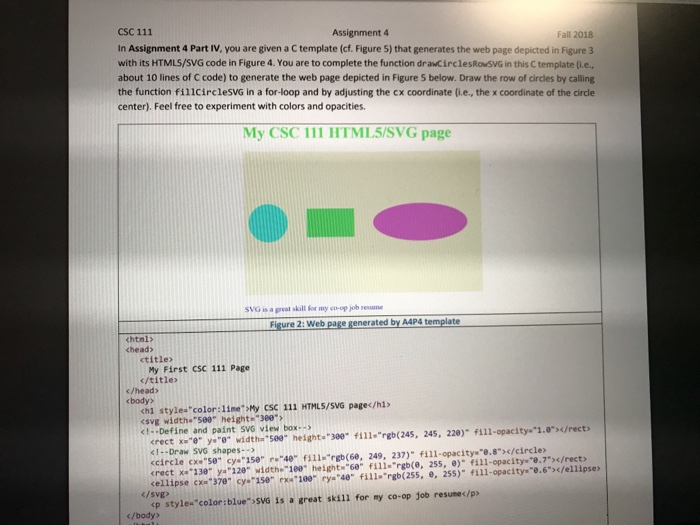
CSC 111 In Assignment 4 Part IV, you are given a C template (cf. Figure 5) that generates the web page depicted in Figure 3 with its HTMLS/SVG code in Figure 4. You are to complete the function drawCirclesRowsvG in this C template (i.e. about 10 lines of C code) to generate the web page depicted in Figure 5 below. Draw the row of circles by calling the function fillcirclesVG in a for-loop and by adjusting the cx coordinate (i.e., the x coordinate of the circle center). Feel free to experiment with colors and opacities. Assignment 4 Fall 2018 My CSC 111 HTMLS/SVG page SVG is a greal skill for my co-op job resume Figure 2: Web page generated by AAP4 template htnl> chead> ctitle My First CSC 111 Page c/title c/head> body? chl stylea color:lime My CSC 111 HTMLS/SVG pagec/h1> esvg width"580" height 380 cellipse cX 370 cy 15e 180 ya 40" fill."rgb(255, e, 255)" fill-opacitys e.6c/ellipse /svg p stylex"color:blue" SVG is a great skill for my co-op job resune
Step by Step Solution
There are 3 Steps involved in it

Get step-by-step solutions from verified subject matter experts
 Study Help