







Question: Final Assignment: / / Java environment setup if you don't have it . / / Submit your source code and output screenshots ( include csv
Final Assignment:
Java environment setup if you don't have it
Submit your source code and output screenshotsinclude csv output screen in a PDF format
AND your source code java and compiled class files.
Problem Description:
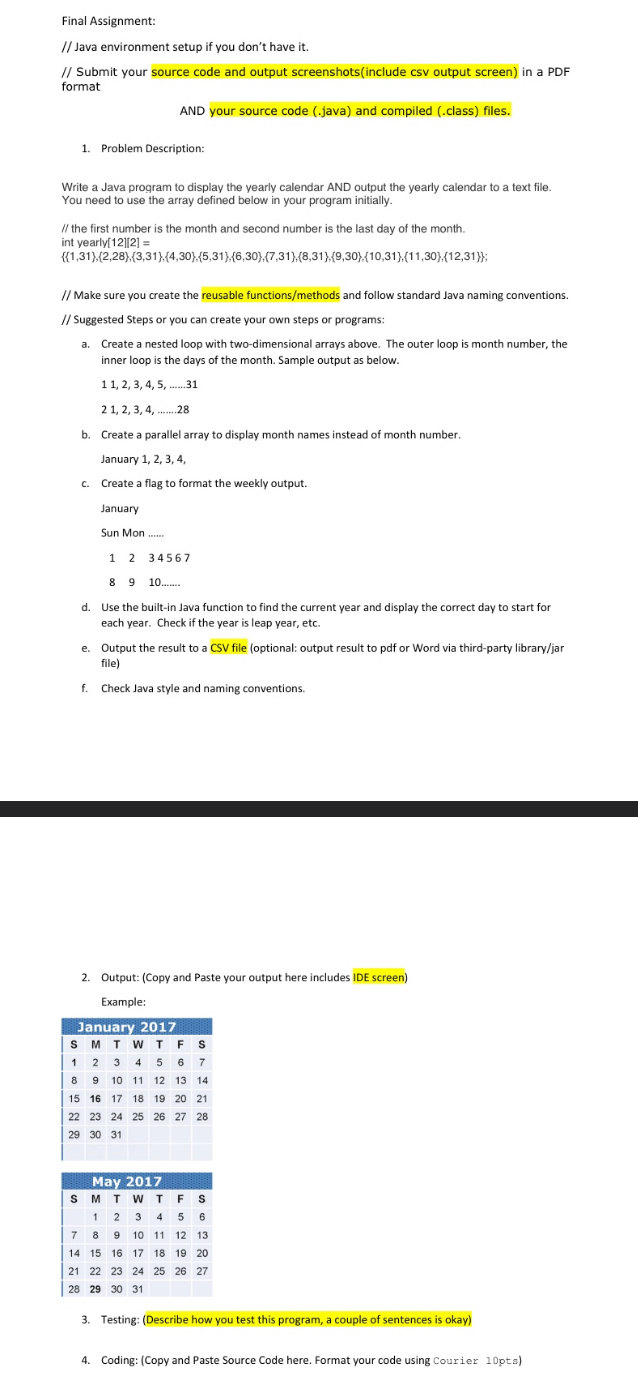
Write a Java program to display the yearly calendar AND output the yearly calendar to a text file. You need to use the array defined below in your program initially.
the first number is the month and second number is the last day of the month. int yearly
;
Make sure you create the reusable functionsmethods and follow standard Java naming conventions.
Suggested Steps or you can create your own steps or programs:
a Create a nested loop with twodimensional arrays above. The outer loop is month number, the inner loop is the days of the month. Sample output as below.
dots.
dotsdots
b Create a parallel array to display month names instead of month number.
January
c Create a flag to format the weekly output.
January
Sun Mon
dots...
d Use the builtin Java function to find the current year and display the correct day to start for each year. Check if the year is leap year, etc.
e Output the result to a CSV file optional: output result to pdf or Word via thirdparty libraryjar file
f Check Java style and naming conventions.
Output: Copy and Paste your output here includes IDE screen
Example:
tableJanuary SMTwTFs
tableMay MTWTFS
Testing: Describe how you test this program, a couple of sentences is okay
Coding: Copy and Paste Source Code here. Format your code using Courier pts
Final Assignment:
Java environment setup if you don't have it
Submit your source code and output screenshotsinclude csv output screen in a PDF format
AND your source code java and compiled class files.
Problem Description:
Write a Java program to display the yearly calendar AND output the yearly calendar to a text file. You need to use the array defined below in your program initially.
the first number is the month and second number is the last day of the month. int yearly
;
Make sure you create the reusable functionsmethods and follow standard Java naming conventions.
Suggested Steps or you can create your own steps or programs:
a Create a nested loop with twodimensional arrays above. The outer loop is month number, the inner loop is the days of the month. Sample output as below.
dots.
dotsdots
b Create a parallel array to display month names instead of month number.
January
c Create a flag to format the weekly output.
January
Sun Mon
dots...
d Use the builtin Java function to find the current year and display the correct day to start for each year. Check if the year is leap year, etc.
e Output the result to a CSV file optional: output result to pdf or Word via thirdparty libraryjar file
f Check Java style and naming conventions.
Output: Copy and Paste your output here includes IDE screen
Example:
tableJanuary SMTwTFs
tableMay MTWTFS
Testing: Describe how you test this program, a couple of sentences is okay
Coding: Copy and Paste Source Code here. Format your code using Courier pts
Step by Step Solution
There are 3 Steps involved in it
1 Expert Approved Answer
Step: 1 Unlock

Question Has Been Solved by an Expert!
Get step-by-step solutions from verified subject matter experts
Step: 2 Unlock
Step: 3 Unlock
 Study Help