







Question: FinSAS: Financial Statement Analysis Spreadsheet allows users to input the reported data from the financial statements, notes, and other sources. FinSAS then computes the ratios
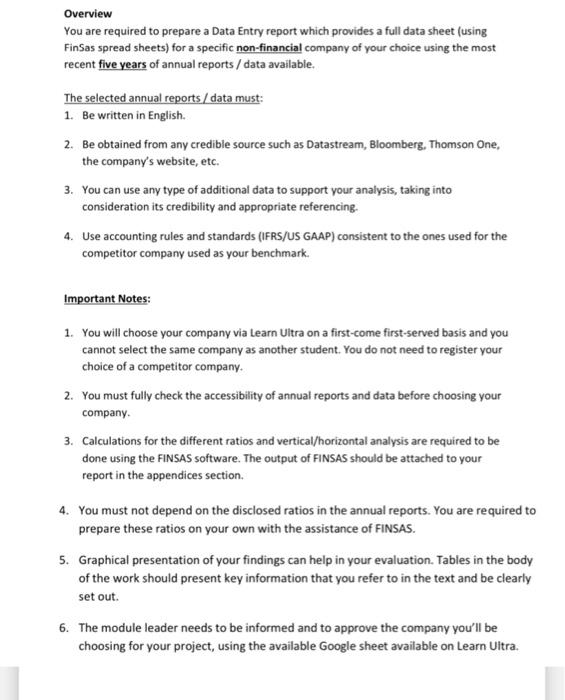
Overview You are required to prepare a Data Entry report which provides a full data sheet (using FinSas spread sheets) for a specific non-financial company of your choice using the most recent five years of annual reports / data available. The selected annual reports/data must: 1. Be written in English. 2. Be obtained from any credible source such as Datastream, Bloomberg, Thomson One, the company's website, etc. 3. You can use any type of additional data to support your analysis, taking into consideration its credibility and appropriate referencing. 4. Use accounting rules and standards (IFRS/US GAAP) consistent to the ones used for the competitor company used as your benchmark. Important Notes: 1. You will choose your company via Learn Ultra on a first-come first-served basis and you cannot select the same company as another student. You do not need to register your choice of a competitor company. 2. You must fully check the accessibility of annual reports and data before choosing your company. 3. Calculations for the different ratios and vertical/horizontal analysis are required to be done using the FINSAS software. The output of FINSAS should be attached to your report in the appendices section. 4. You must not depend on the disclosed ratios in the annual reports. You are required to prepare these ratios on your own with the assistance of FINSAS. 5. Graphical presentation of your findings can help in your evaluation. Tables in the body of the work should present key information that you refer to in the text and be clearly set out. 6. The module leader needs to be informed and to approve the company you'll be choosing for your project, using the available Google sheet available on Learn Uitra
Step by Step Solution
There are 3 Steps involved in it

Get step-by-step solutions from verified subject matter experts
 Study Help