







Question: FirstNameLastNamecit 1 3 0 _ HW 9 B . java for the source file of your class. You should only submit one Java source file.
FirstNameLastNamecitHWBjava for the source file of your class.
You should
only submit one Java source file.
There is no need for creating a utility class for this exercise.
Methods need to be properly documented.
Do not use breakcontinuereturn in your loops.
Do not use the System.exit method to exit the program.
Do not use global variable. Parameters must be passed to methods. The Scanner class is
allowed as global.
Create a system to manage student attendance and grades.
In main method
Create array lists, student name, student status and student grade
Call methods
First method adding student
Second method mark student attendance
third method display student records
close the main method
First method of adding student
It has no return value.
It takes three ArrayList parameters: one for student names, one for attendance status, and one
for student grades.
Define a boolean variable called choice and initialize it to true
Use a loop that continues as long as the student name is not "done.
Ask the user to enter the student's name inside the loop
Add the student name to the arraylist of names
Use If statement as much as the name is not done
Ask the use to enter grade, add the grad to the grade list
Set the attendance status for this student to "Absent" by adding false to the attendance status list.
Example as the following
ArrayListName.addfalse;
Use else
set choice to false to stop the loop and end the process of adding students.
You can a try block to catch exceptions if the user enters a nonnumeric value for the grade.
You might need to use input.nextLine; to clear the buffer
Second method mark student attendance
This method will mark each students attendance.
It has no return value.
It takes two ArrayList parameters: one for student names and one for attendance status.
Use a loop
Ask the user to enter the students name. Enter "done" to stop the loop and end the attendance
marking process.
Use the name entered to find the exact position index of the student in the names list.
If the Name is Found: Proceed to prompt for attendance status.
If the Name is Not Found: Display a message like Student not found and prompt the user to
enter a valid name.
If the name is found, ask the user, Is the student present? truefalse: and expect the input to
be either true for present or false for absent use Boolean input.
Use a try block to capture any errors if the user enters something other than true or false.
If an invalid entry is detected, display an error message and prompt the user to enter the
attendance status again.
Once a valid attendance status true or false is entered:
Update the students attendance in the status list at the correct index.
Example as the following
ArrayListname.setindex isPresent; where isPresent is the Boolean variable that need to
be declared
Use input.nextLine; to clear the buffer
Third method display student recodes
Method has no return value
Method has parameters: student name, status, grade
Display a header row with columns for "Name," "Attendance," and "Grade" to organize the
output.
Use a loop to go through each student in the names list
For each student, check their attendance status in the status list.
If status is true, set the attendance display text to "Present."
If status is false, set the attendance display text to "Absent."
Example as the following
inside the for loop
ifstatusgetiWhere status is the arrayList name for student attendance
attendance"Present";where attendance is a String variable that needs to be declared
inside the method
else
attendance"Absent";.......
Display Each Record: For each student, print their name, their attendance status Present or
"Absent" and student grade is formatted to two decimal places
It's good to practice using try and catch, but if the program runs completely without errors and
doesn't require them, you can replace them with if and else instead.
It's not necessary for the columns to be aligned with each other. It's okay if the spacing is not
the same between columns, as long as the table remains readable and understandable
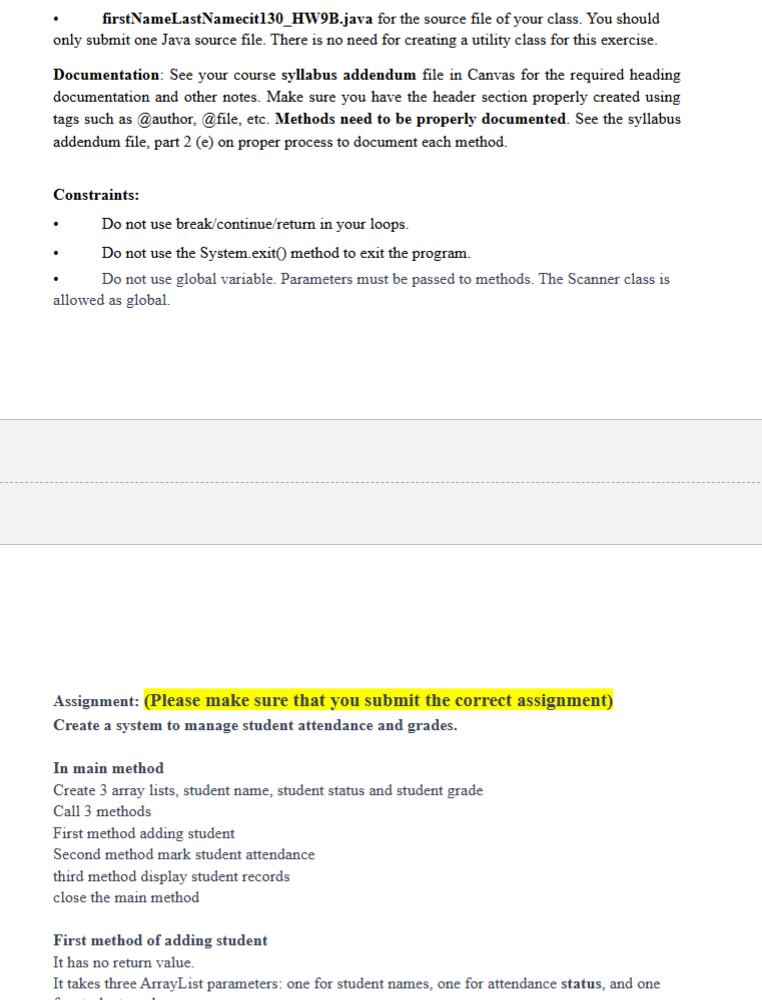
firstNameLastNamecitHWBjava for the source file of your class. You should
only submit one Java source file. There is no need for creating a utility class for this exercise.
Documentation: See your course syllabus addendum file in Canvas for the required heading
documentation and other notes. Make sure you have the header section properly created using
tags such as @author, @file, etc. Methods need to be properly documented. See the syllabus
addendum file, part e on proper process to document each method.
Constraints:
Do not use breakcontinuereturn in your loops.
Do not use the System.exit method to exit the program.
Do not use global variable. Parameters must be passed to methods. The Scanner class is
allowed as global.
Assignment: Please make sure
In main method
Creat
U
attendance"Absen
a
Step by Step Solution
There are 3 Steps involved in it
1 Expert Approved Answer
Step: 1 Unlock

Question Has Been Solved by an Expert!
Get step-by-step solutions from verified subject matter experts
Step: 2 Unlock
Step: 3 Unlock
 Study Help