







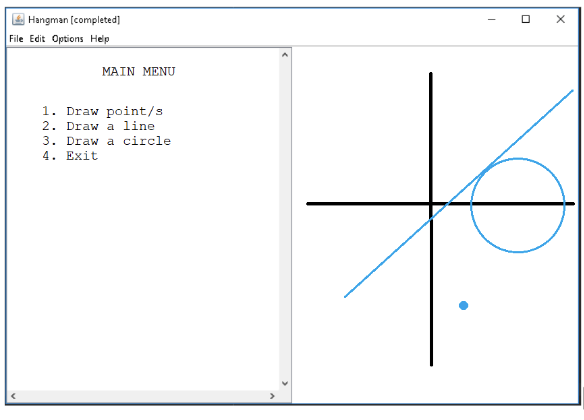
Question: Fix code so that the output graph is similar to the picture attached: MyLine.java import acm.graphics.GLine; import acm.graphics.GMath; import java.awt. * ; public class MyLine
Fix code so that the output graph is similar to the picture attached:
MyLine.java
import acm.graphics.GLine;
import acm.graphics.GMath;
import java.awt.;
public class MyLine extends GLine
private final double dx;
private final double dy;
public MyLinedouble x double y double x double y
superx y x y;
this.dx x x;
this.dy y y;
This method should not override the final paint method from GObject
public void drawGraphics g
GraphicsD gd GraphicsD g;
gdsetStrokenew BasicStroke;
gddrawLineGMathroundgetStartPointgetX GMath.roundgetStartPointgetY
GMath.roundgetEndPointgetX GMath.roundgetEndPointgetY;
Point.java
public class Point
private int x;
private int y;
public Pointint initX, int initY
this.x initX;
this.y initY;
public boolean equalsPoint other
return this.x other.x && this.y other.y;
@Override
public String toString
return this.x this.y ;
public double distanceFromOrigin
return Math.sqrtthisx this.x this.y this.y;
public int getX
return x;
public int getY
return y;
public void setXint x
this.x x;
public void setYint y
this.y y;
public int quadrant
if x && y return ;
if x && y return ;
if x && y return ;
if x && y return ;
return ;
public static Point closestToOriginPoint p Point p
return pdistanceFromOrigin pdistanceFromOrigin p : p;
BasicGraphjava
import acm.graphics.GCanvas;
import acm.graphics.GLine;
import acm.graphics.GOval;
import acm.program.ConsoleProgram;
import java.awt.;
public class BasicGraph extends ConsoleProgram
private static final int APPLICATIONWIDTH ;
private static final int APPLICATIONHEIGHT ;
private fields for drawing functionality
private GCanvas canvas;
private Point origin;
public void init
setSizeAPPLICATIONWIDTH, APPLICATIONHEIGHT;
canvas new DrawingCanvas; Use a custom DrawingCanvas class
addcanvas;
origin new PointAPPLICATIONWIDTH APPLICATIONHEIGHT ;
drawAxes;
public void run
int choice ;
do
println
;
println Main Menu ;
println;
println Draw Points;
println Draw Line";
println Draw Circle";
println Clear Drawing";
println Exit";
println
;
choice readInt;
switch choice
case :
drawPoints;
break;
case :
drawLine;
break;
case :
drawCircle;
break;
case :
clearDrawing;
break;
case :
printlnExiting ;
pause;
exit;
break;
default:
printlnInvalid choice. Please enter a valid option.";
while choice ;
private void drawPoints
int numPoints readIntEnter the number of points to draw: ;
for int i ; i numPoints; i
int x readIntEnter x coordinate for point i : ;
int y readIntEnter y coordinate for point i : ;
DrawingCanvas canvasdrawPointnew Pointx y Color.RED;
private void drawLine
int x readIntEnter x coordinate for start point: ;
int y readIntEnter y coordinate for start point: ;
int x readIntEnter x coordinate for end point: ;
int y readIntEnter y coordinate for end point: ;
double width readDoubleEnter line width: ;
DrawingCanvas canvasdrawLinenew MyLinex y x y width;
private void drawCircle
int x readIntEnter x coordinate for center: ;
int y readIntEnter y coordinate for center: ;
double radius readDoubleEnter radius: ;
double width readDoubleEnter line width: ;
DrawingCanvas canvasdrawCirclenew Pointx y radius, width;
Step by Step Solution
There are 3 Steps involved in it
1 Expert Approved Answer
Step: 1 Unlock

Question Has Been Solved by an Expert!
Get step-by-step solutions from verified subject matter experts
Step: 2 Unlock
Step: 3 Unlock
 Study Help