







Question: FIX THE application that will write a data file to disk for the Mesa seating Application containing the ticket prices. A notice will display when
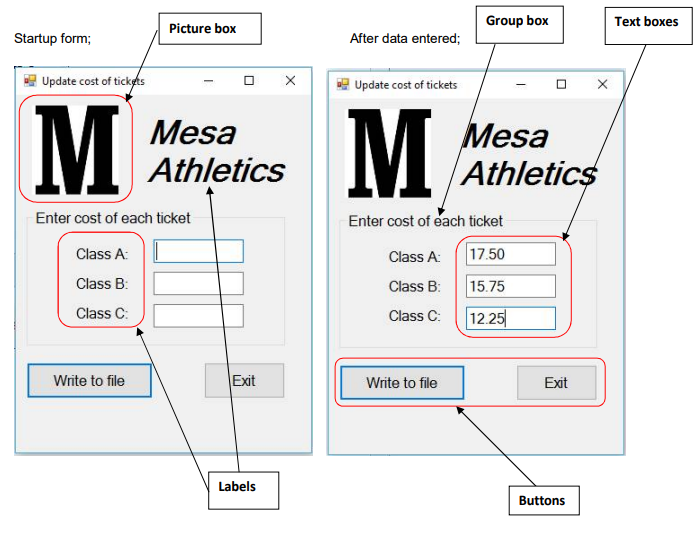
FIX THE application that will write a data file to disk for the Mesa seating Application containing the ticket prices. A notice will display when file has been written to disk. A dollar amount will be entered for each class of tickets, if not a warning message should be displayed and the focus set back to the text box with the bad data. Use nested try/catch to verify the dollar amount entered with a format exception. A generic exception catch will also be used. Use message boxes for all error statements. Use single.parse or decimal.parse for converting amount entered to single or decimal data types. Use saveFileDialog to select folder for writing file. The screens shown below show an example of the application running. The top screen shows the application when it starts. The other screens show the application in various stages of execution. The forms will be centered on the screen when running. Sample text file. 15.75 12.55 9.25
Imports System.IO
Public Class CreateFile Private TicketCostWriter As
Private Sub btnCalculate_Click(sender As Object, e As EventArgs) Handles btnCalculate.Click 'Write cost of tickets to file
Dim sngCostA, sngCostB, sngCostC As Dim strFileName As
Try ' Get the price of tickets to be written to disk. sngCostA = Single.Parse(txtCostA.Text) Try sngCostB = Try sngCostC =
'Select file name for output SaveFileDialog.ShowDialog() strFileName = SaveFileDialog.FileName TicketCostWriter = File.CreateText()
'Write to file TicketCostWriter.WriteLine(sngCostA)
'Close file TicketCostWriter.
'Enable notice of completion lblNotice.
Catch exCostC As FormatException MessageBox.Show("Cost of seats for C must be $ amount i.e. 12.55", "Date Entry Error", MessageBoxButtons.OK, MessageBoxIcon.Exclamation) With txtCostC .Focus() .SelectAll() End With End Try Catch exCostB As FormatException MessageBox.Show("Cost of seats for B must be $ amount i.e. 12.55", "Date Entry Error", MessageBoxButtons.OK, MessageBoxIcon.Exclamation) With txtCostB .Focus() .SelectAll() End With End Try Catch exCostA As FormatException MessageBox.Show("Cost of seats for A must be $ amount i.e. 12.55", "Date Entry Error", MessageBoxButtons.OK, MessageBoxIcon.Exclamation) With txtCostA .Focus() .SelectAll() End With Catch exAnyOther As Exception 'Handles any other exceptions MessageBox.Show(exAnyOther.Message, "Miscellaneous error caught by system", MessageBoxButtons.OKCancel, MessageBoxIcon.Error) End Try End Sub
Private Sub btnExit_Click(sender As Object, e As EventArgs) Handles btnExit.Click ' Close the form and end the application.
Me.Close() End Sub
Private Sub CreateFile_Load(sender As Object, e As EventArgs) Handles MyBase.Load
End Sub End Class
Group box Text boxes Picture box Startup form; After data entered: ??? Update cost of tick update cost of tickets Mesa Athletics esa AthleticS Enter cost of each ticket Class A Class B Class C: Enter cost of each ticket Class A:17.50 Class B: 15.75 Class C: 12.25 Write to file Exit Write to file Exit Labels Buttons
Step by Step Solution
There are 3 Steps involved in it

Get step-by-step solutions from verified subject matter experts
 Study Help