







Question: Flexible Budgets and Standard Cost Systems Using Excel to prepare a flexible budget performance report Pilchuck Company manufactures tote bags and has provided the following
Flexible Budgets and Standard Cost Systems
Using Excel to prepare a flexible budget performance report
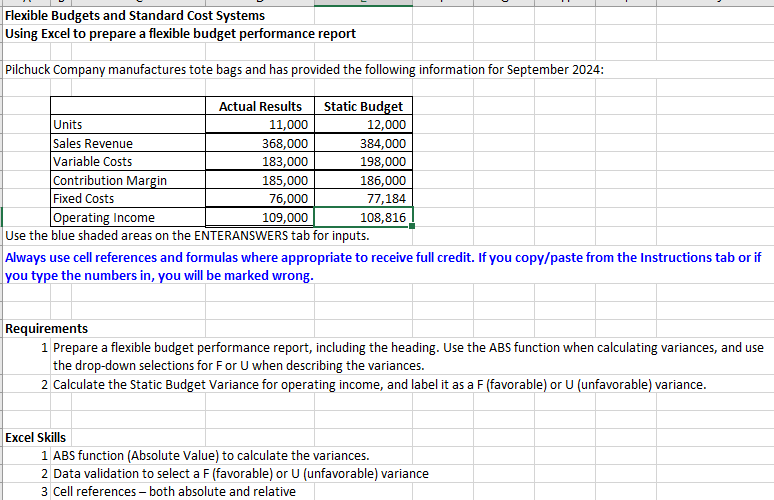
Pilchuck Company manufactures tote bags and has provided the following information for September :
Use the blue shaded areas on the ENTERANSWERS tab for inputs.
Always use cell references and formulas where appropriate to receive full credit. If you copypaste from the Instructions tab or if you type the numbers in you will be marked wrong.
Requirements
Prepare a flexible budget performance report, including the heading. Use the ABS function when calculating variances, and use the dropdown selections for F or U when describing the variances.
Calculate the Static Budget Variance for operating income, and label it as a F favorable or U unfavorable variance. Prepare a flexible budget performance report, including the heading. Use the ABS function when calculating variances, and use the dropdown selections for F or U when describing the variances. Note: start with calculating the budget lamounts, then calculate variances and choose appropriate descriptions of the variances. For variances with a zero amount, make sure to include the result of in the appropriate cell and leave the dropdown to identify the variance as either F or U blank.
Always use cell references and formulas where appropriate to receive full credit. If you copypaste from the Instructions tab or if you type the numbers in you will be marked wrong. Calculate the Static Budget Variance for operating income, and label it as a F favorable or U unfavorable variance.
Always use cell references and formulas where appropriate to receive full credit. If you copypaste from the Instructions tab or if you type the numbers in you will be marked wrong.
HINTS
Cell Hint:
C:C D:D J:J Use cell references to the values in the data table provided at the top of the Instructions worksheet for calculations.
E:E H:H D Use the function ABS to calculate the variances.
F:F I: Do not choose the descriptions and leave cells blank if corresponding variances equalizero.
Step by Step Solution
There are 3 Steps involved in it
1 Expert Approved Answer
Step: 1 Unlock

Question Has Been Solved by an Expert!
Get step-by-step solutions from verified subject matter experts
Step: 2 Unlock
Step: 3 Unlock
 Study Help