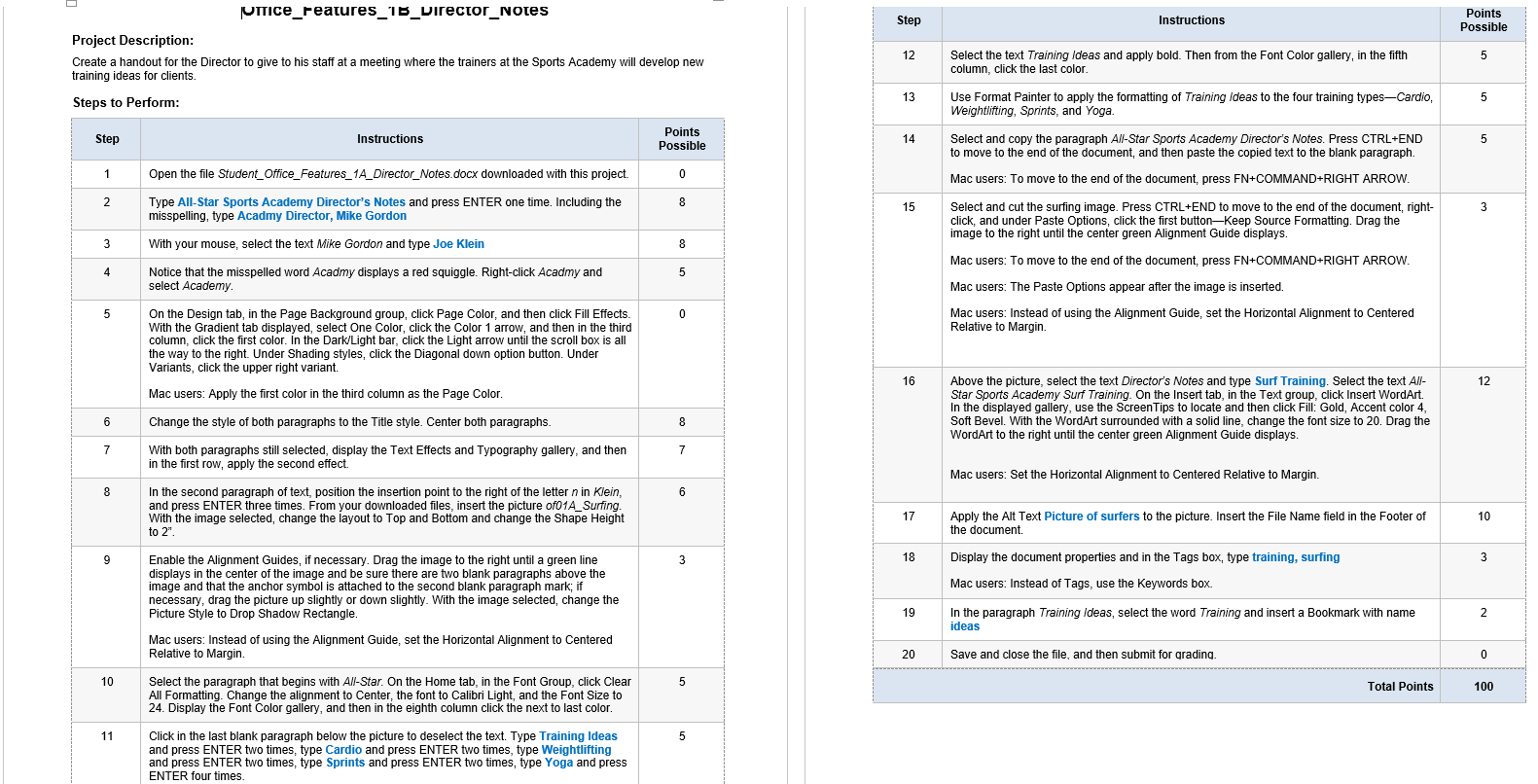
Question: fNOTIce_Features_15_Director_Notes Step Points Instructions Possible Project Description: 12 5 Create a handout for the Director to give to his staff at a meeting where the
\fNOTIce_Features_15_Director_Notes Step Points Instructions Possible Project Description: 12 5 Create a handout for the Director to give to his staff at a meeting where the trainers at the Sports Academy will develop new Select the text Training Ideas and apply bold. Then from the Font Color gallery, in the fifth training ideas for clients column, click the last color. Steps to Perform: 13 Use Format Painter to apply the formatting of Training Ideas to the four training types-Cardio, 5 Weightlifting, Sprints, and Yoga. Step Instructions Points 14 5 Possible Select and copy the paragraph All-Star Sports Academy Director's Notes. Press CTRL+END to move to the end of the document, and then paste the copied text to the blank paragraph. 1 Open the file Student_Office_Features_1A_Director_Notes.docx downloaded with this project. 0 Mac users: To move to the end of the document, press FN+COMMAND+RIGHT ARROW. 2 Type All-Star Sports Academy Director's Notes and press ENTER one time. Including the 8 15 Select and cut the surfing image. Press CTRL+END to move to the end of the document, right- 3 misspelling, type Acadmy Director, Mike Gordon click, and under Paste Options, click the first button-Keep Source Formatting. Drag the image to the right until the center green Alignment Guide displays. 3 With your mouse, select the text Mike Gordon and type Joe Klein 8 Mac users: To move to the end of the document, press FN+COMMAND+RIGHT ARROW. 4 Notice that the misspelled word Acadmy displays a red squiggle. Right-click Acadmy and 5 select Academy. Mac users: The Paste Options appear after the image is inserted. 5 On the Design tab, in the Page Background group, click Page Color, and then click Fill Effects 0 Mac users: Instead of using the Alignment Guide, set the Horizontal Alignment to Centered With the Gradient tab displayed, select One Color, click the Color 1 arrow, and then in the third Relative to Margin column, click the first color. In the Dark/Light bar, click the Light arrow until the scroll box is all the way to the right. Under Shading styles, click the Diagonal down option button. Under Variants, click the upper right variant. 16 Above the picture, select the text Director's Notes and type Surf Training. Select the text All- 12 Mac users: Apply the first color in the third column as the Page Color. Star Sports Academy Surf Training. On the Insert tab, in the Text group, click Insert WordArt. In the displayed gallery, use the Screen Tips to locate and then click Fill: Gold, Accent color 4, 6 Change the style of both paragraphs to the Title style. Center both paragraphs. 8 Soft Bevel. With the WordArt surrounded with a solid line, change the font size to 20. Drag the WordArt to the right until the center green Alignment Guide displays. 7 With both paragraphs still selected, display the Text Effects and Typography gallery, and then 7 in the first row, apply the second effect Mac users: Set the Horizontal Alignment to Centered Relative to Margin. In the second paragraph of text, position the insertion point to the right of the letter n in Klein, 6 and press ENTER three times. From your downloaded files, insert the picture of01A_Surfing. With the image selected, change the layout to Top and Bottom and change the Shape Height 17 Apply the Alt Text Picture of surfers to the picture. Insert the File Name field in the Footer of 10 to 2". the document. Enable the Alignment Guides, if necessary. Drag the image to the right until a green line 3 18 Display the document properties and in the Tags box, type training, surfing 3 displays in the center of the image and be sure there are two blank paragraphs above the image and that the anchor symbol is attached to the second blank paragraph mark; if Mac users: Instead of Tags, use the Keywords box. necessary, drag the picture up slightly or down slightly. With the image selected, change the Picture Style to Drop Shadow Rectangle. 19 In the paragraph Training Ideas, select the word Training and insert a Bookmark with name 2 ideas Mac users: Instead of using the Alignment Guide, set the Horizontal Alignment to Centered Relative to Margin. 20 Save and close the file, and then submit for grading. 0 10 Select the paragraph that begins with A//-Star. On the Home tab, in the Font Group, click Clear 5 Total Points 100 All Formatting. Change the alignment to Center, the font to Calibri Light, and the Font Size to 24. Display the Font Color gallery, and then in the eighth column click the next to last color. 11 Click in the last blank paragraph below the picture to deselect the text. Type Training Ideas 5 and press ENTER two times, type Cardio and press ENTER two times, type Weightlifting and press ENTER two times, type Sprints and press ENTER two times, type Yoga and press ENTER four times
Step by Step Solution
There are 3 Steps involved in it
1 Expert Approved Answer
Step: 1 Unlock
Question Has Been Solved by an Expert!
Get step-by-step solutions from verified subject matter experts
Step: 2 Unlock
Step: 3 Unlock
Students Have Also Explored These Related Business Writing Questions!










 Study Help