







Question: folder called 07.05Assignment in yourModule07assignments folder. Copy yourElectionTesterV1.javaandElectionTesterV2.javafiles to the new folder. Rename V1 to V3 and V2 to V4. Be sure to update the
- folder called07.05Assignmentin yourModule07assignments folder.
- Copy yourElectionTesterV1.javaandElectionTesterV2.javafiles to the new folder. Rename V1 to V3 and V2 to V4. Be sure to update the class statement as well, to reflect the new versions.
- Modify theElectionTesterV3program to include the following:
- a method that will find a particular candidate by name and change the name for that candidate. Its arguments should include the array, a name to find, and the replacement name.
- a method that will find a particular candidate by name and change the number of votes for that candidate. Its arguments should include the array, a name to find, and the replacement votes.
- a method that will find a particular candidate by name and replace both the name and number of votes for that candidate. Its arguments should include the array, a name to find, the replacement name, and the replacement votes.
- Test your program by calling each of the methods. Be sure to print the election results after each change. See the sample output below. Clearly announce the change that should occur so someone reading your output knows which change occurred.
- change a candidate's name
- change a candidate's vote count
- change a candidate by replacing the name and number of votes
- Now modify theElectionTesterV4class that uses an ArrayList to include the same functionality as the array version.
Expected Output:This is a sample of the expected output. The details will vary based on design choices you make while completing the project.
- folder called07.05Assignmentin yourModule07assignments folder.
- Copy yourElectionTesterV1.javaandElectionTesterV2.javafiles to the new folder. Rename V1 to V3 and V2 to V4. Be sure to update the class statement as well, to reflect the new versions.
- Modify theElectionTesterV3program to include the following:
- a method that will find a particular candidate by name and change the name for that candidate. Its arguments should include the array, a name to find, and the replacement name.
- a method that will find a particular candidate by name and change the number of votes for that candidate. Its arguments should include the array, a name to find, and the replacement votes.
- a method that will find a particular candidate by name and replace both the name and number of votes for that candidate. Its arguments should include the array, a name to find, the replacement name, and the replacement votes.
- Test your program by calling each of the methods. Be sure to print the election results after each change. See the sample output below. Clearly announce the change that should occur so someone reading your output knows which change occurred.
- change a candidate's name
- change a candidate's vote count
- change a candidate by replacing the name and number of votes
- Now modify theElectionTesterV4class that uses an ArrayList to include the same functionality as the array version.
Expected Output:This is a sample of the expected output. The details will vary based on design choices you make while completing the project.
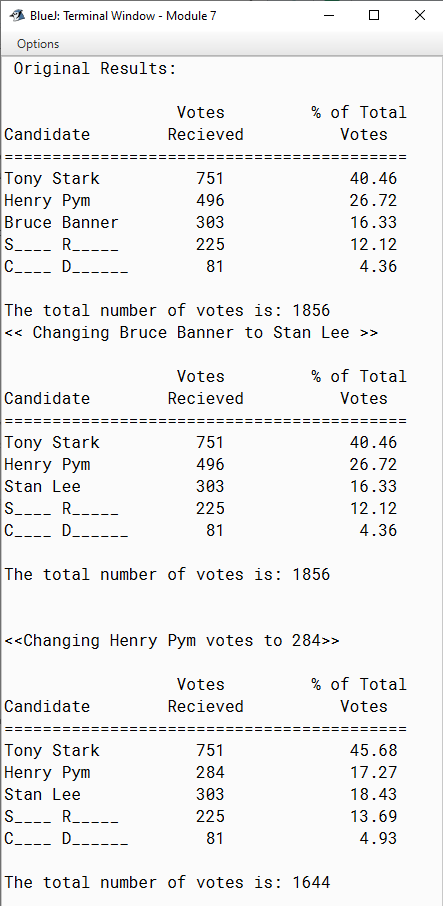
Bluel: Terminal Window - Module 7 0 X Options Original Results: Votes % of Total Candidate Recieved Votes Tony Stark 751 40 . 46 Henry Pym 496 26.72 Bruce Banner 303 16.33 S. R. 225 12 . 12 C. D 81 4.36 The total number of votes is: 1856 > Votes % of Total Candidate Recieved Votes Tony Stark 751 40 . 46 Henry Pym 496 26.72 Stan Lee 303 16.33 S. R. 225 12 . 12 C. D 81 4.36 The total number of votes is: 1856 > Votes % of Total Candidate Recieved Votes SEEE SEES Tony Stark 751 45.68 Henry Pym 284 17.27 Stan Lee 303 18.43 S. R. 225 13.69 C. D 81 4.93 The total number of votes is: 1644
Step by Step Solution
There are 3 Steps involved in it

Get step-by-step solutions from verified subject matter experts
 Study Help