







Question: Follow comments directions. Ignore the code after the comments are wrong. File Edit Selection View Go Run Terminal Help currency.js - Visual Studio Code X
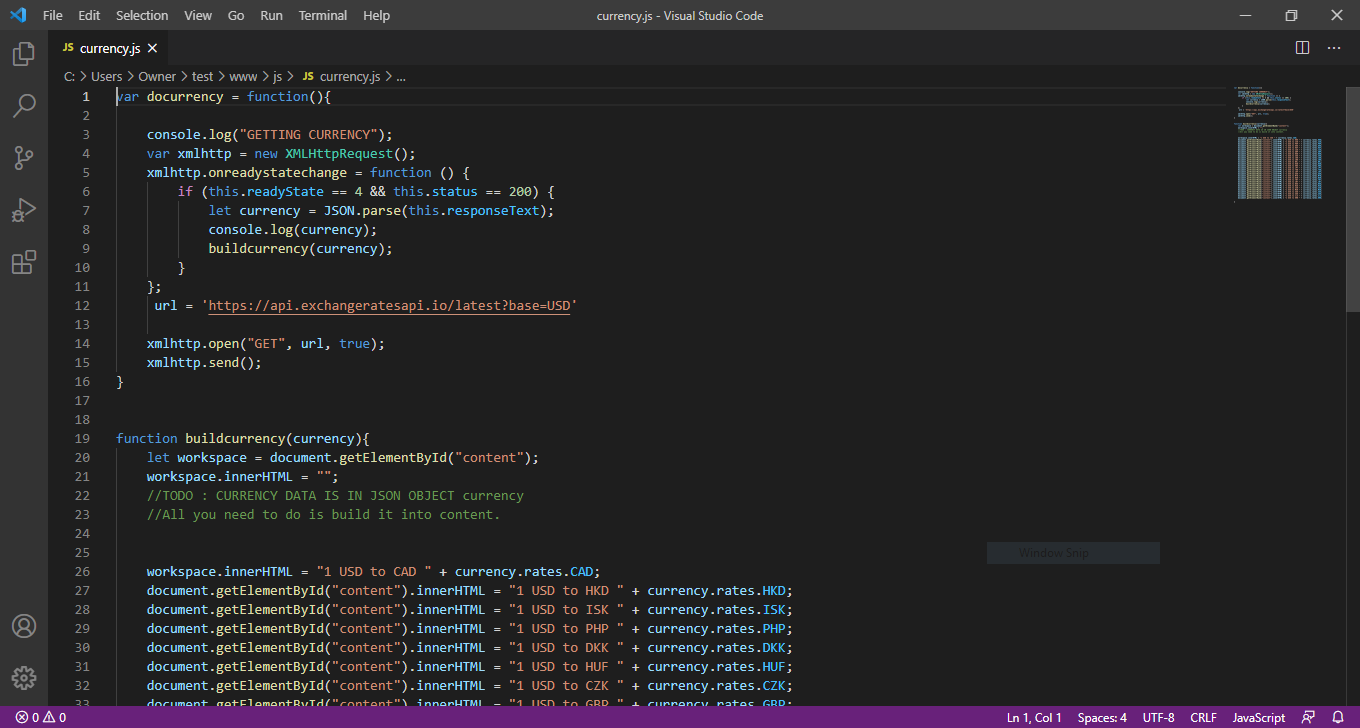 Follow comments directions. Ignore the code after the comments are wrong.
File Edit Selection View Go Run Terminal Help currency.js - Visual Studio Code X JS currency.js X ge Pohy C: > Users > Owner > test > www > js > JS currency.js > ... 1 War docurrency = function(){ 2 3 console.log("GETTING CURRENCY"); 4 var xmlhttp = new XMLHttpRequest(); 5 xmlhttp.onreadystatechange = function () { 6 if (this.readyState == 4 && this.status == 200) { 7 let currency = JSON.parse(this.responseText); 8 console.log(currency); 9 buildcurrency(currency); 10 11 }; 12 url = "https://api.exchangeratesapi.io/latest?base=USD" 13 14 xmlhttp.open("GET", url, true); 15 xmlhttp.send(); 16 } 17 function buildcurrency(currency) { let workspace = document.getElementById("content"); workspace.innerHTML = ""; //TODO : CURRENCY DATA IS IN JSON OBJECT currency //All you need to do is build it into content. 18 19 20 21 22 23 24 25 26 27 28 29 Window Snip workspace.innerHTML = "1 USD to CAD " + currency.rates.CAD; document.getElementById("content").innerHTML = "1 USD to HKD + currency.rates.HKD; document.getElementById("content").innerHTML = "1 USD to ISK " + currency.rates. ISK; document.getElementById("content").innerHTML = "1 USD to PHP + currency.rates.PHP; document.getElementById("content").innerHTML = "1 USD to DKK " + currency.rates.DKK; document.getElementById("content").innerHTML = "1 USD to HUF + currency.rates.HUF; document.getElementById("content").innerHTML = "1 USD to CZK + currency.rates.czK; document notilomantRutd/"content" innerHTML - "1 USD to GRD "I currency ratec GRD. 30 31 32 22 In 1, Col1 Spaces: 4 UTF-8 CRLF JavaScript File Edit Selection View Go Run Terminal Help currency.js - Visual Studio Code X JS currency.js X ge Pohy C: > Users > Owner > test > www > js > JS currency.js > ... 1 War docurrency = function(){ 2 3 console.log("GETTING CURRENCY"); 4 var xmlhttp = new XMLHttpRequest(); 5 xmlhttp.onreadystatechange = function () { 6 if (this.readyState == 4 && this.status == 200) { 7 let currency = JSON.parse(this.responseText); 8 console.log(currency); 9 buildcurrency(currency); 10 11 }; 12 url = "https://api.exchangeratesapi.io/latest?base=USD" 13 14 xmlhttp.open("GET", url, true); 15 xmlhttp.send(); 16 } 17 function buildcurrency(currency) { let workspace = document.getElementById("content"); workspace.innerHTML = ""; //TODO : CURRENCY DATA IS IN JSON OBJECT currency //All you need to do is build it into content. 18 19 20 21 22 23 24 25 26 27 28 29 Window Snip workspace.innerHTML = "1 USD to CAD " + currency.rates.CAD; document.getElementById("content").innerHTML = "1 USD to HKD + currency.rates.HKD; document.getElementById("content").innerHTML = "1 USD to ISK " + currency.rates. ISK; document.getElementById("content").innerHTML = "1 USD to PHP + currency.rates.PHP; document.getElementById("content").innerHTML = "1 USD to DKK " + currency.rates.DKK; document.getElementById("content").innerHTML = "1 USD to HUF + currency.rates.HUF; document.getElementById("content").innerHTML = "1 USD to CZK + currency.rates.czK; document notilomantRutd/"content" innerHTML - "1 USD to GRD "I currency ratec GRD. 30 31 32 22 In 1, Col1 Spaces: 4 UTF-8 CRLF JavaScript
Step by Step Solution
There are 3 Steps involved in it

Get step-by-step solutions from verified subject matter experts
 Study Help