







Question: Follow the instructions to modify the program. 3. Create a new app in Eclipse called PrimeNumber, and create a Java class PrimeNumber.java. 4. Run the
Follow the instructions to modify the program.

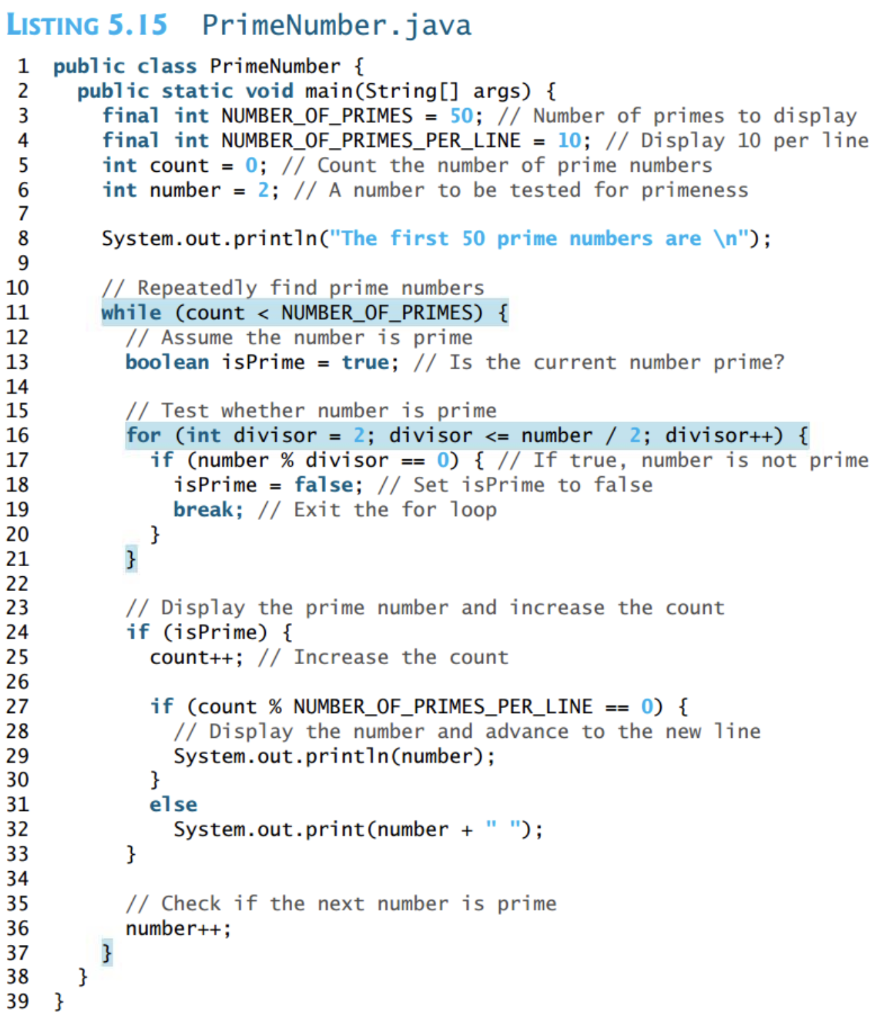
3. Create a new app in Eclipse called PrimeNumber, and create a Java class PrimeNumber.java. 4. Run the app, and find the prime numbers up to 500, then copy into a word document. 5. Changes to the code: The break statement is not part of the AP subset. Make the change to the inside loop that is discussed on page 175. This will remove the break statement. o 6. Run the app again and verify that it still accurately calculates the prime numbers up to 500. LISTING 5.15 PrimeNumber.java 1 public class PrimeNumber { 2 public static void main(String[] args) { 3 final int NUMBER_OF_PRIMES = 50; // Number of primes to display 4 final int NUMBER_OF_PRIMES_PER_LINE = 10; // Display 10 per line 5 int count = 0; // Count the number of prime numbers 6 int number = 2; // A number to be tested for primeness 7 8 System.out.println("The first 50 prime numbers are "); 9 10 // Repeatedly find prime numbers 11 while (count
Step by Step Solution
There are 3 Steps involved in it

Get step-by-step solutions from verified subject matter experts
 Study Help