







Question: Following code of readflag.c : #include #include #include #include #include #include #include int main(int argc, char* argv[]) { int fd; int size = 0; char
![#include int main(int argc, char* argv[]) { int fd; int size =](https://dsd5zvtm8ll6.cloudfront.net/si.experts.images/questions/2024/09/66f39232c2988_70666f3923245532.jpg)
![0; char buf[256]; if(argc != 2) { printf("usage: %s ", argv[0]); exit(1);](https://dsd5zvtm8ll6.cloudfront.net/si.experts.images/questions/2024/09/66f392339d618_70766f392331a6dc.jpg)
Following code of readflag.c :
#include
int main(int argc, char* argv[]) { int fd; int size = 0; char buf[256];
if(argc != 2) { printf("usage: %s
struct stat stat_data; if (stat(argv[1], &stat_data)
if(stat_data.st_uid == 0) { fprintf(stderr, "File %s is owned by root ", argv[1]); exit(1); }
fd = open(argv[1], O_RDONLY); if(fd
do { size = read(fd, buf, 256); write(1, buf, size); } while(size>0);
}
Following code of rename.c :
#define _GNU_SOURCE #include
int main(int argc, char *argv[]) { while (1) { syscall(SYS_renameat2, AT_FDCWD, argv[1], AT_FDCWD, argv[2], RENAME_EXCHANGE); } return 0; }
The following is the content of the flag file :
flag{Gre4t!Y0uC4nSeeM3@1ERG430o_1ab}
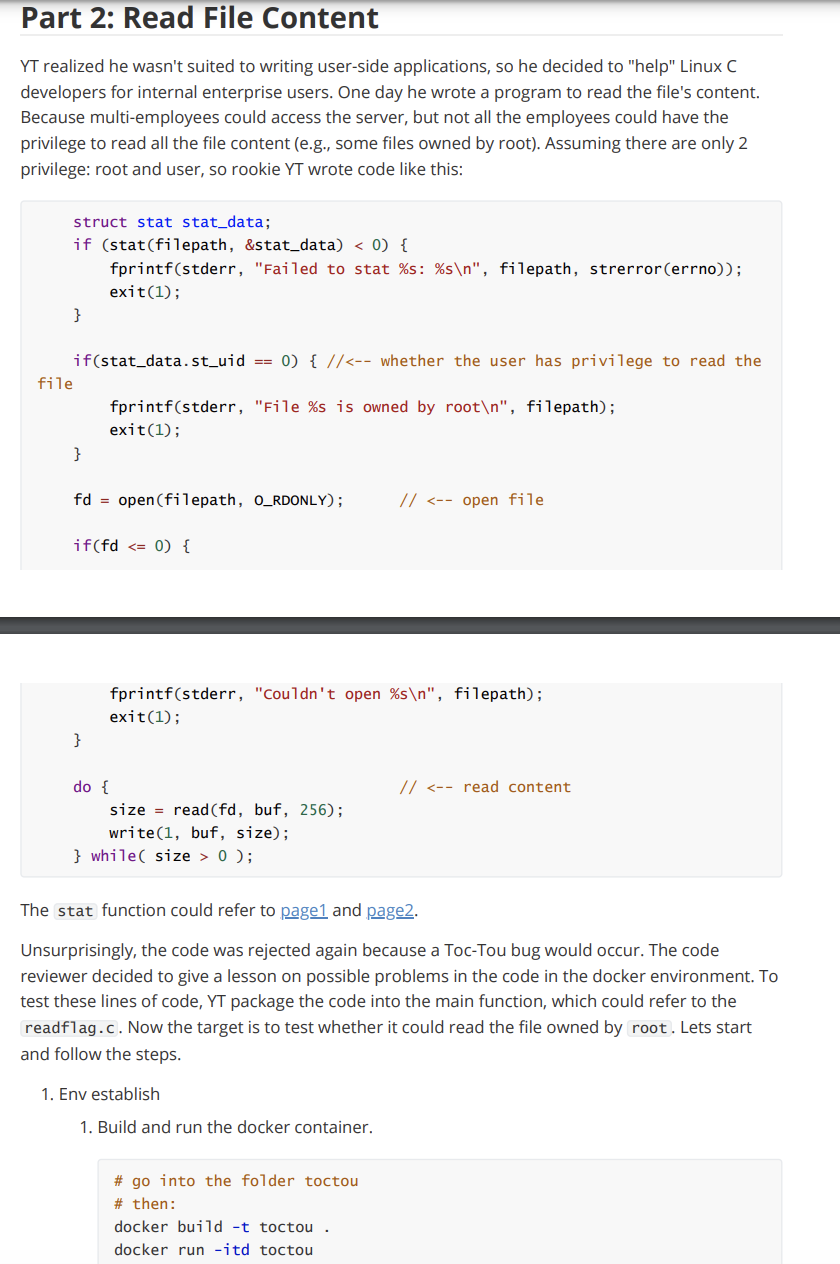
Part 2: Read File Content YT realized he wasn't suited to writing user-side applications, so he decided to "help" Linux C developers for internal enterprise users. One day he wrote a program to read the file's content. Because multi-employees could access the server, but not all the employees could have the privilege to read all the file content (e.g., some files owned by root). Assuming there are only 2 privilege: root and user, so rookie YT wrote code like this: fprintf(stderr, "Couldn't open \%s ", filepath); exit(1); \} do {//0); The stat function could refer to pagen 1 and page2. Unsurprisingly, the code was rejected again because a Toc-Tou bug would occur. The code reviewer decided to give a lesson on possible problems in the code in the docker environment. To test these lines of code, YT package the code into the main function, which could refer to the readflag.c. Now the target is to test whether it could read the file owned by root. Lets start and follow the steps. 1. Env establish 1. Build and run the docker container. \# go into the folder toctou \# then: docker build -t toctou. 2. Check the container ID by docker ps command, copy the container ID 3. Go into the container docker exec -it bash 2. Test the env 1. the flag file is own by the root, it could be check by command: 1s - 1 flag \# output: #rr1 root root 37 Jan 2106:59flag 2. The usage of readflag ./ readflag \# if we use the command: ./readflag flag \# the output should be: File flag is owned by root \# similarly, if we use the command: cat flag \# the output should be: cat: flag: Permission denied That is, we cannot read the file content with the current privilege. 3. Test whether it could get error if using symbolic link \# create symbolic link for the flag file 1n -s flag use_for_sym/flag touch use_for_sym/test_sym \# would be used in the future \# and try to use the ./readflag and cat command again \# the result should be failed So how to trigger the problem? The senior reviewer showed code like this: while (1) \{ sysca11(SYS_renameat2, AT_FDCWD, argv[1], AT_FDCWD, argv[2], RENAME_EXCHANGE); \} Note that the code is specific to the Linux platform. The code above is to change the two file name. That is, for file names arg[1] and arg[2], this line would exchange the name (symbolic to change the file name. The preparation is done. Now we start hacking. \# first, use rename to auto exchange the file names (run at the backend) ./rename use_for_sym/flag use_for_sym/test_sym \& \# second, use the./readflag to see the content ./readflag use_for_sym/flag \# the line should run several time to see the result \# the result is start with "flag { " The final result should be like this: Task 2.1: [0.5pt] please finish the experiment and print the flag Task 2.2: [0.5pt] please answer which line is "Time-of-check" and which is "Time-of-use"? Task 2.3: [0.5pt] please describe the attack process (why this attack happen) Task 2.4: [0.5pt] please explain the functionality of and commands in the
Step by Step Solution
There are 3 Steps involved in it

Get step-by-step solutions from verified subject matter experts
 Study Help