



Question: Font INFO 1110:WINDOWS OPERATING SYSTEMS I INTRODUCTION In this project, you will work with relative paths to navigate around the Wndows file system Use the
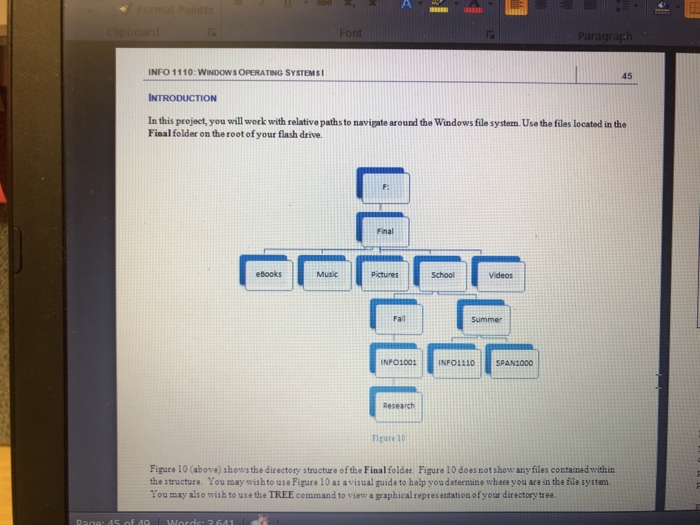
Font INFO 1110:WINDOWS OPERATING SYSTEMS I INTRODUCTION In this project, you will work with relative paths to navigate around the Wndows file system Use the files located in the 45 Final folder on the root of your flash drive. Final Music Pictures INFO1001 INF01110 SPANT000 Research Figure 10 Figure 10 (above) shows the directory structure of the Final folder Figure 10 does not show anyfiles containad withiu the structure. You may wishto use Figure 10 as avisual guide to help you determine where you are in the file system You may also wish to use the TREE command to view a graphical representation of your directory tree Font INFO 1110:WINDOWS OPERATING SYSTEMS I INTRODUCTION In this project, you will work with relative paths to navigate around the Wndows file system Use the files located in the 45 Final folder on the root of your flash drive. Final Music Pictures INFO1001 INF01110 SPANT000 Research Figure 10 Figure 10 (above) shows the directory structure of the Final folder Figure 10 does not show anyfiles containad withiu the structure. You may wishto use Figure 10 as avisual guide to help you determine where you are in the file system You may also wish to use the TREE command to view a graphical representation of your directory tree
Step by Step Solution
There are 3 Steps involved in it

Get step-by-step solutions from verified subject matter experts