







Question: For comparisons sake, lets use this same query for each of the ranking functions. Add the bolded statements listed in the following code segment to
For comparison’s sake, let’s use this same query for each of the ranking functions. Add the bolded statements listed in the following code segment to your previous code and execute it.
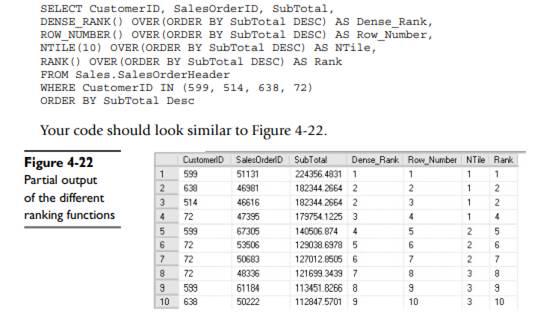
SELECT CustomerID, SalesOrderID, SubTotal, DENSE RANK () OVER (ORDER BY SubTotal DESC) AS Dense_Rank, ROW NUMBER() OVER (ORDER BY SubTotal DESC) AS Row_Number, NTILE (10) OVER (ORDER BY SubTotal DESC) AS NTile, RANK() OVER (ORDER BY SubTotal DESC) AS Rank FROM Sales. SalesOrderHeader WHERE CustomerID IN (599, 514, 638, 72) ORDER BY SubTotal Desc. Your code should look similar to Figure 4-22. Figure 4-22 CustomerID SalesOrder D SubTotal Dense Rank Row Number NTile Rank 1 599 51131 224356 4831 1 1 1 1 Partial output 2 630 46981 182344 2664 2 2 1 2 of the different 3 514 46616 182344 2664 2 3 1 2 ranking functions 4 72 47395 179754 1225 3 4 1 4 5 599 67305 140506.874 4 5 2 5 6 72 53506 129038.6978 5 6 2 6 7 72 50683 127012.8505 6 7 2 7 8 72 48336 121699.3439 7 8 3 8 9 599 61184 113451.8266 8 g 3 g 10 638 50222 112847.5701 9 10 3 10
Step by Step Solution
There are 3 Steps involved in it

Get step-by-step solutions from verified subject matter experts
 Study Help