







Question: For database applications course 2.10 LAB - Implement independent entity (Sakila) Implement a new independent entity phone in the Sakila database. Attributes and relationships are
For database applications course
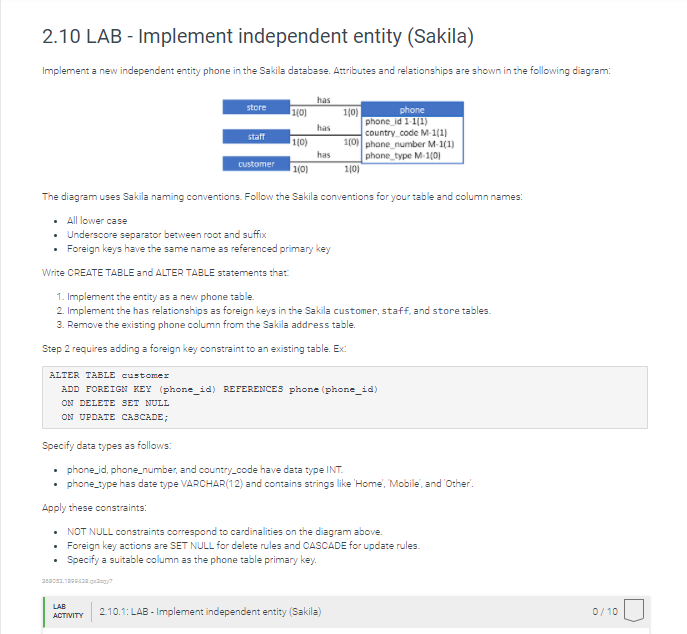
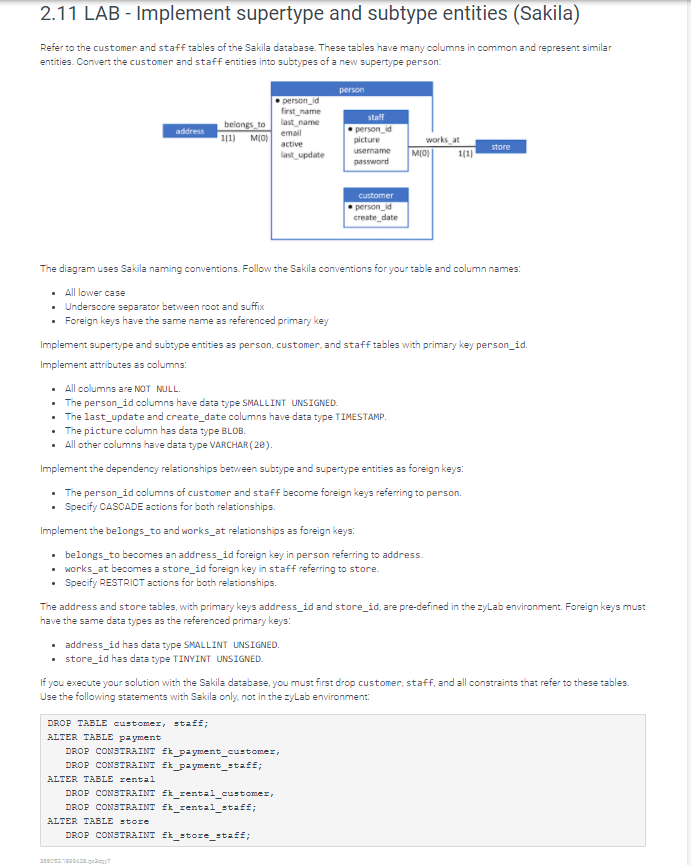
2.10 LAB - Implement independent entity (Sakila) Implement a new independent entity phone in the Sakila database. Attributes and relationships are shown in the following diagram: has store 11/01 1101 has staff 110) phone phone_id 1 1/1) country code M-1111 100) phone number M-1(1) phone_type M-101 110) has customer 110) The diagram uses Sakila naming conventions. Follow the Sakila conventions for your table and column names: All lower case Underscore separator between root and suffix Foreign keys have the same name as referenced primary key Write CREATE TABLE and ALTER TABLE statements that 1. Implement the entity as a new phone table 2. Implement the has relationships as foreign keys in the Sakila customer, staff, and store tables. 3. Remove the existing phone column from the Sakila address table. Step 2 requires adding a foreign key constraint to an existing table. Ex: a ALTER TABLE customer ADD FOREIGN KEY (phone_id) REFERENCES phone (phone_id) ON DELETE SET NULL ON UPDATE CASCADE; Specify data types as follows: phone_id, phone number, and country_code have data type INT. phone_type has date type VARCHAR(12) and contains strings like 'Home, Mobile and Other Apply these constraints: NOT NULL constraints correspond to cardinalities on the diagram above. Foreign key actions are SET NULL for delete rules and CASCADE for update rules. Specify a suitable column as the phone table primary key. 202.18 LAB ACTIVITY 2.10.1: LAB - Implement independent entity (Sakila) 0/10 2.11 LAB - Implement supertype and subtype entities (Sakila) Refer to the customer and staff tables of the Sakila database. These tables have many columns in common and represent similar entities. Convert the customer and staff entities into subtypes of a new supertype person: person address person_id first_name belongs to last_name 111) MIO) email active last update staff person_id picture username password works at MO) 1/11 store customer person_id create date The diagram uses Sakila naming conventions. Follow the Sakila conventions for your table and column names: . All lower case Underscore separator between root and suffix Foreign keys have the same name as referenced primary key Implement supertype and subtype entities as person, customer and staff tables with primary key person_id. Implement attributes as columns All columns are NOT NULL The person_id columns have data type SMALLINT UNSIGNED. The last_update and create_date columns have data type TIMESTAMP. The picture column has data type BLOB. All other columns have data type VARCHAR (20). Implement the dependency relationships between subtype and supertype entities as foreign keys: The person_id columns of customer and staff become foreign keys referring to person. Specify CASCADE actions for both relationships. Implement the belongs to and works_at relationships as foreign keys: belongs_to becomes an address_id foreign key in person referring to address. works_at becomes a store_id foreign key in staff referring to store. Specify RESTRICT actions for both relationships. The address and store tables, with primary keys address_id and store_id, are pre-defined in the zyLab environment. Foreign keys must have the same data types as the referenced primary keys: address_id has data type SMALLINT UNSIGNED. store_id has data type TINYINT UNSIGNED. If you execute your solution with the Sakila database, you must first drop customer, staff, and all constraints that refer to these tables. Use the following statements with Sakila only, not in the zyLab environment: DROP TABLE customer, sta; ALTER TABLE payment DROP CONSTRAINT Ek_payment_customer, DROP CONSTRAINT Ek_payment_stat; ALTER TABLE rental DROP CONSTRAINT Ek_rental_customer, DROP CONSTRAINT Ek_rental_staff; ALTER TABLE store DROP CONSTRAINT Ek_store_stat; 202.1990
Step by Step Solution
There are 3 Steps involved in it

Get step-by-step solutions from verified subject matter experts
 Study Help