







Question: For each information request below, formulate a single SQL query to produce the required information. In each case, you should display only the columns requested.
For each information request below, formulate a single SQL query to produce the required information. In each case, you should display only the columns requested. Be sure that your queries do not produce duplicate records unless otherwise directed.
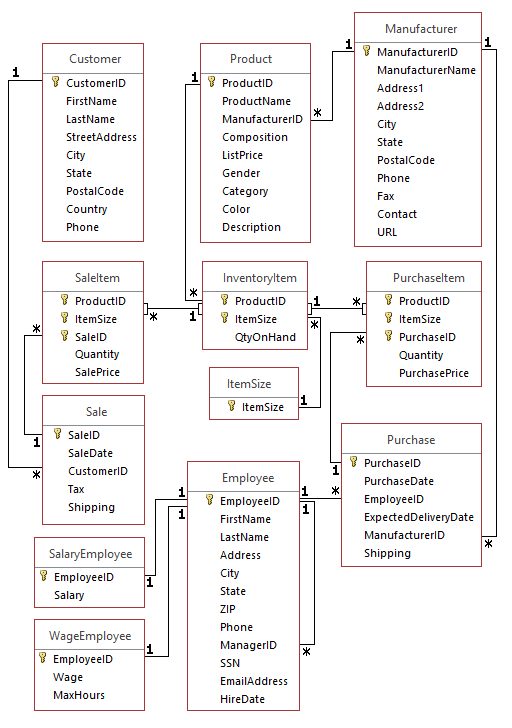
1.
Show customers (CustomerID, FirstName, LastName, city) from Oregon and sales (SaleID, SaleDate) to those customers. Include customers with no sales. Sort the data by CustomerID.
2.
Show Customers (CustomerID, firstname, lastname) from Oregon and the number of sales for each customer. Include customers with no sales. Name the Count column "NoOfSales". Sort the data ascending by the number of sales.
3.
List Inventory Items (show ProductID and ItemSize) and the Sales Items (SaleID and Quantity) for each Inventory Item. Sort by productID. Only include inventory items that have a QtyOnHand greater than 40. Sort the output data by ProductID. (Do not need to show QtyOnHand in the results.) Include all Inventory Items, even those that have not been sold on a sale item. (Hint: To join tables use all the common key fields.)
4.
List Inventory Items (show ProductID and ItemSize) and the number (count the SaleID) of Sale Items for each inventory item. Name the count NoOfSales. Include Inventory Items that have not been sold. Also only include inventory items that have a QtyOnHand greater than 40. Sort the output by NoOfSales. (Hint: To join tables use all the common key fields.)
5.
List Products (ProductID and ProductName) whose list price is greater than 100 and how many sales (count SaleID in SaleItem) there are for each product. Also include those that have not been sold. Sort the output data by the number of sale items; name the column NoOfSales.
6.
How many times has has each product in the "flats" category been purchased? Include those items that have never been purchased. Show ProductName and ProductID. Sort the data by the number of purchases.
7.
List all manufacturers (ID and name) and the number of purchases made from that manufacturer. Include manufacturers where no purchases have been made. Sort the output data by the number of purchases. Name that column NoOfPurchases.
Customer CustomerID FirstName LastName StreetAddress City State PostalCode Country Phone Product ProductID ProductName ManufacturerlD Composition ListPrice Gender Category Color Description Manufacturer ManufacturerID ManufacturerName Address Address2 City State PostalCode Phone Contact URL Saleltem ProductID ItemSize Sale!D Quantity SalePrice Inventoryltem Purchaseltem ProductID ItemSize PuchaseID Quantity PurchasePrice ProductID ItemSize QtyOnHand ItemSize ItemSize Sale SalelD SaleDate CustomerlD Purchase Employee EmployeelD FirstName LastName Address City State PurchaselD PurchaseDate EmployeelD ExpectedDeliveryDate ManufacturerlD Shipping ax Shipping SalaryEmployee EmployeelD Salary WageEmployee EmployeelD Wage MaxHours Phone ManagerlD SSN EmailAddress HireDate Customer CustomerID FirstName LastName StreetAddress City State PostalCode Country Phone Product ProductID ProductName ManufacturerlD Composition ListPrice Gender Category Color Description Manufacturer ManufacturerID ManufacturerName Address Address2 City State PostalCode Phone Contact URL Saleltem ProductID ItemSize Sale!D Quantity SalePrice Inventoryltem Purchaseltem ProductID ItemSize PuchaseID Quantity PurchasePrice ProductID ItemSize QtyOnHand ItemSize ItemSize Sale SalelD SaleDate CustomerlD Purchase Employee EmployeelD FirstName LastName Address City State PurchaselD PurchaseDate EmployeelD ExpectedDeliveryDate ManufacturerlD Shipping ax Shipping SalaryEmployee EmployeelD Salary WageEmployee EmployeelD Wage MaxHours Phone ManagerlD SSN EmailAddress HireDate
Step by Step Solution
There are 3 Steps involved in it

Get step-by-step solutions from verified subject matter experts
 Study Help