







Question: For each of the queries specified below, write the corresponding SQL code in a Word file or PDF (you can test your SQL code in
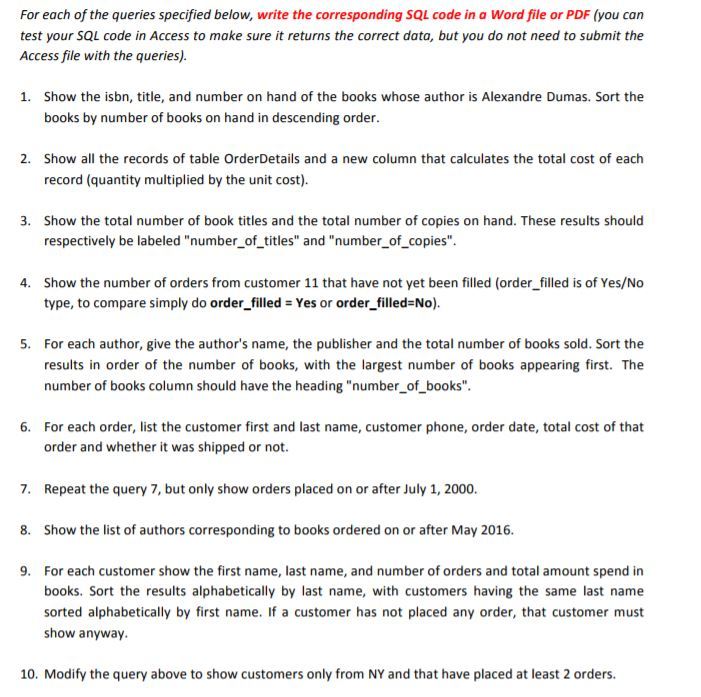
For each of the queries specified below, write the corresponding SQL code in a Word file or PDF (you can test your SQL code in Access to make sure it returns the correct data, but you do not need to submit the Access file with the queries) Show the isbn, title, and number on hand of the books whose author is Alexandre Dumas. Sort the books by number of books on hand in descending order. 1. 2. Show all the records of table OrderDetails and a new column that calculates the total cost of each record (quantity multiplied by the unit cost) Show the total number of book titles and the total number of copies on hand. These results should respectively be labeled "number_of_titles" and "number of copies" 3. Show the number of orders from customer 11 that have not yet been filled (order filled is of Yes/No type, to compare simply do order_filled Yes or order_filled-No). 4. For each author, give the author's name, the publisher and the total number of books sold. Sort the results in order of the number of books, with the largest number of books appearing first. The number of books column should have the heading "number_of books". 5. For each order, list the customer first and last name, customer phone, order date, total cost of that order and whether it was shipped or not. 6. 7. Repeat the query 7, but only show orders placed on or after July 1, 2000. 8. Show the list of authors corresponding to books ordered on or after May 2016 9. For each customer show the first name, last name, and number of orders and total amount spend in books. Sort the results alphabetically by last name, with customers having the same last name sorted alphabetically by first name. If a customer has not placed any order, that customer must show anyway. 10. Modify the query above to show customers only from NY and that have placed at least 2 orders. For each of the queries specified below, write the corresponding SQL code in a Word file or PDF (you can test your SQL code in Access to make sure it returns the correct data, but you do not need to submit the Access file with the queries) Show the isbn, title, and number on hand of the books whose author is Alexandre Dumas. Sort the books by number of books on hand in descending order. 1. 2. Show all the records of table OrderDetails and a new column that calculates the total cost of each record (quantity multiplied by the unit cost) Show the total number of book titles and the total number of copies on hand. These results should respectively be labeled "number_of_titles" and "number of copies" 3. Show the number of orders from customer 11 that have not yet been filled (order filled is of Yes/No type, to compare simply do order_filled Yes or order_filled-No). 4. For each author, give the author's name, the publisher and the total number of books sold. Sort the results in order of the number of books, with the largest number of books appearing first. The number of books column should have the heading "number_of books". 5. For each order, list the customer first and last name, customer phone, order date, total cost of that order and whether it was shipped or not. 6. 7. Repeat the query 7, but only show orders placed on or after July 1, 2000. 8. Show the list of authors corresponding to books ordered on or after May 2016 9. For each customer show the first name, last name, and number of orders and total amount spend in books. Sort the results alphabetically by last name, with customers having the same last name sorted alphabetically by first name. If a customer has not placed any order, that customer must show anyway. 10. Modify the query above to show customers only from NY and that have placed at least 2 orders
Step by Step Solution
There are 3 Steps involved in it

Get step-by-step solutions from verified subject matter experts
 Study Help