







Question: For EACH use cases below, create Fully Developed Use Case Descriptions for EACH of them. Use Case Name Actors Brief Use Case Description Record new
For EACH use cases below, create "Fully Developed Use Case Descriptions" for EACH of them.
| Use Case Name | Actors | Brief Use Case Description |
| Record new ticket | Officer | A clerk will enter the data recorded on a paper ticket which has been sent in from the officer. |
| Record fine payment | Driver | A clerk will enter the data from the payment sent in by the driver. |
| Process trial request | Driver | A clerk will enter the data from the trial request checkbox and the envelope sent in by the driver. The system must generate a trial request and send it to the court system. It also produces a questionnaire for the driver. |
| Record verdict | Court | The system records the verdict information sent by the court system. |
| Produce warrant request | Court | After two weeks, the system produces a warrant request to be sent to the court. |
The Fully Developed Use Case Descriptions may look like this.
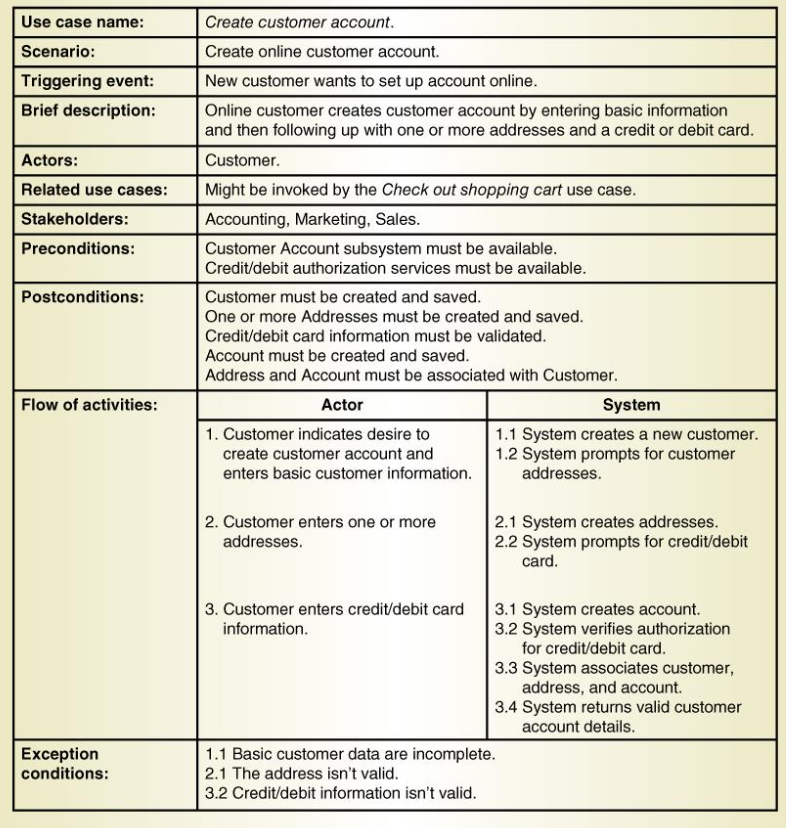
Use case name: Create customer account. Scenario: Triggering event: Brief description: Actors: Related use cases: Stakeholders: Preconditions: Create online customer account. New customer wants to set up account online. Online customer creates customer account by entering basic information and then following up with one or more addresses and a credit or debit card. Customer. Might be invoked by the Check out shopping cart use case. Accounting, Marketing, Sales. Customer Account subsystem must be available. Credit/debit authorization services must be available. Customer must be created and saved. One or more Addresses must be created and saved. Credit/debit card information must be validated. Account must be created and saved. Address and Account must be associated with Customer. Actor System 1. Customer indicates desire to 1.1 System creates a new customer. create customer account and 1.2 System prompts for customer enters basic customer information. addresses. Postconditions: Flow of activities: 2. Customer enters one or more addresses 2.1 System creates addresses. 2.2 System prompts for credit/debit card. 3. Customer enters credit/debit card 3.1 System creates account. information. 3.2 System verifies authorization for credit/debit card. 3.3 System associates customer, address, and account. 3.4 System returns valid customer account details. 1.1 Basic customer data are incomplete. 2.1 The address isn't valid. 3.2 Credit/debit information isn't valid. Exception conditions: Use case name: Create customer account. Scenario: Triggering event: Brief description: Actors: Related use cases: Stakeholders: Preconditions: Create online customer account. New customer wants to set up account online. Online customer creates customer account by entering basic information and then following up with one or more addresses and a credit or debit card. Customer. Might be invoked by the Check out shopping cart use case. Accounting, Marketing, Sales. Customer Account subsystem must be available. Credit/debit authorization services must be available. Customer must be created and saved. One or more Addresses must be created and saved. Credit/debit card information must be validated. Account must be created and saved. Address and Account must be associated with Customer. Actor System 1. Customer indicates desire to 1.1 System creates a new customer. create customer account and 1.2 System prompts for customer enters basic customer information. addresses. Postconditions: Flow of activities: 2. Customer enters one or more addresses 2.1 System creates addresses. 2.2 System prompts for credit/debit card. 3. Customer enters credit/debit card 3.1 System creates account. information. 3.2 System verifies authorization for credit/debit card. 3.3 System associates customer, address, and account. 3.4 System returns valid customer account details. 1.1 Basic customer data are incomplete. 2.1 The address isn't valid. 3.2 Credit/debit information isn't valid. Exception conditions
Step by Step Solution
There are 3 Steps involved in it

Get step-by-step solutions from verified subject matter experts
 Study Help