







Question: For Image 1 write out the HTML, and for image 2 write out the CSS, follow the instructions in the 3rd picture for the CSS
For Image 1 write out the HTML, and for image 2 write out the CSS, follow the instructions in the 3rd picture for the CSS code 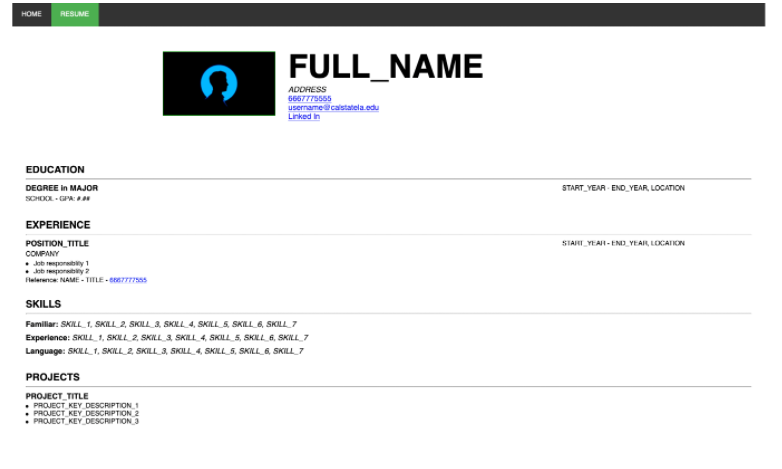
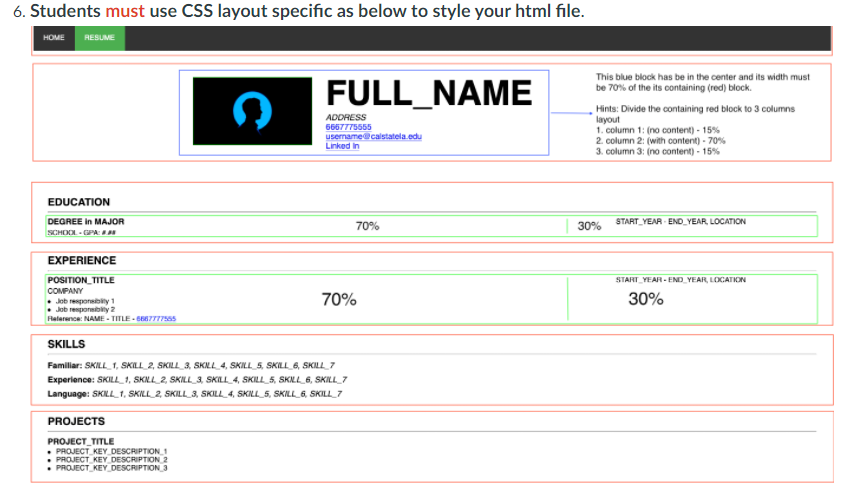
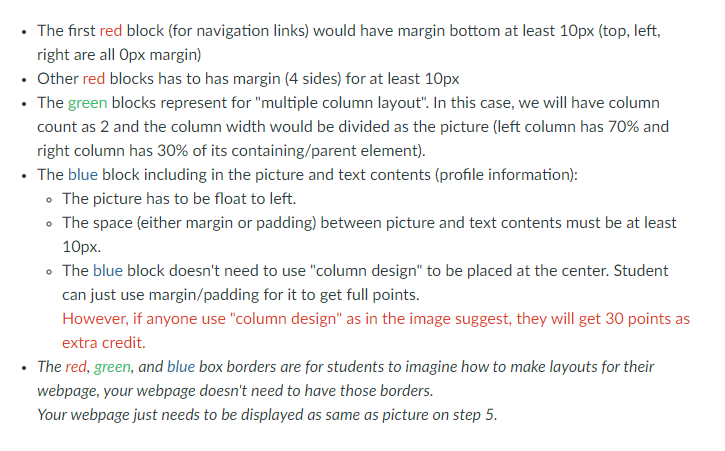
HOME RESUME FULL_NAME ADDRESS 6667775565 username castatela.edu LinkedIn EDUCATION DEGREE IN MAJOR SCHOOL.GPA: START_YEAR - END_YEAR, LOCATION EXPERIENCE START YEAR-END YEAR, LOCANON POSITION_TITLE COMPANY Job posby 1 Jobby? Relea: NAME - TITLE. STI755 SKILLS Famillar: SKILL 1. SKILL 2, SKILL 3, SKIL_4. SKILLS, SKILL_6.SKILL 7 Experience: SKILL 1. SKL 2. SKAL SKILL 4. SKILL 5, SKILL 6, SKAL 7 Language: SKILL 1. SKL 2. SKILL_3, SKILL_4. SKILLS. SKAL SKILL 7 PROJECTS PROJECT TITLE PROJECT KEY DESCRIPTION 1 PROJECT KEY DESCRIPTION 2 PROJECT KEY DESCRIPTION 3 6. Students must use CSS layout specific as below to style your html file. HOME RESUME FULL_NAME ADDRESS 6667775555 username@calstatela.edu LinkedIn This blue block has be in the center and its width must be 70% of the its containing (red) block. Hints: Divide the containing red block to 3 columns layout 1. column 1:(no content) - 15% 2 column 2 (with content) - 70% 3. column 3: (no content) - 15% EDUCATION DEGREE in MAJOR SCHOOL-GPA: 70% START_YEAR END YEAR, LOCATION 30% START YEAR-END YEAR, LOCATION EXPERIENCE POSITION_TITLE COMPANY Job respoty Job respon 2 Relerse: NAME -TITLE-6667777565 70% 30% SKILLS Familiar: SKILL_1, SKILL 2, SKILL_3. SKAL_4, SKILL_5. SKILL_6, SKILL 7 Experience: SKILL_1, SKAL 2. SKILL 3. SKILL_4, SKILL_5. SKALL_6, SKILL_7 Language: SKUL_1. SKULL_2 SKILL_3, SKILL_4. SKILL_5, SKILL_6, SKILL_7 PROJECTS PROJECT TITLE PROJECT KEY DESCRIPTION 1 PROJECT KEY DESCRIPTION 2 PROJECT_KEY_DESCRIPTION 3 The first red block (for navigation links) would have margin bottom at least 10px (top, left, right are all Opx margin) Other red blocks has to has margin (4 sides) for at least 10px The green blocks represent for "multiple column layout". In this case, we will have column count as 2 and the column width would be divided as the picture (left column has 70% and right column has 30% of its containing/parent element). The blue block including in the picture and text contents (profile information): The picture has to be float to left. The space (either margin or padding) between picture and text contents must be at least 10px. - The blue block doesn't need to use "column design" to be placed at the center. Student can just use margin/padding for it to get full points. However, if anyone use "column design" as in the image suggest, they will get 30 points as extra credit. The red, green, and blue box borders are for students to imagine how to make layouts for their webpage, your webpage doesn't need to have those borders. Your webpage just needs to be displayed as same as picture on step 5. o
Step by Step Solution
There are 3 Steps involved in it

Get step-by-step solutions from verified subject matter experts
 Study Help