







Question: for my java hw, I made a source code using Array. However when I run the program, I want it to display the areas where
for my java hw, I made a source code using Array. However when I run the program, I want it to display the areas where it is blank to be "0" instead in my rows and colums. here is my code:
public class ArrayTest { public static void printColumnHeading(int[][] arr, int maxColumnSize) { //then, print the column headings (based on the value of the longest row) for (int columnTemp = 0; columnTemp i) sum = sum + arr[i][column]; } System.out.printf("\t%.2f", sum/arr.length); } } public static float average (int [] arr) { float sum=arr[0]; for (int temp=1; temp
} //end
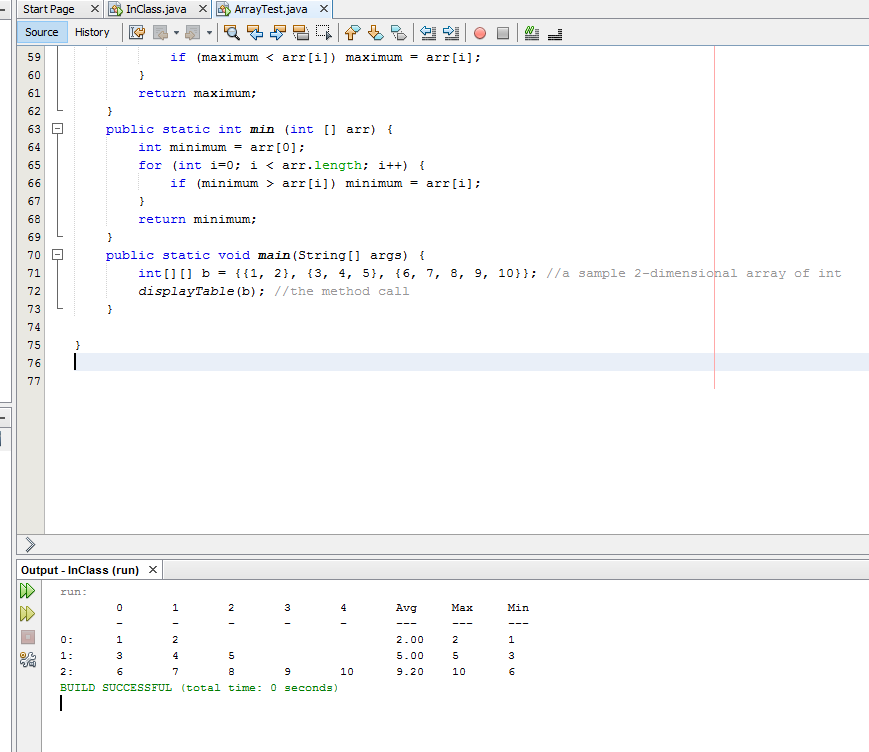
here is the screenshot of my output. For the area in my rows which are blank, how do i make those into "zeroes". I want it to say:
1 2 0 0 0
3 4 5 0 0
6 7 8 9 10
thanks!
Start Page XInClass.java X ArrayTest.java X if (maximum arr [1]) minimum= arr [1]; return minimum; 68 69 70 71 72 73 74 75 76 public static void main (String [] args) i 2-dimensional array of int 7, 8, 9, 10}}; //a sample int [ ] [] b= {{1, 2), {3, 4, 5), {6, displayTable (b) //the method call Output InClass (run) X Avg 2.00 5.00 9.20 10 10 BUILD SUCCESSFUL (total time: 0 seconds)
Step by Step Solution
There are 3 Steps involved in it

Get step-by-step solutions from verified subject matter experts
 Study Help