







Question: For problem #4, I a walkthrough in knowing how to do the questions that are asked as I have been spending almost 6 hours on
For problem #4, I a walkthrough in knowing how to do the questions that are asked as I have been spending almost 6 hours on this one problem and haven't been able to complete this problem
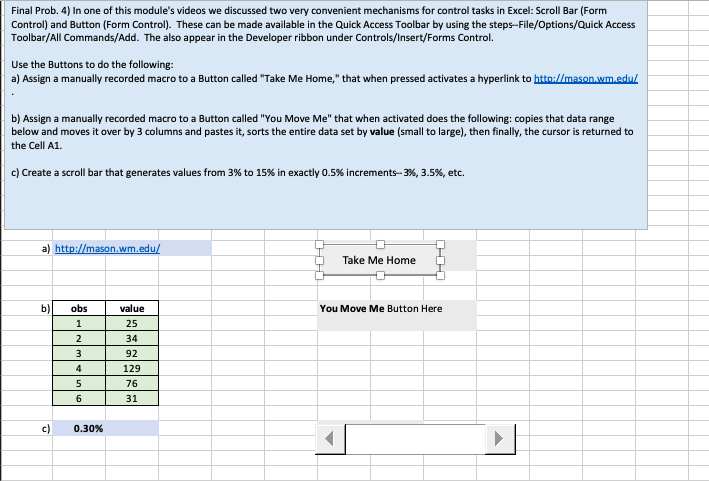
Final Prob. 4) In one of this module's videos we discussed two very convenient mechanisms for control tasks in Excel: Scroll Bar (Form Control) and Button (Form Control). These can be made available in the Quick Access Toolbar by using the steps-File/Options/Quick Access Toolbar/All Commands/Add. The also appear in the Developer ribbon under Controls/Insert/Forms Control. Use the Buttons to do the following: a) Assign a manually recorded macro to a Button called "Take Me Home," that when pressed activates a hyperlink to htto://mason.wm.edu b) Assign a manually recorded macro to a Button called "You Move Me" that when activated does the following: copies that data range below and moves it over by 3 columns and pastes it, sorts the entire data set by value (small to large), then finally, the cursor is returned to the Cell A1 c) Create a scroll bar that generates values from 3% to 15 % in exactly 0.5 % increments-3% , 3.5 % , etc. a) http://mason.wm.edu/ Take Me Home ) obs value You Move Me Button Here 1 25 2 34 3 92 4 129 5 76 6 31 0.30 % c) Final Prob. 4) In one of this module's videos we discussed two very convenient mechanisms for control tasks in Excel: Scroll Bar (Form Control) and Button (Form Control). These can be made available in the Quick Access Toolbar by using the steps-File/Options/Quick Access Toolbar/All Commands/Add. The also appear in the Developer ribbon under Controls/Insert/Forms Control. Use the Buttons to do the following: a) Assign a manually recorded macro to a Button called "Take Me Home," that when pressed activates a hyperlink to htto://mason.wm.edu b) Assign a manually recorded macro to a Button called "You Move Me" that when activated does the following: copies that data range below and moves it over by 3 columns and pastes it, sorts the entire data set by value (small to large), then finally, the cursor is returned to the Cell A1 c) Create a scroll bar that generates values from 3% to 15 % in exactly 0.5 % increments-3% , 3.5 % , etc. a) http://mason.wm.edu/ Take Me Home ) obs value You Move Me Button Here 1 25 2 34 3 92 4 129 5 76 6 31 0.30 % c)
Step by Step Solution
There are 3 Steps involved in it

Get step-by-step solutions from verified subject matter experts
 Study Help