







Question: For QUESTION 2, please create a class, name it as Program. Then add a main method to this class. Finally, create an object of class
For QUESTION 2, please create a class, name it as "Program". Then add a main method to this class. Finally, create an object of class Rect which is defined in QUESTION 1 in the main method, and call its methods.
As an example, see the following code:
class Program{
public static void main (String[] args){
Rect r = new Rect();
r.getArea();
}
}
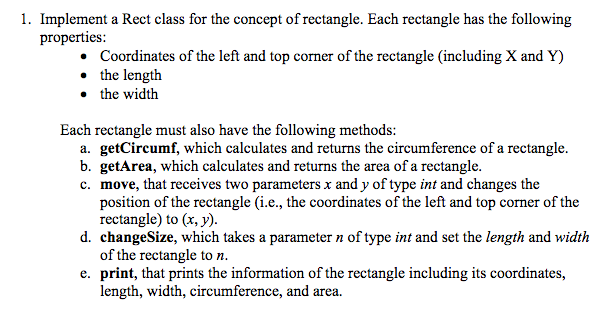
Below the QUESTION 1. Here is a code for question 1 and want is prints out
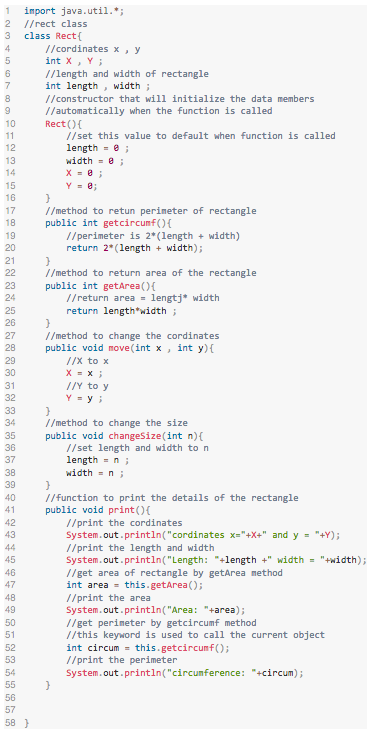
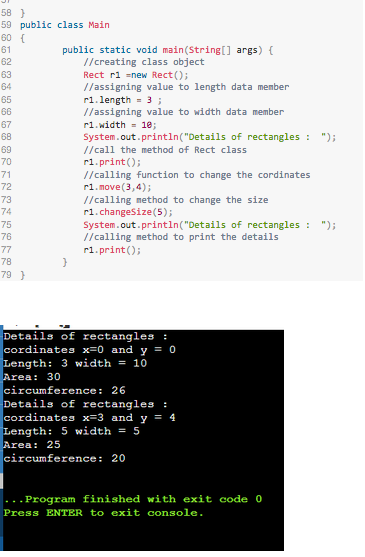
Below the block box are certain requirements for the code:
-And the coding language for this code must be in java and not in python, C code, etc
-Also In the code, use comments to explain the purpose of the declared variables and the lines in the code.
1. Implement a Rect class for the concept of rectangle. Each rectangle has the following properties: Coordinates of the left and top corner of the rectangle (including X and Y) the length the width Each rectangle must also have the following methods: a. getCircumf, which calculates and returns the circumference of a rectangle. b. getArea, which calculates and returns the area of a rectangle. c. move, that receives two parameters x and y of type int and changes the position of the rectangle (i.e., the coordinates of the left and top corner of the rectangle) to (x, y). d. changeSize, which takes a parameter n of type int and set the length and width of the rectangle to n. e. print, that prints the information of the rectangle including its coordinates, length, width, circumference, and area. 24 27 29 29 1 import java.util.*; 2 //rect class 3 class Rect 4 //cordinates x, y 5 int X, Y; 6 //length and width of rectangle 7 int length, width; 8 //constructor that will initialize the data members 9 1/ automatically when the function is called 10 Recto 11 1/ set this value to default when function is called 12 length = @ 13 width = @; 14 15 Y = @ 16 } 17 //method to retun perimeter of rectangle 18 public int getcircunf(){ 19 //perimeter is 2*(length + width) 20 return 2* (length + width); 21 ) 22 1/method to return area of the rectangle 23 public int getArea() //return area - lengtj width 25 return length width; 26 } //method to change the cordinates public void move(int x , int y) { //X to x 30 X-X; 31 1/4 to y 32 Y = y; 33 ) //method to change the size public void changesize(int n) { // set length and width to n 37 length = n; 38 width=n; } //function to print the details of the rectangle public void print() { 1/print the cordinates System.out.println("cordinates x="+X+" and y = "+Y); 1/print the length and width System.out.println("Length: *+length +" width = "+width); 46 //get area of rectangle by getArea method 47 int area = this.getArea(); 1/print the area System.out.println("Area: "+area); 50 1/get perimeter by getcircumf method 51 //this keyword is used to call the current object int circum=this.getcircumf; 1/print the perimeter System.out.println("circunference: "+circum); 55 } 56 57 58 34 35 36 39 40 41 42 43 44 45 48 49 53 58 ) 59 public class Main 60 61 public static void main(String[] args) { 62 //creating class object 63 Rect ri =new Rect(); 64 //assigning value to length data member 65 ri. length = 3; 66 //assigning value to width data member 67 ri.width = 10; 6B System.out.println("Details of rectangles : "); 69 //call the method of Rect class 70 ri.print(); 71 //calling function to change the cordinates 72 ri.move(3, 4); 73 //calling method to change the size 74 ri.changesize(5); 75 System.out.println("Details of rectangles : "); 76 // calling method to print the details 77 ri.print(); 78 79) Details of rectangles : cordinates x=0 and y = 0 Length: 3 width = 10 Area: 30 circumference: 26 Details of rectangles : cordinates x=3 and y = 4 Length: 5 width = 5 Area: 25 circumference: 20 ... Program finished with exit code 0 Press ENTER to exit console
Step by Step Solution
There are 3 Steps involved in it

Get step-by-step solutions from verified subject matter experts
 Study Help