







Question: for question # 9 what is the formula I put in Use the Art worksheet to create a blank Pivot Table on a new worksheet
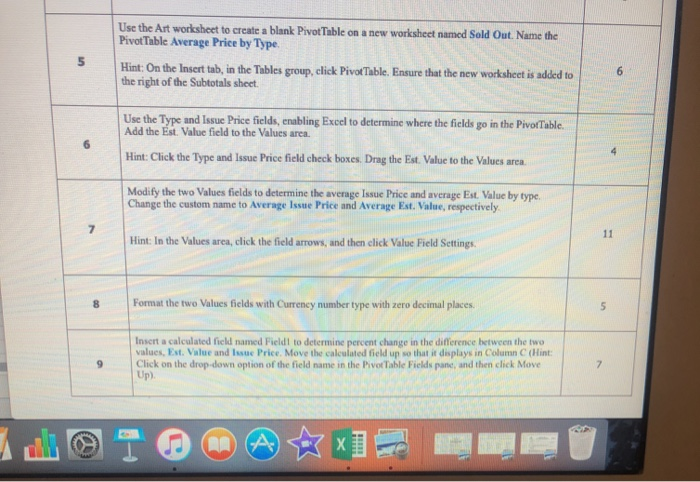
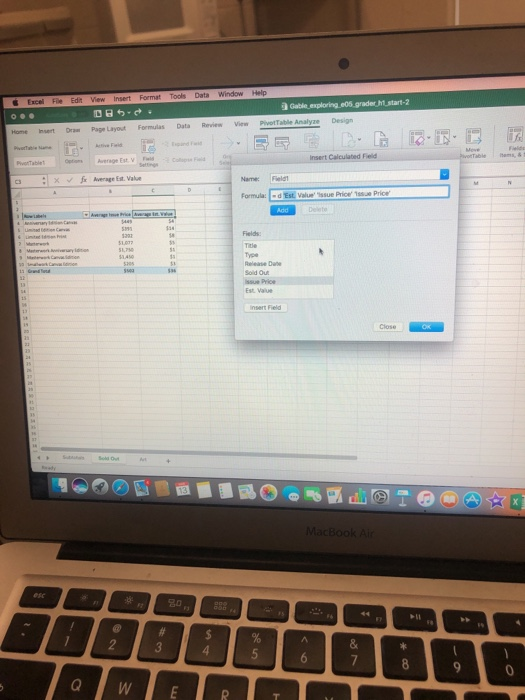
Use the Art worksheet to create a blank Pivot Table on a new worksheet named Sold Out. Name the PivotTable Average Price by Type. Hint:On the Insert tab, in the Tables group, click PivotTable. Ensure that the new worksheet is added to the right of the Subtotals sheet Use the Type and Issue Price fields, enabling Excel to determine where the fields go in the PivofTable. Add the Est. Value field to the Values area Hint: Click the Type and Issue Price field check boxes. Drag the Est. Value to the Values area Modify the two Values fields to determine the average Issue Price and average Est. Value by type. Change the custom name to Average Issue Price and Average Est. Value, respectively 7 Hint: In the Values area, click the field arrows, and then click Value Field Settings 8 Format the two Values fields with Currency number type with zero decimal places Insert a calculated field named Fieldl to determine percent change in the difference between the two values, Est. Value and Issuc Price. Move the calculated field up so that it displays in Column C (Hint 9 Click on the drop-down option of the field name in the PivotTable Fields pane, and then click Move Up). Excel File Edit View Insert Format Tools Data Window Help Gable exploring e05.grader h start-2 Home Insert Dra Page Layout Formulas Data Review View Pivot Table Analyze Design Average Est V Fd Insert Calculabed Fieid Name: Field Formula:d Est Valuessue Price 1ssue Price Type elease Da ssue Price Est. Value 8 0
Step by Step Solution
There are 3 Steps involved in it

Get step-by-step solutions from verified subject matter experts
 Study Help