







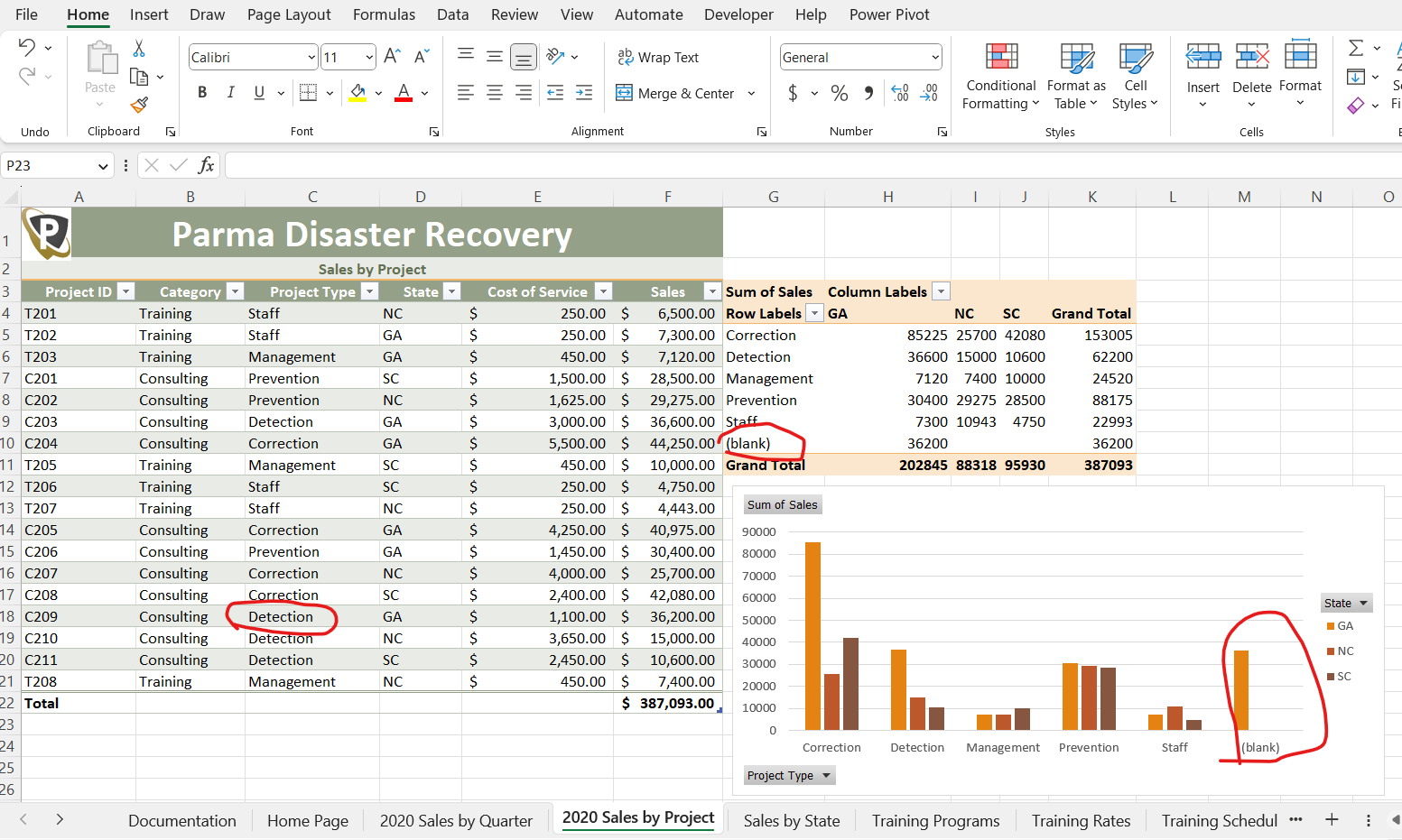
Question: For some reason, my Excel Pivot Chart & Pivot Table does not recognize the value listed in cell C18 even though it is not blank
For some reason, my Excel Pivot Chart & Pivot Table does not recognize the value listed in cell C18 even though it is not blank (circled in red in the image). This is causing the data in the chart & table to populate incorrectly the data in Row 18 since it is not sorted in its appropriate section. Any suggestions on what I need to do to fix this?
Note: In C18, I did a data validation rule to insert a cell drop-down list with the values of Correction, Detection, Prevention, Management, and Staff. I selected 'Detection' from the drop-down list after creating this data validation rule. There are no formulas listed in this cell, only this data validation rule.
Step by Step Solution
There are 3 Steps involved in it

Get step-by-step solutions from verified subject matter experts
 Study Help