







Question: For the ARM Assembly program please use Keil, as this is the program that I am studying. And for the second part, please show work
For the ARM Assembly program please use Keil, as this is the program that I am studying. And for the second part, please show work thoroughly and clearly, i want to learn off of it.
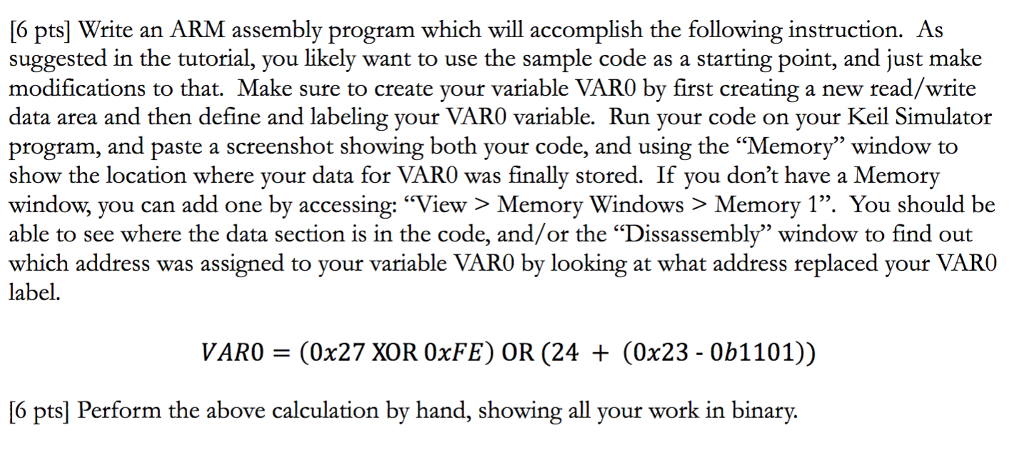
6 pts] Write an ARM assembly program which will accomplish the following instruction. As suggested in the tutorial, you likely want to use the sample code as a starting point, and just make modifications to that. Make sure to create your variable VAR0 by first creating a new read/write data area and then define and labeling your VAR0 variable. Run your code on your Keil Simulator program, and paste a screenshot showing both your code, and using the "Memory" window to show the location where your data for VARO was finally stored. If you don't have a Memory window, you can add one by accessing: "View > Memory Windows > Memory 1". You should be able to see where the data section is in the code, and/or the "Dissassembly" window to find out which address was assigned to your variable VARO by looking at what address replaced your VARO label. VARO (0x27 XOR OxFE) OR (24 + (0x23 - 0b1101)) pol Perfiom the above calelaion by hand,ho all r n binary 6 pts] Write an ARM assembly program which will accomplish the following instruction. As suggested in the tutorial, you likely want to use the sample code as a starting point, and just make modifications to that. Make sure to create your variable VAR0 by first creating a new read/write data area and then define and labeling your VAR0 variable. Run your code on your Keil Simulator program, and paste a screenshot showing both your code, and using the "Memory" window to show the location where your data for VARO was finally stored. If you don't have a Memory window, you can add one by accessing: "View > Memory Windows > Memory 1". You should be able to see where the data section is in the code, and/or the "Dissassembly" window to find out which address was assigned to your variable VARO by looking at what address replaced your VARO label. VARO (0x27 XOR OxFE) OR (24 + (0x23 - 0b1101)) pol Perfiom the above calelaion by hand,ho all r n binary
Step by Step Solution
There are 3 Steps involved in it

Get step-by-step solutions from verified subject matter experts
 Study Help