







Question: For the Equipment Check-out event ONLY, draw a Primitive Data Flow Diagram. Following is the narrative for the Check-out Equipment event. Use it to create
For the Equipment Check-out event ONLY, draw a Primitive Data Flow Diagram.
Following is the narrative for the Check-out Equipment event. Use it to create a Primitive Data Flow Diagram. The employee enters an Employee ID which the system validates. If the employee is found to be active, the system prompts for an Equipment ID. The employee enters the Equipment ID of the equipment s/he requires and the system checks that it is valid. It also checks whether the employee is qualified to operate the equipment based on the skill classification, and whether the requested piece of equipment is in stock. If the employee and equipment ID are valid, available, and not restricted, a check-out transaction is recorded. The employee is provided with a receipt detailing the check-out. The depot staff is notified of the equipment location so they can physically retrieve it from inventory. This ends the Check-out Equipment event diagram. NOTE: Once the equipment is handed to the employee, another event, the Confirm Equipment Check-out, will confirm that the inventory has been physically reduced.
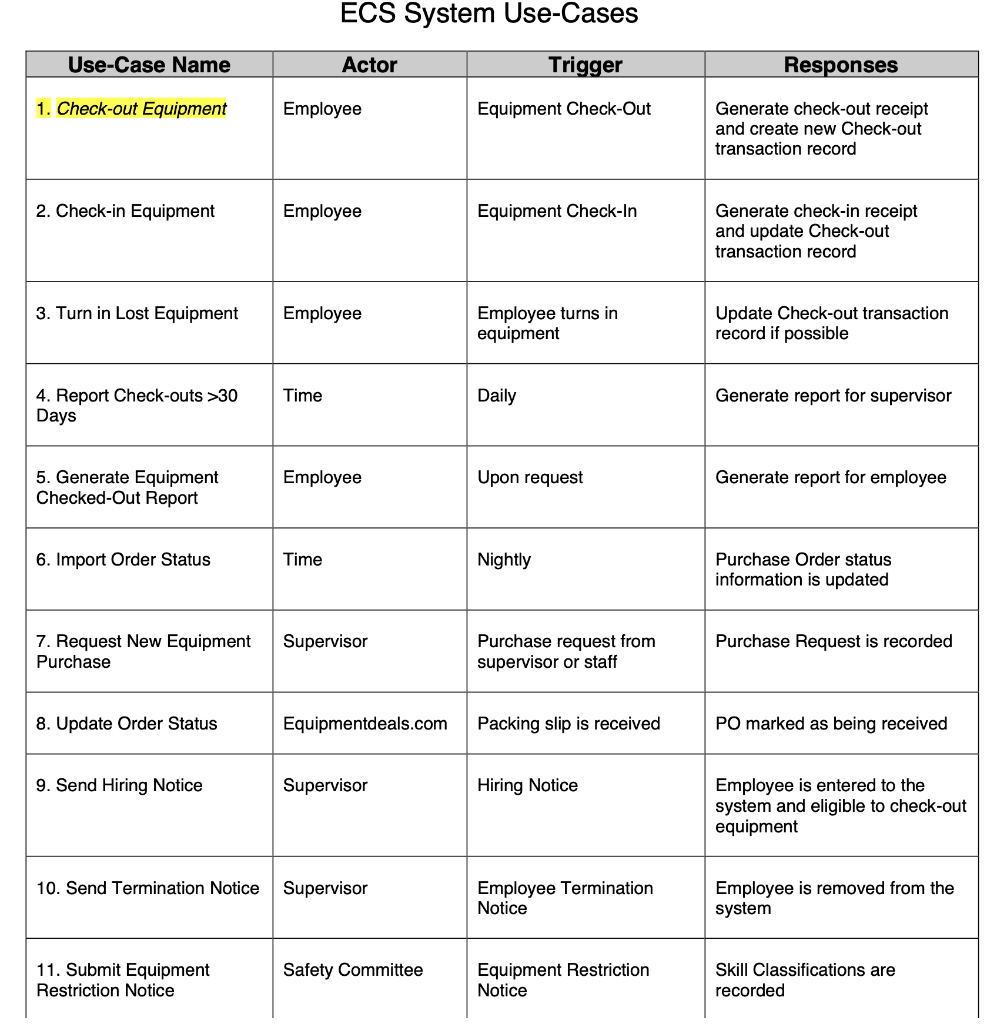

ECS System Use-Cases \begin{tabular}{|l|l|l|l|} \hline 14.GenerateEquipmentRequestNotice & Depot Staff & Equipment Check-out & Generateequipmentrequestnotice \\ \hline 15.ConfirmEquipmentCheck-out & Depot Staff & Equipment Check-out & Check-out is recorded \\ \hline \end{tabular}
Step by Step Solution
There are 3 Steps involved in it

Get step-by-step solutions from verified subject matter experts
 Study Help