







Question: . For the following instructions, use the RAM table below. Draw what the memory looks like after each instruction is executed. You don't have to
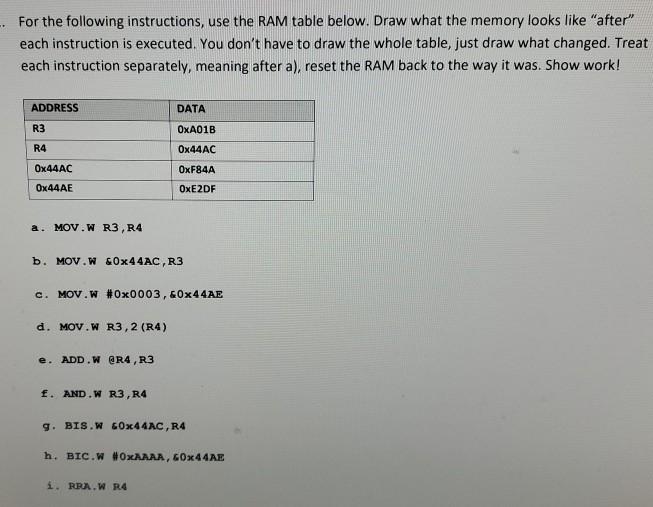
. For the following instructions, use the RAM table below. Draw what the memory looks like "after" each instruction is executed. You don't have to draw the whole table, just draw what changed. Treat each instruction separately, meaning after a), reset the RAM back to the way it was. Show work! ADDRESS DATA R3 OxA01B R4 Ox44AC OxF84A Ox44AC Ox44AE OxE2DF a. MOV.W R3, R4 b. MOV.W &0x44AC,R3 c. MOV.W #Ox0003, &0x44AE d. MOV.W R3,2 (R4) ADD.W @R4, R3 f. AND.W R3, R4 9. BIS.W GOx44AC, R4 h. BIC.W #OxAAAA, 60x44AE i. RBA.W R4
Step by Step Solution
There are 3 Steps involved in it
1 Expert Approved Answer
Step: 1 Unlock

Question Has Been Solved by an Expert!
Get step-by-step solutions from verified subject matter experts
Step: 2 Unlock
Step: 3 Unlock
 Study Help