



Question: For this assignment, design a login page that contains the following part: Part 1: Create two HTML webpage login.html and user.html. For login.html, create a
For this assignment, design a login page that contains the following part:
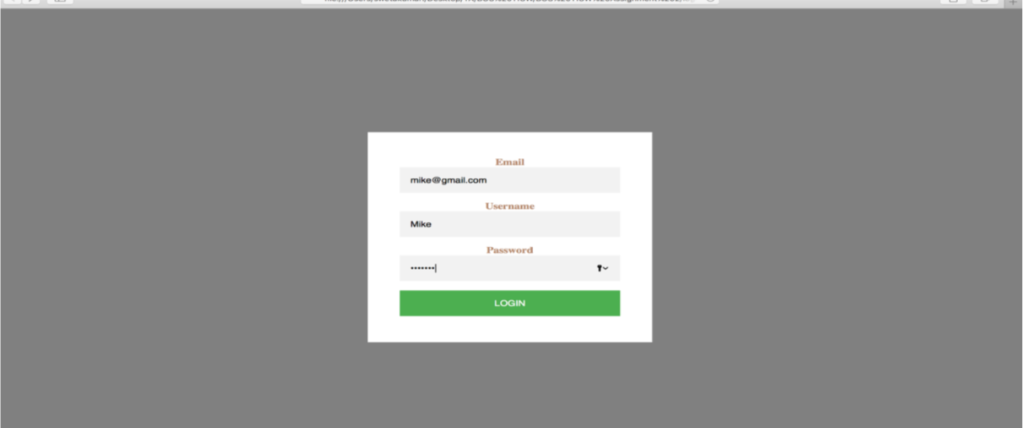
Part 1: Create two HTML webpage login.html and user.html. For login.html, create a form that should have 4 input elements - Add a div class login-page for login page and a div class form for form. The form method should be set to POST, and the action should be a new html page user.html.
Part 2: Change the look of an entire webpage by adding an external style sheet. In login.html page, include a reference to the external style sheet file inside the element of the section. Select elements with a login-page class (write a period (.) character, followed by the name of the class) to adjust the width, padding, and margin. Select elements with a form class to adjust the position and background color of the form. Also, modify the maximum width, margin, padding, text alignment of the form. Use attribute selectors to style form input type (username and password), adjust font family, background, width, margin, padding, box size, font size. Use attribute selectors to style button input type, adjust font family, text transform, background, width, padding, color, font size, and cursor. Select elements with a label name to adjust labels position, color, width, font weight, display, margin, text alignment. Select elements with a body name to set the body background color to grey.
Part 3: On clicking the LOGIN button, it will redirect the form to a new HTML page user.html. The user.html page will have a paragraph with You are logged in.. text message.
Below is the picture for your reference
Email Username Mike Password LOGIN
Step by Step Solution
There are 3 Steps involved in it

Get step-by-step solutions from verified subject matter experts