







Question: For this assignment you will be writing T-SQL statements in SSMS. Learn Quer Using the knowledge you gained in the Lea create and perform the
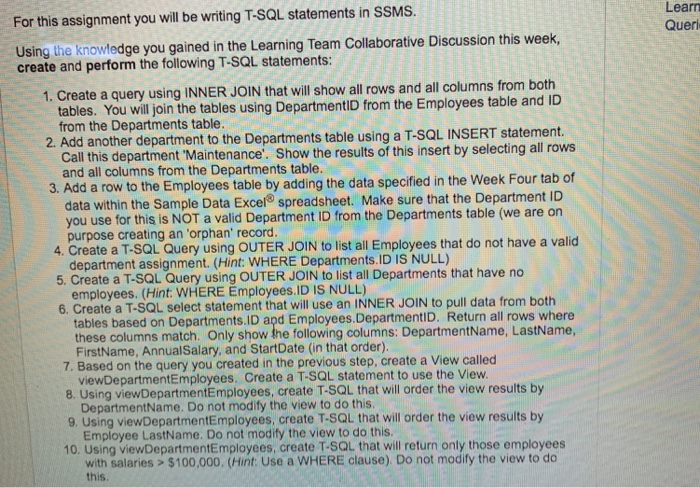
For this assignment you will be writing T-SQL statements in SSMS. Learn Quer Using the knowledge you gained in the Lea create and perform the following T-SQL statements: rning Team Collaborative Discussion this week, 1. Create a query using INNER JOIN that will show all rows and all columns from both tables. You will join the tables using DepartmentID from the Employees table and ID from the Departments table another department to the Departments table using a T-SQL INSERT statement. Call this department Maintenance'. Show the results of this insert by selecting all rows and all columns from the Departments table 3. Add a row to the Employees table by adding the data specified in the Week Four tab of data within the Sample Data Excel spreadsheet. Make sure that the Department ID you use for this is NOT a valid Department ID from the Departments table (we are on purpose creating an 'orphan' record 4. Create a T-SQL Query using OUTER JOIN to list all Employees that do not have a valid department assignment. (Hint: WHERE Departments.ID IS NULL) 5. Create a T-SQL Query using OUTER JOIN to list all Departments that have no employees. (Hint: WHERE Employees.ID IS NULL) 6. Create a T-SQL select statement that will use an INNER JOIN to pull data from both tables based on Departments.ID apd Employees.DepartmentID. Return all rows where these columns match. Only show the following columns: DepartmentName, LastName, FirstName, AnnualSalary, and StartDate (in that order) 7. Based on the query you created in the previous step, create a View called 8. Using viewDepartmentEmployees, create T-SQL that will order the view results by 9. Using viewDepartmentEmployees, create T-SQL that will order the view results by 10. Using viewDepartmentEmployees, create T-SQL that will return only those employees viewDepartmentEmployees. Create a TSQL statement to use the View DepartmentName. Do not modify the view to do this Employee LastName. Do not modify the view to do this with salaries> $100,000. (Hint: Use a WHERE clause). Do not modify the view to do this
Step by Step Solution
There are 3 Steps involved in it

Get step-by-step solutions from verified subject matter experts
 Study Help