







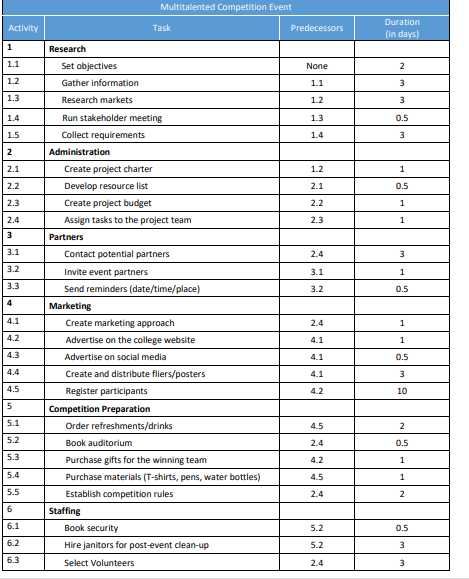
Question: for this assignment, you will create a budget using Excel. You will use the data in the chart below including; tasks, predecessors and durations. 1
for this assignment, you will create a budget using Excel. You will use the data in the chart below including;
tasks, predecessors and durations.
Create the structure of your budget in Microsoft Excel.
Estimate the labour and nonlabour costs, use the duration estimates provided.
a Determine hourly rates
b Consider nonlabour costs of this project, equipment, furniture, food and supplies.
Create the total aggregate budget
a Sum up the costs of each major deliverable
b Create subtotals at the major deliverable level
c Create subtotals for the labour and nonlabour costs
d Use formulas whenever possible so you fully harness the power of Microsoft Excel.
e Establish a reasonable contingency for this project
f You are free to make any assumptions you like; simply ensure they are well documented
Create the timephased budget
a Consider when the work will be done.
b Contingency can be spread across the projects duration
c Ensure your timephased budget has the same total cost as your aggregate budgetMultitalented Competition Event
tableActivityTask,Predecessors,tableDurationin daysResearch,,Set objectives,None,Gather information,Research markets,Run stakeholder meeting,Collect requirements,Administration,,Create project charter,Develop resource list,Create project budget,Assign tasks to the project team,Partners,,Contact potential partners,Invite event partners,Send reminders datetimeplaceMarketing,,tableCreate marketing approach,Advertise on the college website,Advertise on social media,Create and distribute flierspostersRegister participants,Competition Preparation,,Order refreshmentsdrinksBook auditorium,Purchase gifts for the winning team,Purchase materials Tshirts, pens, water bottlesEstablish competition rules,Staffing,,Book security,Hire janitors for postevent cleanupSelect Volunteers,
Step by Step Solution
There are 3 Steps involved in it
1 Expert Approved Answer
Step: 1 Unlock

Question Has Been Solved by an Expert!
Get step-by-step solutions from verified subject matter experts
Step: 2 Unlock
Step: 3 Unlock
 Study Help