







Question: For this assignment, you will learn to use different HTML5 form attributes. Create a form as shown below. Familiarize yourself with the output shared below
For this assignment, you will learn to use different HTML5 form attributes. Create a form as shown below. Familiarize yourself with the output shared below and present it as close as you see it on here. Use the HTML5 attributes such as autocomplete, autofocus, required, patter, email, url, text, input, formtarget and add more as needed for this web form. Refer to my Week 4 lecture slides to put together this form. The key thing is to see if you are applying the proper attributes to validate the form on your page. Use the provided images in here. Validate your code before uploading the file and images.
Above links are:
Learn more : http://www.habitat.org/about Volunteer :
http://www.habitat.org/volunteer Advocate :
http://www.habitat.org/about/advocacy Donate :
https://www.habitat.org/donate/
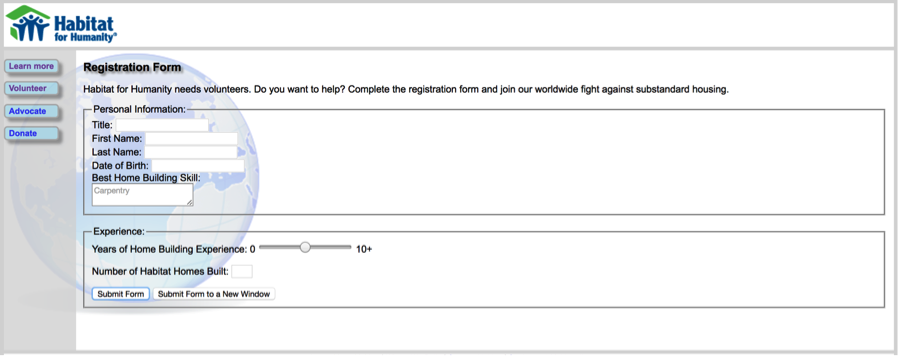
Habitat for Humanity Learn more Registration Form Habitat for Humanity needs volunteers. Do you want to help? Complete the registration form and join our worldwide fight against substandard housing. Personal Information Advocate Title: First Name Last Name: Date of Birth: Best Home Building Skill: Carpentry n Experience Years of Home Building Experience: 0 10+ Number of Habitat Homes Built: Submit Form Submit Form to a New Window
Step by Step Solution
There are 3 Steps involved in it

Get step-by-step solutions from verified subject matter experts
 Study Help