







Question: For this assignment you will once again write a program to play the Tile Puzzle game, but this time your program will interact with
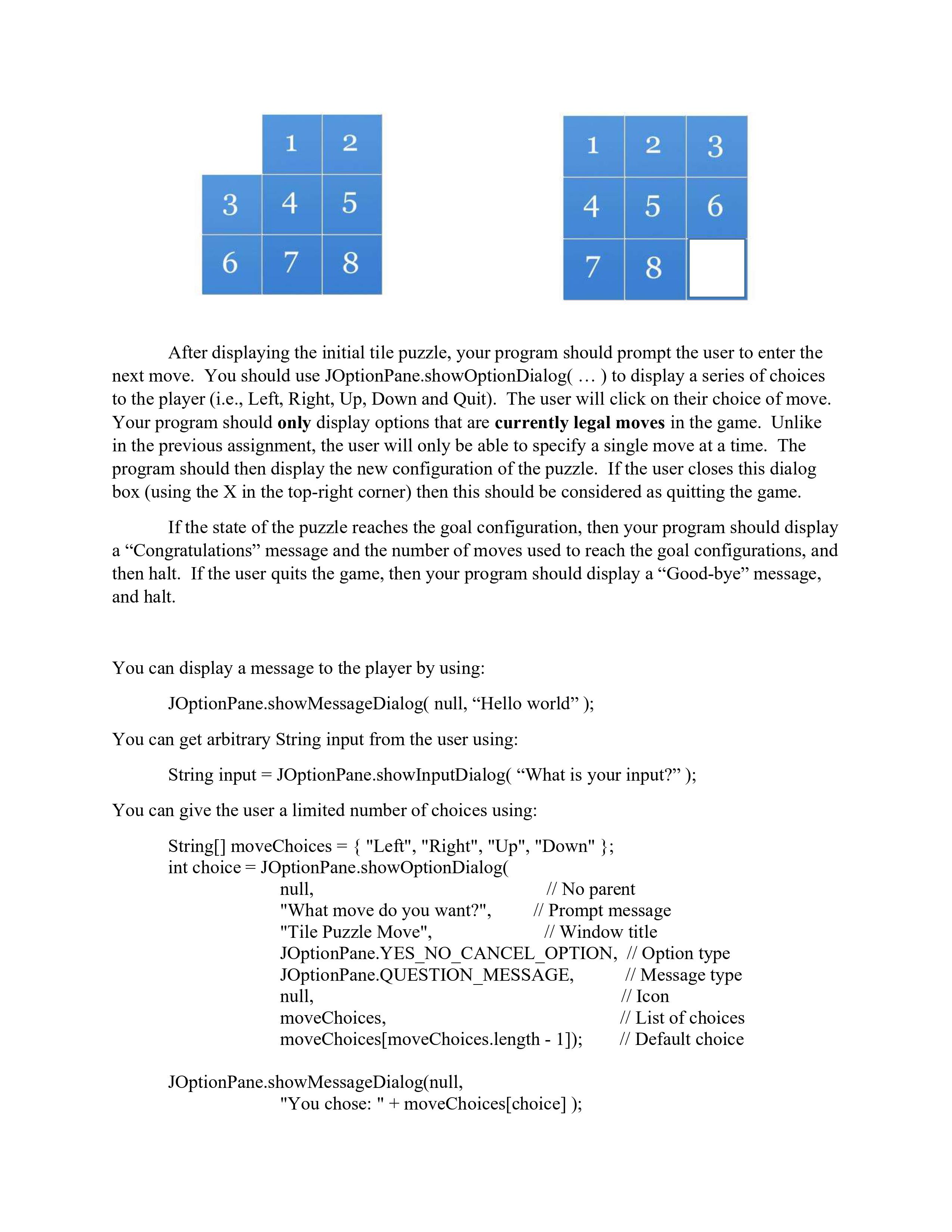
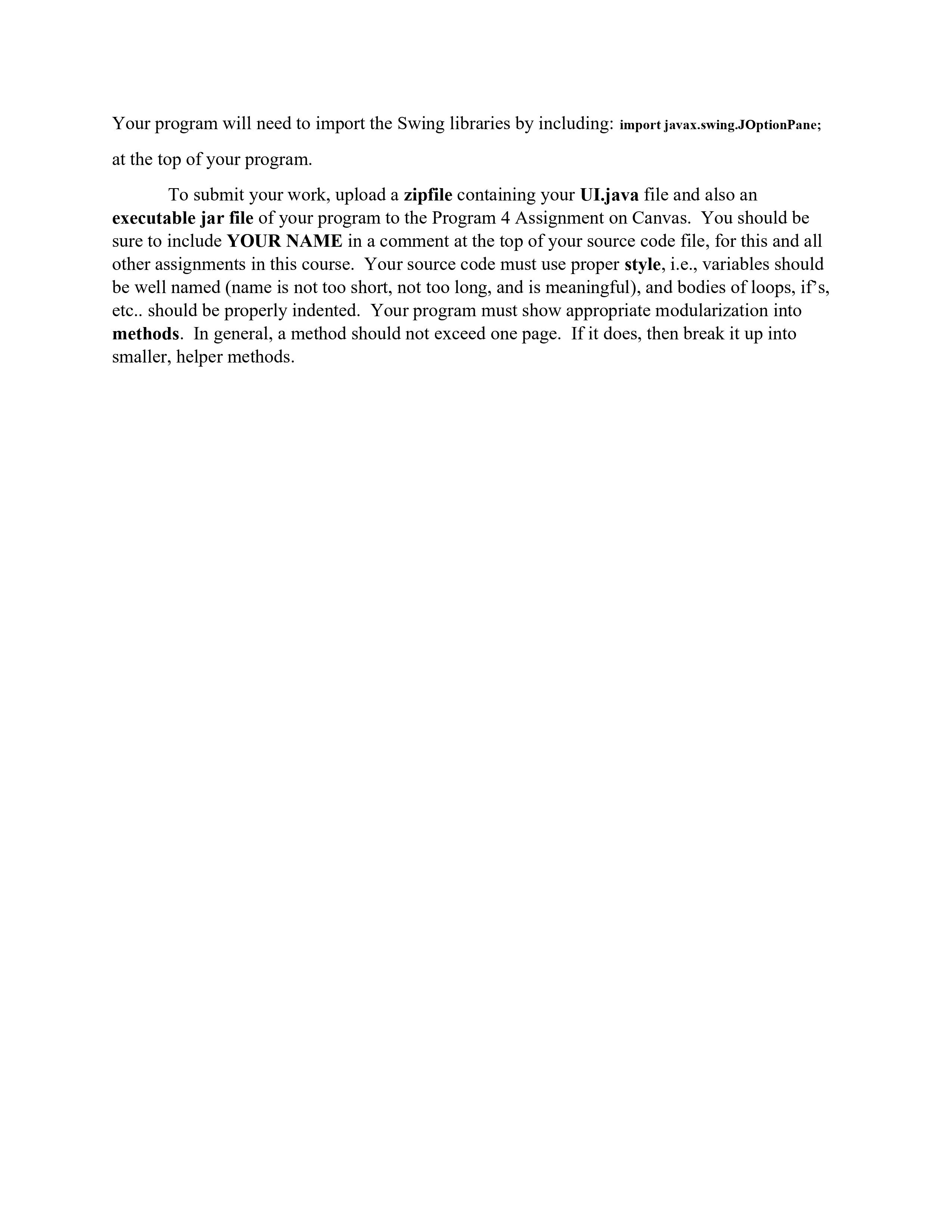
For this assignment you will once again write a program to play the Tile Puzzle game, but this time your program will interact with the player using Dialog Boxes (i.e. javax.swing.JOptionPane). Your program should not use System.out.print or the Scanner class at all. There should be no Console I/O for this program (none, nada, zilch). The only code that changes in this assignment, compared to the previous assignment, is the UI class. The actual playing of the game (in the TilePuzzle class) is identical to what you wrote before (don't write the same code twice!). As before, you must not change any of the class provided for the previous assignment (e.g., TilePuzzleDriver) As before, you should query the user for the size of the puzzle, which must be a value between 3 and 8. If the user enters garbage (e.g., "abc"), then your program should prompt the user again to enter a numeric value. If the user fails to do so after three attempts, then your program should throw an IllegalStateException. Your program should then query the user for the initial configuration of the puzzle. There are two possible choices. Either the initial puzzle is the "default" configuration, where the blank tile is in the upper-left corner and the tiles are arranged in order from left-to-right and top- to-bottom. Or the initial puzzle is randomly generated. You can use the shuffle method in the Collections class to randomly shuffle a List of numbers. The position of the Blank Tile in the original puzzle layout should be included in this randomization. As before, the goal configuration of the puzzle is to have the blank tile in the bottom- right corner, with the remaining tiles arranged in order from left-to-right and top-to-bottom. The default starting puzzle, and the solution for a 3x3 grid is illustrated below. 1 21 1 2 3 3 4 5 4 5 6 6 7 8 7 8 After displaying the initial tile puzzle, your program should prompt the user to enter the next move. You should use JOptionPane.showOptionDialog( ... ) to display a series of choices to the player (i.e., Left, Right, Up, Down and Quit). The user will click on their choice of move. Your program should only display options that are currently legal moves in the game. Unlike in the previous assignment, the user will only be able to specify a single move at a time. The program should then display the new configuration of the puzzle. If the user closes this dialog box (using the X in the top-right corner) then this should be considered as quitting the game. If the state of the puzzle reaches the goal configuration, then your program should display a "Congratulations" message and the number of moves used to reach the goal configurations, and then halt. If the user quits the game, then your program should display a "Good-bye" message, and halt. You can display a message to the player by using: JOptionPane.showMessageDialog(null, "Hello world"); You can get arbitrary String input from the user using: String input =JOptionPane.showInputDialog( "What is your input?); You can give the user a limited number of choices using: String[] moveChoices = { "Left", "Right", "Up", "Down" }; int choice =JOptionPane.showOptionDialog( null, // No parent "What move do you want?", // Prompt message "Tile Puzzle Move", // Window title JOptionPane. YES_NO_CANCEL_OPTION, // Option type JOptionPane.QUESTION_MESSAGE, null, moveChoices, moveChoices[moveChoices.length - 1]); JOptionPane.showMessageDialog(null, "You chose: "+moveChoices [choice] ); // Message type // Icon // List of choices // Default choice Your program will need to import the Swing libraries by including: import javax.swing.JOptionPane; at the top of your program. To submit your work, upload a zipfile containing your UI.java file and also an executable jar file of your program to the Program 4 Assignment on Canvas. You should be sure to include YOUR NAME in a comment at the top of your source code file, for this and all other assignments in this course. Your source code must use proper style, i.e., variables should be well named (name is not too short, not too long, and is meaningful), and bodies of loops, if's, etc.. should be properly indented. Your program must show appropriate modularization into methods. In general, a method should not exceed one page. If it does, then break it up into smaller, helper methods.
Step by Step Solution
3.38 Rating (145 Votes )
There are 3 Steps involved in it
Heres a possible implementation of the Tile Puzzle game using JOptionPane dialog boxes for user interaction java import javaxswingJOptionPane public c... View full answer

Get step-by-step solutions from verified subject matter experts
 Study Help