







Question: For this exercise, we will revisit the utility we have used in prior exercise-ipconfig. On my computer, the output of ipconfig /all | more
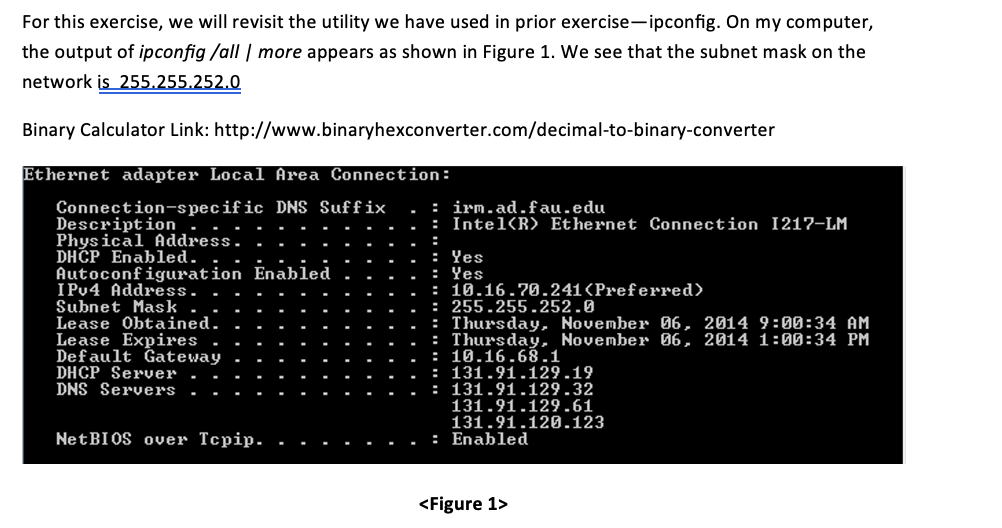
For this exercise, we will revisit the utility we have used in prior exercise-ipconfig. On my computer, the output of ipconfig /all | more appears as shown in Figure 1. We see that the subnet mask on the network is 255.255.252.0 Binary Calculator Link: http://www.binaryhexconverter.com/decimal-to-binary-converter Ethernet adapter Local Area Connection: Connection-specific DNS Suffix Description . . Physical Address. DHCP Enabled. Autoconfiguration Enabled IPv4 Address. Subnet Mask Lease Obtained. Lease Expires Default Gateway DHCP Server DNS Servers NetBIOS over Tcpip. : irm.ad.fau.edu Intel Ethernet Connection 1217-LM : Yes : Yes = 10.16.70.241 : 255.255.252.0 Thursday, November 06, 2014 9:00:34 AM : Thursday, November 06, 2014 1:00:34 PM : 10.16.68.1 : 131.91.129.19 = 131.91.129.32 131.91.129.61 131.91.120.123 : Enabled
Step by Step Solution
There are 3 Steps involved in it

Get step-by-step solutions from verified subject matter experts
 Study Help