







Question: For this lab we will be taking our various tables created from our normalization process and entering them into SQL Server Management Studio (PATIENT, BED,
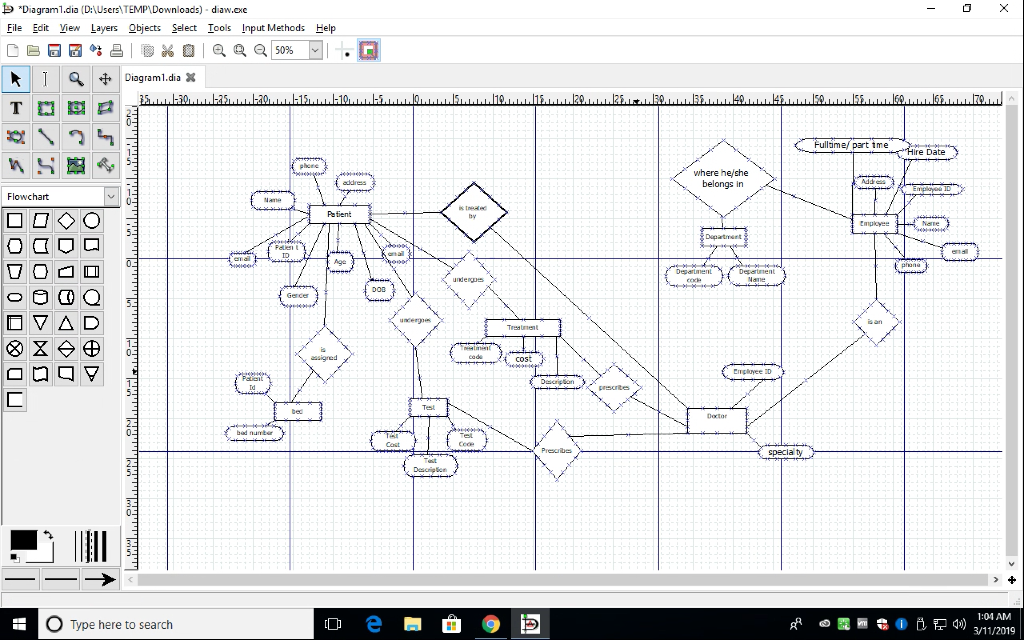
For this lab we will be taking our various tables created from our normalization process and entering them into SQL Server Management Studio
(PATIENT, BED, EMPLOYEE, DEPARTMENT, TREATMENT, TEST). (From above)
For each of your tables you will use SQL and the CREATE TABLE command to create each table with it's various attributes (columns).
You will then use the INSERT INTO command to add 5 rows of data (you make up your own data) to populate each table.
After creating the tables and entering the data - use the SELECT * FROM tablename to list all of the data in each table. You can do a screen capture to save the queries and table data.
Turn in each "screen shot" of each query and each of your tables with all of the data.
*Diagram1.dia (DAUsersTEMPDownloads) , diaw.exe File Edit Vew Layers Objects Select Iools Input Methods Help Q Diagraml.dia X amef part tme re Date where he/she belongs in Flowchart Patient specia ty :04 AM Type here to search *Diagram1.dia (DAUsersTEMPDownloads) , diaw.exe File Edit Vew Layers Objects Select Iools Input Methods Help Q Diagraml.dia X amef part tme re Date where he/she belongs in Flowchart Patient specia ty :04 AM Type here to search
Step by Step Solution
There are 3 Steps involved in it
StepbyStep SQL Table Creation and Data Insertion Based on the Provided Diagram The diagram shows several entities PATIENT BED EMPLOYEE DEPARTMENT TREATMENT TEST I will write the SQL CREATE TABLE state... View full answer

Get step-by-step solutions from verified subject matter experts
 Study Help