







Question: For this lab you will create and apply a linked list using the STL List container. No credit will be given if the STL list
For this lab you will create and apply a linked list using the STL List container. No credit will be given if the STL list container is not used. Remember to turn in all your source code and screenshots of the execution display.
Note: Because you are using the STL List container you only need a struct for this lab. All source code can be in one file.
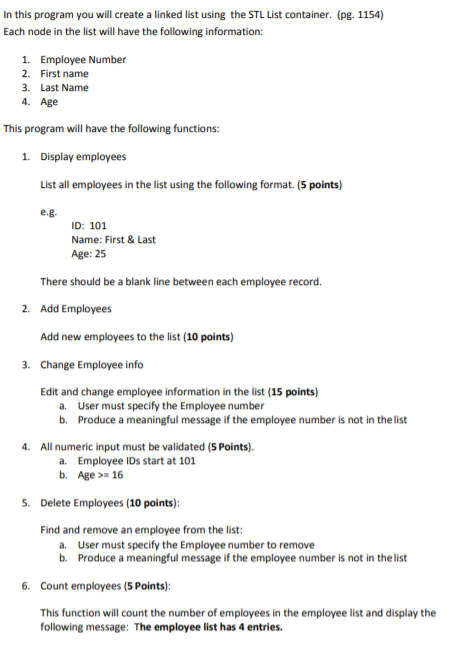
In this program you will create a linked list using the STL List container. (pg. 1154) Each node in the list will have the following information: 1. Employee Number 2. First name 3. Last Name 4. Age This program will have the following functions: 1. Display employees List all employees in the list using the following format. (5 points) ID: 101 Name: First& Last Age: 25 There should be a blank line between each employee record. 2. Add Employees Add new employees to the list (10 points) 3. Change Employee info Edit and change employee information in the list (15 points) a. b. User must specify the Employee number Produce a meaningful message if the employee number is not in the list . All numeric input must be validated (5 Points) a. Employee IDs start at 101 b. Age16 5. Delete Employees (10 points): Find and remove an employee from the list: a. b. User must specify the Employee number to remove Produce a meaningful message if the employee number is not in the list 6. Count employees (5 Points): This function will count the number of employees in the employee list and display the following message: The employee list has 4 entries In this program you will create a linked list using the STL List container. (pg. 1154) Each node in the list will have the following information: 1. Employee Number 2. First name 3. Last Name 4. Age This program will have the following functions: 1. Display employees List all employees in the list using the following format. (5 points) ID: 101 Name: First& Last Age: 25 There should be a blank line between each employee record. 2. Add Employees Add new employees to the list (10 points) 3. Change Employee info Edit and change employee information in the list (15 points) a. b. User must specify the Employee number Produce a meaningful message if the employee number is not in the list . All numeric input must be validated (5 Points) a. Employee IDs start at 101 b. Age16 5. Delete Employees (10 points): Find and remove an employee from the list: a. b. User must specify the Employee number to remove Produce a meaningful message if the employee number is not in the list 6. Count employees (5 Points): This function will count the number of employees in the employee list and display the following message: The employee list has 4 entries
Step by Step Solution
There are 3 Steps involved in it

Get step-by-step solutions from verified subject matter experts
 Study Help