







Question: For this part, you will need to implement the 4 - bit memory of warehouse stock and add any stock to the warehouse as directed
For this part, you will need to implement the bit memory of warehouse stock
and add any stock to the warehouse as directed by the stock calculator. The
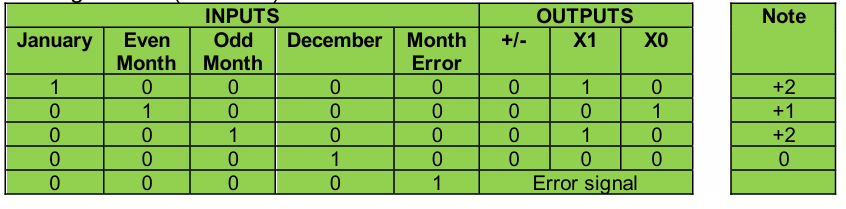
OUTPUTS Columns identifies for each row Januaryeven monthodd
monthDecember and error category the value to add to the stock using an
adder unit that you have built. The note shows the decimal value of the addition
or subtraction.
This is driven by the output from Part A ie indicating what month is currently
being processed. The Error output should light an error LED in Part B
Examples based on the above table:
Month January special case stock value is increased by
Month June odd month stock value is increased by
Month September even month stock value is increased by
Month December special case stock value does not change
Month Error state Error signal is generated, stock value does not change
Note this is only a sample of the possible months to aid in understanding the
stock calculation table above. Your circuit will need to cover all months and
error combinations.
Note:
For Part B you will need to add a button that is pressed by you after the Month
M values have been entered. This is to avoid adding input while you are
adjusting the input pins for the M values M M M M You will also need
to build your own adder units.
For Part B you must use only the following:
The three basic logic gates AND OR NOT Each AND gate and
each OR gate can have only inputs. Each NOT gate can have only
input.
XOR gates with inputs to build adderfull adder circuits
The D FLIPFLOP circuit from the Logisim circuit library. The prebuilt D
FLIPFLOP circuit can be used for the current stock levelmemory
Buttons.
Constants.
LED outputs.tableINPUTSOUTPUTS,JanuarytableEvenMonthtableOddMonthDecember,tableMonthErrorXXError signal
Step by Step Solution
There are 3 Steps involved in it
1 Expert Approved Answer
Step: 1 Unlock

Question Has Been Solved by an Expert!
Get step-by-step solutions from verified subject matter experts
Step: 2 Unlock
Step: 3 Unlock
 Study Help