







Question: For this problem, you will need google - map.html , c 0 9 . css and google - map.js . These are available from the
For this problem, you will need google map.html ccss and googlemap.js These are available from the textbooks website and are also included in the hwsupport.zip file. The first thing you should do is get this example working correctly. Once it is going, we will make some changes:
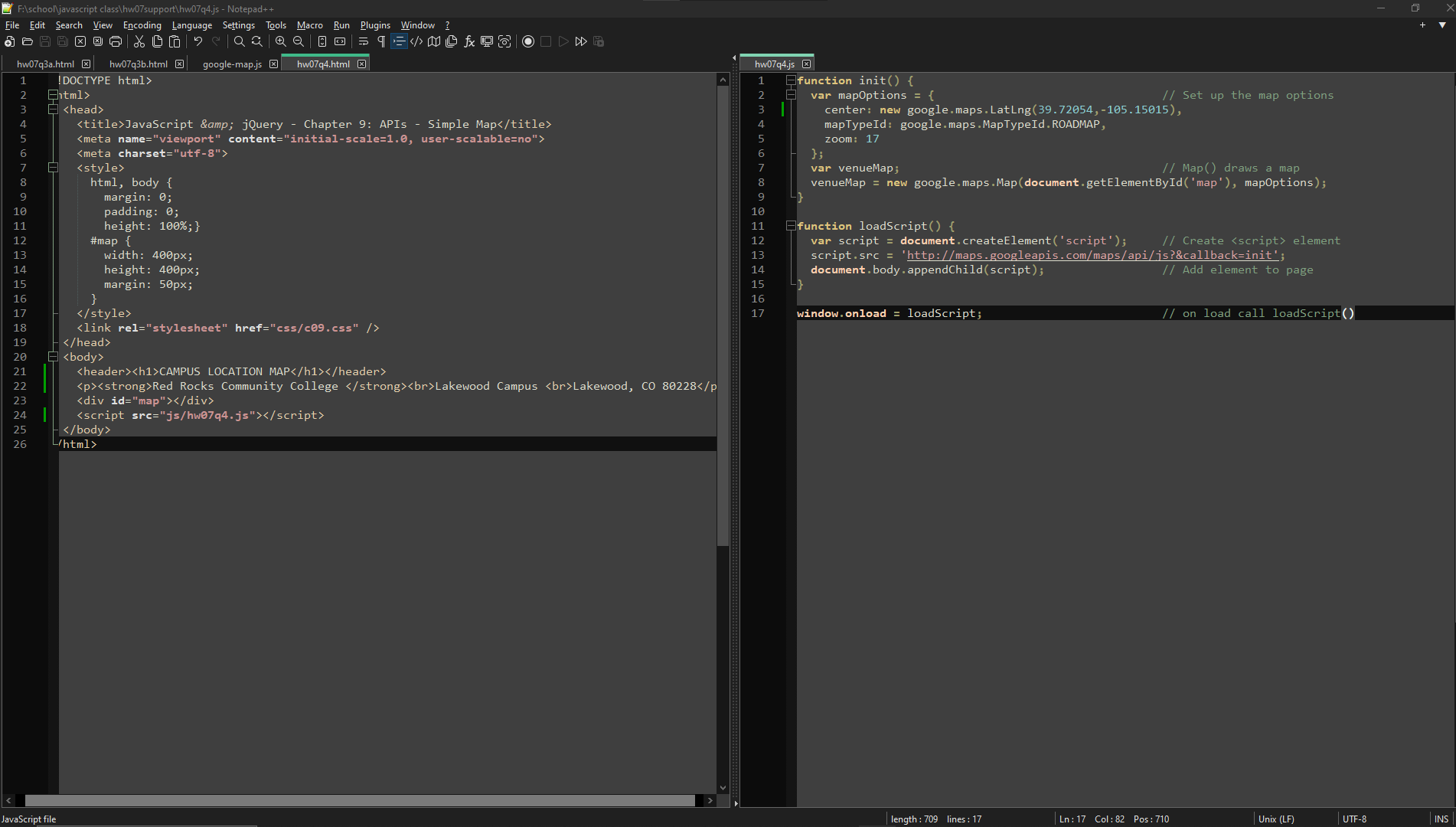
Rename googlemap.html to hwqhtml and look at the difference in googlemap.js versus hmqjs Be sure to update the html file to use the hmqjs file name for the needed scripts and copy it to the same folder as your HTML file. very important!!!!
Find the coordinates for your local campuss location, and change the js file to show the map for the area around your school. Update the html file to correctly describe the schools location.
These code changes should go into hmqjs You may need to change the zoom: factor of to something smaller, if your two marker locations are far apart. Your instructor used a factor value of
This is not a perfect map but when executed the webpage should show a map of the area around your school and the two reddish markers, using the Google map default marker shape
Step by Step Solution
There are 3 Steps involved in it
1 Expert Approved Answer
Step: 1 Unlock

Question Has Been Solved by an Expert!
Get step-by-step solutions from verified subject matter experts
Step: 2 Unlock
Step: 3 Unlock
 Study Help