







Question: For this problem, you'll write a program to draw a simple picture of a car. It will look something like this: Figure 2: A
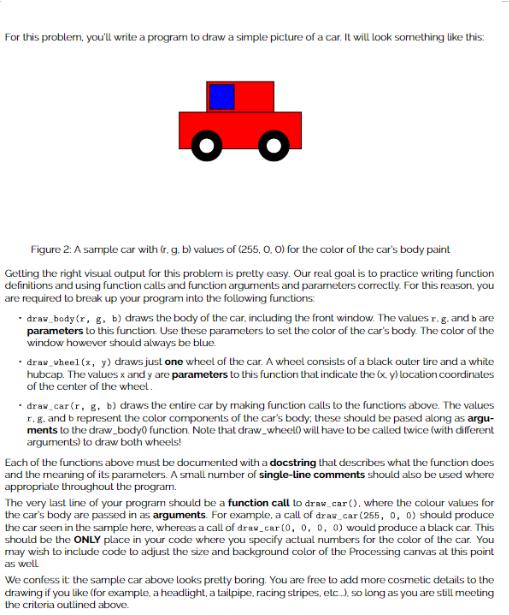
For this problem, you'll write a program to draw a simple picture of a car. It will look something like this: Figure 2: A sample car with (r. g. b) values of (255, 0.0) for the color of the car's body paint Getting the right visual output for this problem is pretty easy. Our real goal is to practice writing function definitions and using function calls and function arguments and parameters correctly. For this reason, you are required to break up your program into the following functions - draw_hody (r, g, b) draws the body of the car, including the front window. The values r. g. and bare parameters to this function. Use these parameters to set the color of the car's body. The color of the window however should always be blue draw_wheel (x, y) draws just one wheel of the car. A wheel consists of a black outer tire and a white hubcap. The values x andy are parameters to this function that indicate the x y) location coordinates of the center of the wheel. - draw_car (r, g, b) draws the entire car by making function calls to the functions above. The values r. g. and b represent the color components of the car's body, these should be pased along as argu- ments to the draw.body0 function. Note that draw_wheel will have to be called twice (with different arguments) to draw both wheels! Each of the functions above must be documented with a docstring that describes what the function does and the meaning of its parameters. A small number of single-line comments should also be used where appropriate throughout the program. The very last line of your program should be a function call to draw_car (), where the colour values for the car's body are passed in as arguments. For example, a call of draw_car (255, 0, 0) should produce the car seen in the sample here, whereas a call of dras_car (0, 0, 0, 0) would produce a black car. This should be the ONLY place in your code where you specify actual numbers for the color of the car. You may wish to include code to adjust the size and background color of the Processing canvas at this point as well We confess it the sample car above looks pretty boring. You are free to add more cosmetic details to the drawing if you like (for example, a headlight, a tailpipe, racing stripes, etc.), so long as you are still meeting the criteria outlined above.
Step by Step Solution
3.41 Rating (145 Votes )
There are 3 Steps involved in it

Get step-by-step solutions from verified subject matter experts
 Study Help