







Question: For this programming assignment we are going to develop a two player python program for the game of Tic-Tac-Toe. Tic-Tac-Toe is traditionally a paper and
For this programming assignment we are going to develop a two player python
program for the game of Tic-Tac-Toe. Tic-Tac-Toe is traditionally a paper and pencil
game played with two players, where one player is represented by an X and the other
player is represented by an O. Players take turns putting their symbol in an open spot
on a 3 by 3 grid. The first person to get three of their symbols in a line (horizontal, vertical, or diagonal)
wins the game.
We are going to develop a game that should terminate if either there is a winner or if the game results in
a tie. The Tic-Tac-Toe board should be displayed after every move. We are also going to develop this
program using functions. Below you will find a sample run of the program. I want your program to
function exactly the same way.
Create a python program called tictactoe.py and complete part1.
Part 1 - Specification:
Initialization/Function Section:
For each function definition you should have a docstring specification that explains the purpose of the
function, what is expected as input to the function and if anything is going to be returned from the
function.
Function Name: displayBoard
Arguments/Parameter(s): 1 Parameter: A list called board that contains strings that represent the
current state of the board (the current state of the 9 spaces on the board).
Returned Value(s): Nothing is returned from this function. This is a non-value returning function and it
is called for its side effect, which is to display the current state of the board.
Function Purpose/Algorithm: The purpose of this function is to display the current state of the board
based on the list called board that holds the symbols for the board.
- Loop through the list board and for each element in board that does not have a player symbol we
want to print out the - symbol to show that the spot is still vacant, otherwise we will print out
the X or O that has been placed in that location on the board.
- Pretty much all you are doing in this function is printing out the list and doing some formatting
to get it to look like the board shown in the sample run.
Function Name: getMove
Arguments/Parameter(s): 3 Parameters: A list called board that contains strings that represent the
current state of the board (the current state of the 9 spaces on the board), a list called locations that
2
contains the strings that represent the original 9 locations on the board, and a string variable called
player representing the players name.
Returned Value(s): 1 value: the move selection from the user, which will be a string literal
Function Purpose/Algorithm: The purpose of this function is to ask the correct player to enter their
move and then return that move back to main. This function should also do error handling to make sure
that the move is valid by checking to see if it is in locations. If the user enters a valid location, you
should then check to make sure that there isnt already a game piece in that location.
Function Name: win
Arguments/Parameter(s): 2 Parameters: A list called board that contains strings that represent the
current state of the board (the current state of the 9 spaces on the board) and a string variable called
symbol representing the players coordinating symbol(X or O) to check and see if that player won.
Returned Value(s): 1 boolean value called player_win: True if the player won and False if not
Function Purpose/Algorithm: The purpose of this function is to determine if the current player won
with the move they just made. There are three ways that a user can win: horizontal, vertical and
diagonal. You should handle all three cases and return a Boolean result at the end of the function. Note:
this is the hardest function
Function Name: tieGame
Arguments/Parameter(s): 1 Parameters: A list called board that contains strings that represent the
current state of the board (the current state of the 9 spaces on the board).
Returned Value(s): 1 boolean value called tie_game: True if it is a tie and False if not
Function Purpose/Algorithm: The purpose of this function is to determine if the game has ended in a
tie. This function should look at every element in board and if any spot is still the empty string then
there are still moves left to make therefore tie_game is False, otherwise it is True because there are no
more moves to make.
Main function:
Please follow this algorithm as closely as possible, the way this algorithm is laid out will help you make
sense of the way the functions are designed.
- Create a list called board filled with 9 empty strings to represent the blank board that we are
going to start the game with.
- Create a list called locations filled with the string literals of 1 through 9 to represent the 9
locations on the board. (Remember the board positions shown above in the sample run)
- Print the program greeting. (As shown above in the sample run)
- Get the two players names and store them into two different variables (As shown above in the
sample run)
- Print out the message that tells the user Enter your mark using the board positions shown below
- Call/Invoke the displayBoard function and pass it locations as a parameter/argument.
- Now for the play of the game
- Create a new variable called player and assign it to the variable you used to hold the name of
player1, since we want to start the game with the first player.
- Create a new variable to hold the player symbol and set it to X to start with.
3
- Print out a message letting the first player know what symbol they are playing with, using their
name. (As shown in the sample run above.)
- Display the current board by calling the displayBoard function
- Create a Boolean variable to use to determine if the game is over and set it to False to begin with.
- While the game is not over
o Call the getMove function, passing to it the board, locations, and player name, also save
the value that is returned from getMove into a variable called move
o Use the move as an index into board and put the player symbol in that spot, overwriting
the blank symbol that was initially put into that list
o Display the board again
o Use the win function to determine if the player won
Print out the winning message, as shown in sample output
Change the Boolean for game over to True
o Else we need to use the tieGame function to determine if the game was a tie
Print tie game message, as shown in the sample output
Change the boolean for game over to True
o Else we need to switch players before it loops back around again
If we were using player1
Switch the player to the player2 name
Switch the player symbol to the O
Else
Switch it to the player1 name
Switch it to player symbol to the X
Create 2 programs called tictactoeMain.py and tictactoeModule.py and complete part2.
Part 2 After completing the first part, based on the code that you just wrote, separate this program into
two files.
A module for all the tic-tac-toe functions with the specifications. Name it tictactoeModule.py.
Modify the tictactoe.py (created in Part 1) to create another program called tictactoeMain.py
which will contain the main () and modify it to use the module tictactoemodule.
I will test your two files together.
Example output:
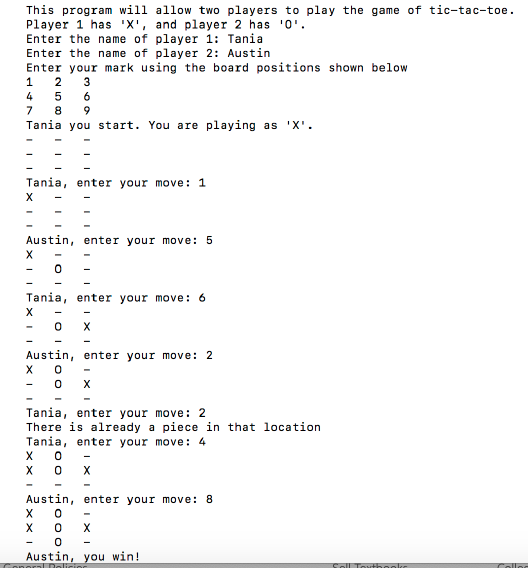
(only try this Part if Part 1 & 2 work). You wont get points if the first two parts
dont work.
Part 3 Turtle Graphics: Once you have the problem working, save your work and then create a
completely separate file for the extra credit. Use turtle graphics to create a cool game board and two
player pieces that could be used with tic-tac-toe. Add the game board and pieces to your game and get a
graphical version of tic-tac-toe working.
This program will allow two players to play the game of tic-tac-toe. Player 1 has 'X', and player 2 has '0 Enter the name of player 1: Taniia Enter the name of player 2: Austin Enter your mark using the board positions shown below 7 89 Tania you start. You are playing as 'X'- Tania, enter your move: 1 Austin, enter your move: 5 0 Tania, enter your move: 6 Austin, enter your move: 2 Tania, enter your move: 2 There is already a piece in that location Tania, enter your move: 4 X 0- Austin, enter your move: 8 -O This program will allow two players to play the game of tic-tac-toe. Player 1 has 'X', and player 2 has '0 Enter the name of player 1: Taniia Enter the name of player 2: Austin Enter your mark using the board positions shown below 7 89 Tania you start. You are playing as 'X'- Tania, enter your move: 1 Austin, enter your move: 5 0 Tania, enter your move: 6 Austin, enter your move: 2 Tania, enter your move: 2 There is already a piece in that location Tania, enter your move: 4 X 0- Austin, enter your move: 8 -O
Step by Step Solution
There are 3 Steps involved in it

Get step-by-step solutions from verified subject matter experts
 Study Help